Using New-MgUserMessageForward in Graph PowerShell
The New-MgUserMessageForward cmdlet allows administrators to forward an email message from a user’s mailbox to one or more recipients. This is a useful feature for automating email forwarding in scenarios like IT support task delegation and email monitoring. In this article, we'll cover the syntax, usage examples, cmdlet tips, possible errors and solutions, use cases, and a conclusion to help you make the most out of this cmdlet.
Cmdlet Syntax
New-MgUserMessageForward -UserId <String> -MessageId <String> -BodyParameter <Hashtable>The key parameters are:
- -UserId: The unique identifier (User Principal Name or ID) of the user whose message you want to forward.
- -MessageId: The unique identifier of the message that you want to forward.
- -BodyParameter: A hashtable containing the necessary parameters to forward the message, including Comment (optional) and ToRecipients (mandatory).
Usage Examples
Example 1: Forward a message to a single recipient
This example forwards an email from a user's mailbox to a single recipient, including a comment.
$params = @{
    Comment = "Please review this email."
    ToRecipients = @(
        @{
            emailAddress = @{
                address = "manager@domain.com"
            }
        }
    )
}

New-MgUserMessageForward -UserId "johndoe@contoso.com" -MessageId "AAMkAGI2..." -BodyParameter $params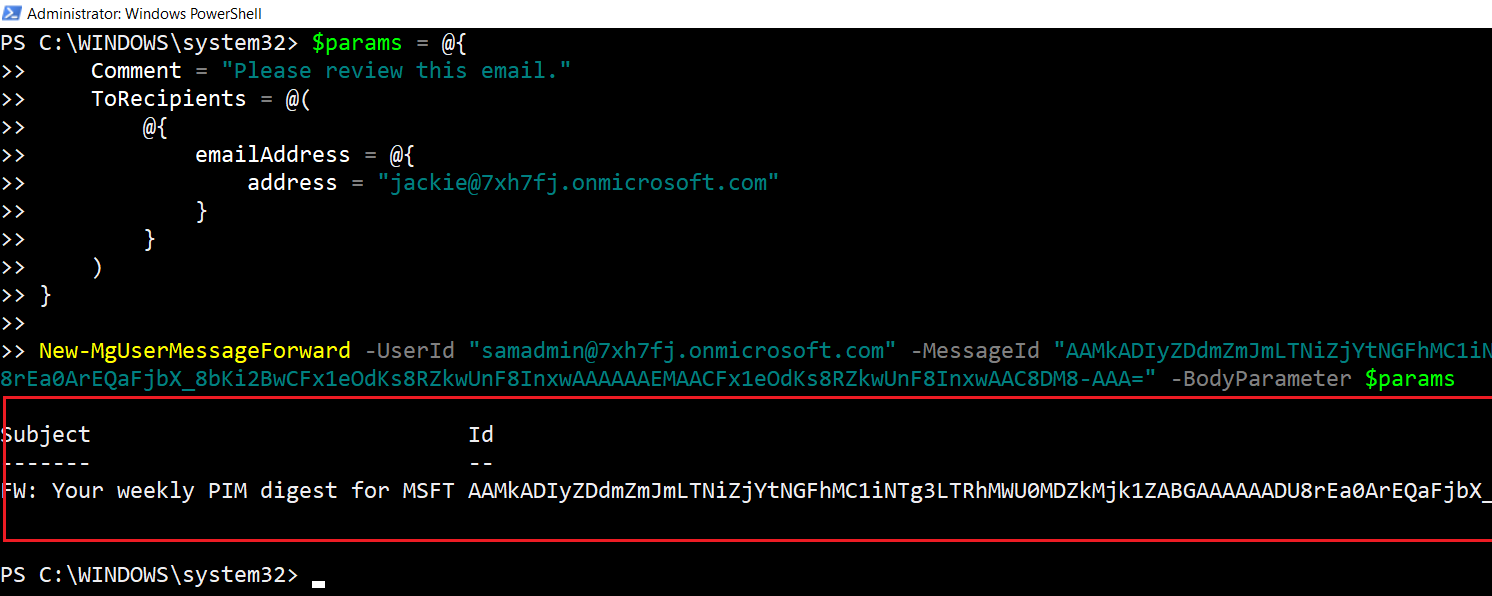
Example 2: Forward a message to multiple recipients
This example forwards a message to multiple recipients without including any comments.
$params = @{
    ToRecipients = @(
        @{
            emailAddress = @{
                address = "hr@domain.com"
            }
        }
        @{
            emailAddress = @{
                address = "legal@domain.com"
            }
        }
    )
}

New-MgUserMessageForward -UserId "janedoe@contoso.com" -MessageId "AAMkADh..." -BodyParameter $params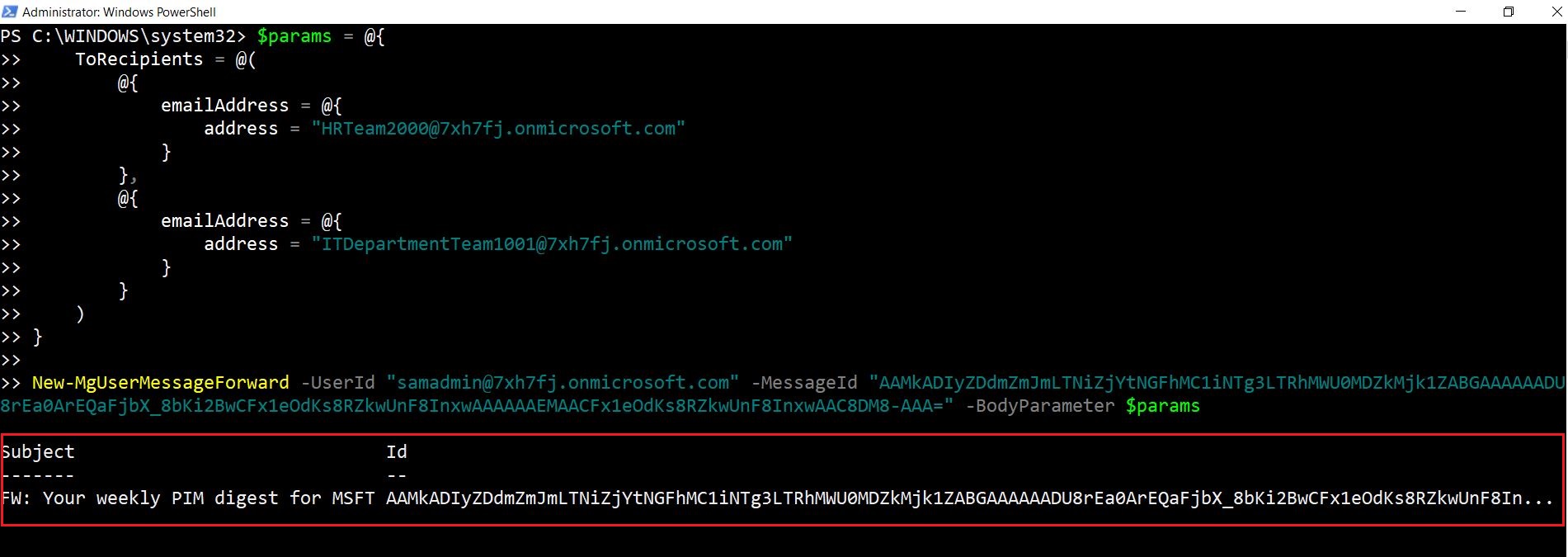
Cmdlet Tips
- Prepare the BodyParameter: The
-BodyParametermust be structured as a hashtable, withToRecipientsbeing the key that stores an array of recipients. This is critical to ensuring the email gets forwarded correctly. - User Permissions: Ensure the executing user has the necessary permissions to forward messages from the target user's mailbox. Typically, this requires the user to have mailbox access or be an administrator with elevated privileges.
- Recipient Format: Always use the proper
emailAddressobject format when adding recipients to the hashtable.
Possible Errors & Solutions
| Error | Cause | Solution |
| Invalid Authentication Token | The user executing the cmdlet does not have sufficient permissions or the authentication token is expired. | Ensure the user has the necessary permissions to access and forward messages from the target mailbox. Additionally, ensure the token is refreshed using Connect-MgGraph. |
| 404 Not Found | The provided MessageId does not exist, or the message has already been deleted or archived. | Double-check the MessageId and confirm the message is still available in the user's mailbox. |
| Bad Request | The ToRecipients field is missing or incorrectly formatted in the -BodyParameter. |
Ensure the ToRecipients is structured correctly as an array of recipient objects, each with a valid emailAddress. |
| Request_ResourceNotFound | The provided UserId is incorrect, or the user does not exist in the tenant. | Double-check the UserId and confirm the user is part of the Microsoft 365 tenant. |
Use Cases
- Automating IT Support: Imagine an IT support team that receives a flood of emails in a shared mailbox. Using New-MgUserMessageForward, administrators can forward specific critical emails to the support lead or other key team members for faster resolution. For instance, an email marked as urgent or related to a specific system can be forwarded automatically using a PowerShell script that filters messages based on certain keywords or criteria.
- Delegating Important Tasks: In a scenario where executives receive high-priority emails that require attention from their assistants or specific departments, you can automate email forwarding using this cmdlet. For example, emails sent to the CFO that relate to legal matters can automatically be forwarded to the legal team with a comment like, "Please take action."
- Compliance and Monitoring: Organizations may need to monitor emails for compliance purposes. New-MgUserMessageForward can be employed to forward emails that meet certain criteria, such as containing specific keywords or being from specific senders, to a compliance officer or legal department for review.
Conclusion
The New-MgUserMessageForward cmdlet is a powerful tool for automating email forwarding within a Microsoft 365 environment. By utilizing the cmdlet's flexibility, you can forward emails to individual recipients or multiple recipients, making it useful in various scenarios such as IT support task delegation and email monitoring. Be mindful of permissions, ensure that the -BodyParameter is structured correctly, and handle common errors to avoid disruptions.
By leveraging the examples and use cases provided here, you can streamline email management, making processes more efficient and reducing the need for manual intervention.
Additional Resources:
Graph PowerShell New-MgUserMessageForward Cmdlet DocumentationMicrosoft Graph PowerShell Module Documentation
Microsoft Graph API Documentation
Related Articles:
Using Get-MgDirectoryRole in Graph PowerShellUsing Get-MgUserLicenseDetail in Graph PowerShell
Using Find-GraphMgCommand in Graph PowerShell
Connect to Microsoft 365 Using PowerShell
How to Create Bulk Users in Office 365 Using Graph PowerShell?
Create Microsoft 365 Group Using Microsoft Graph PowerShell
Block Microsoft 365 User Using Microsoft Graph PowerShell
Assign Microsoft 365 License Using Graph PowerShell
Microsoft 365 User Management Using Graph PowerShell
Checking Group Membership in Microsoft 365
Bulk Assign Microsoft 365 License
Find Inactive Users in Microsoft 365
Using Powershell Graph Search Query
Using Powershell Graph Filter Query
Using Where-Object In Graph PowerShell
Using Expand Property In Graph PowerShell
Using Select Object In Graph PowerShell
Using -Contains Operator In Graph PowerShell
Add User to Multiple Microsoft 365 Groups Using Graph PowerShell
Get Microsoft 365 User Location Using Graph PowerShell
Import Microsoft 365 Groups from CSV File Using Graph PowerShell
Microsoft 365 Group User Import Using Graph PowerShell