Microsoft 365 Free Reporting Tool – Teams With Private Channels Report
Private channels in Microsoft Teams provide restricted collaboration within a Team. While they are powerful for handling sensitive discussions, they also introduce additional governance complexity.
Many administrators eventually ask: Which Teams in my tenant contain Private Channels?
Unfortunately, getting a clear answer using native tools is not straightforward.
The Teams With Private Channels Report, available in the M365 Free Reporting Tool, gives administrators instant visibility into Teams that contain private channels — without scripting or manual filtering.
How to Generate Teams With Private Channels Report?
Let’s examine the available approaches and their limitations.
- Using Microsoft 365 Admin Center
- No support for identifying Teams with Private Channels
- No reporting or filtering options
- No visibility into channel types
- Using Microsoft Teams Admin Center
- Add the Private Channels column to the Teams list
- Teams with 0 private channels are still shown
- No exclusive filtering for Teams that actually contain private channels
- Results require manual inspection
- No clean export view
- Using Graph PowerShell
- Retrieves all Teams-enabled groups
- Fetches channels for each Team
- Filters channels where MembershipType = private
- Outputs only Teams that contain private channels
- Requires Graph and PowerShell expertise
- Multiple API calls per Team
- Script maintenance required
- Manual formatting and export
- Not ideal for quick governance checks
- Using M365Corner Microsoft 365 Free Reporting Tool
- No scripts required
- Exclusive listing of Teams that actually contain private channels
- Clear visibility into private collaboration spaces
- One-click CSV export
- Clean, consistent UI
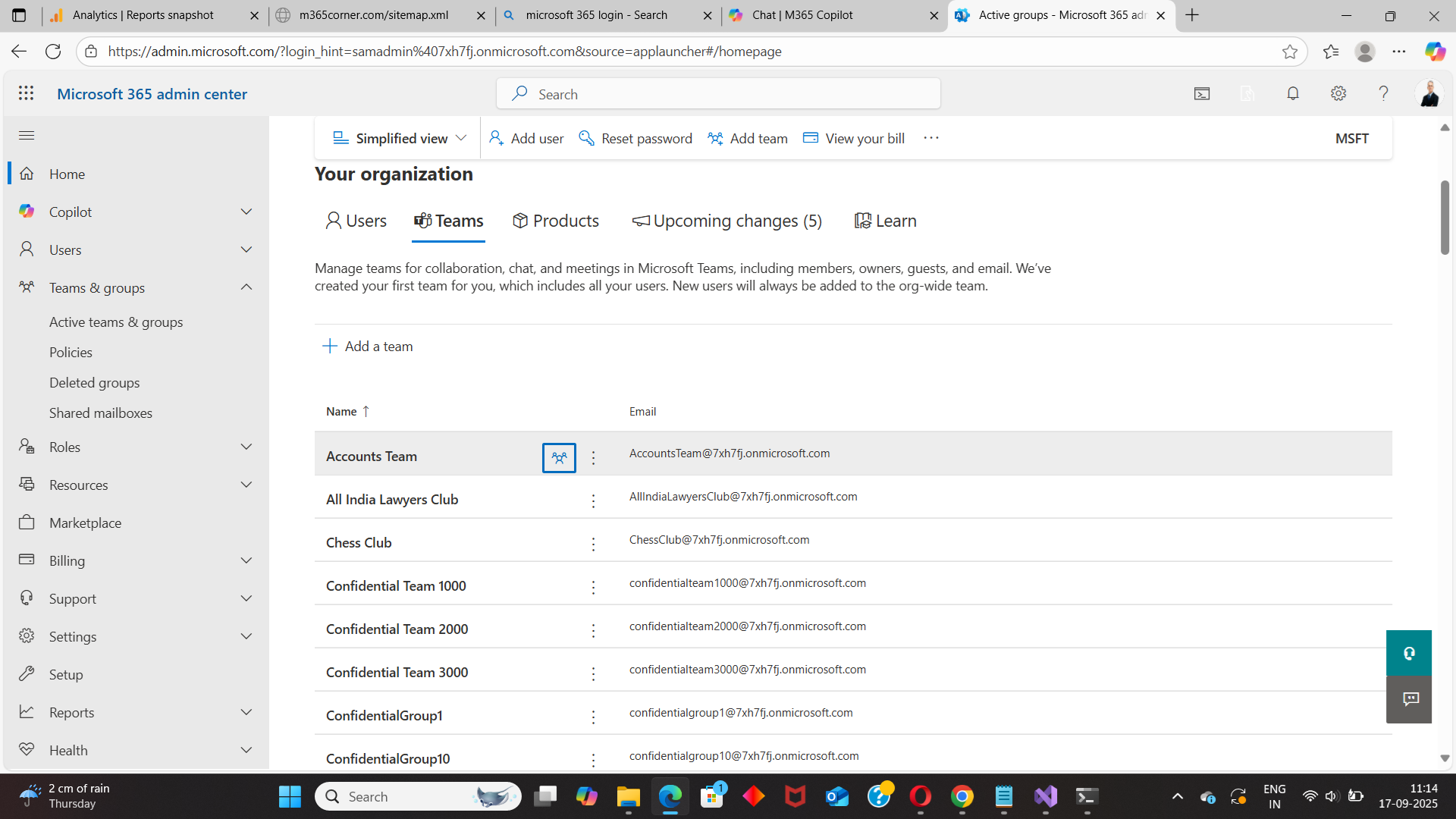
The Microsoft 365 Admin Center does not provide any visibility into private channel usage.
❌ Limitations
This method is not suitable for private channel monitoring.
The Microsoft Teams Admin Center offers limited visibility.
Admins can:
However:
❌ Limitations
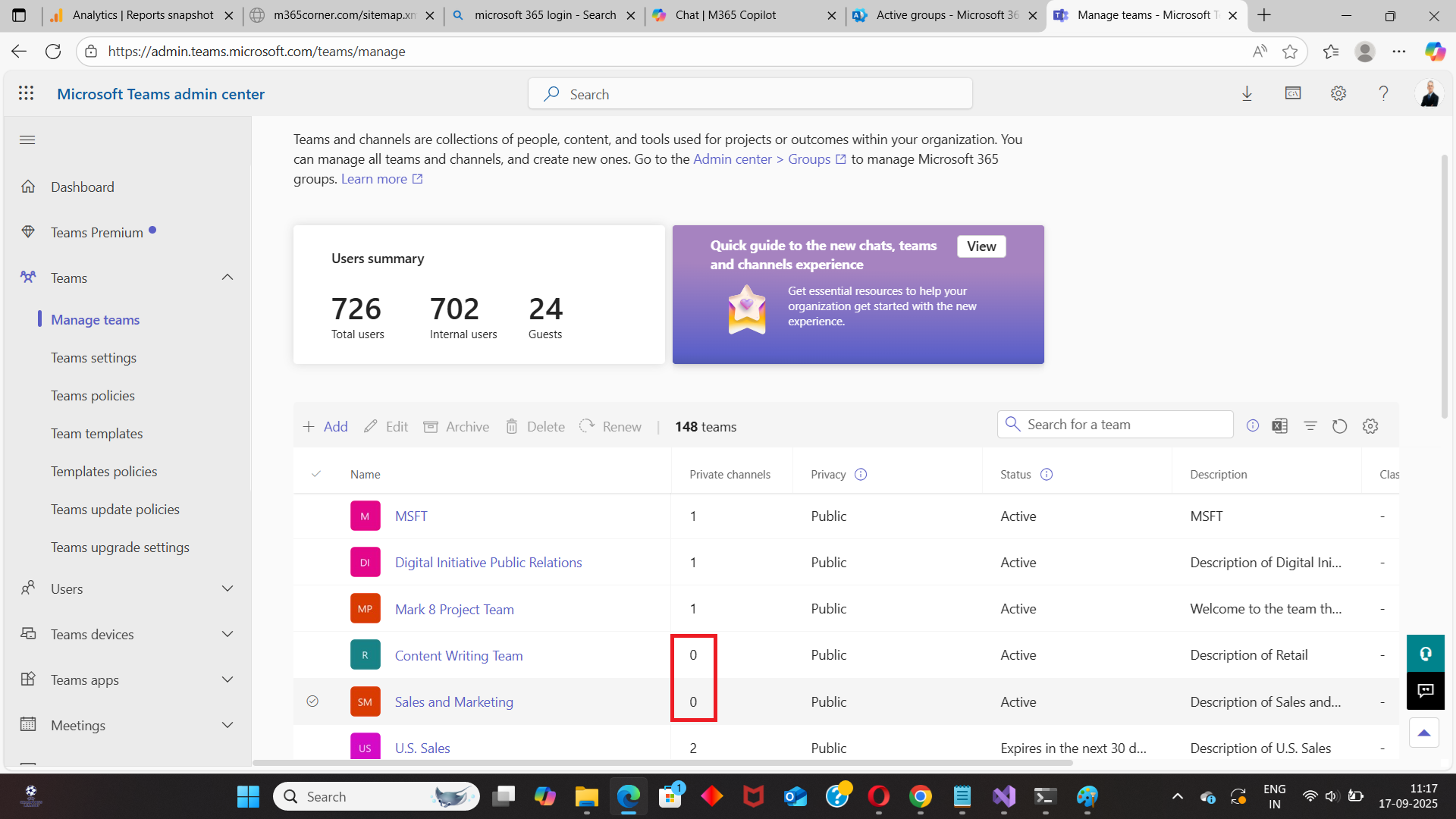
In large tenants, this becomes time-consuming and inefficient.
Graph PowerShell allows administrators to programmatically identify Teams that contain private channels.
Sample Graph PowerShell Script
# Connect to Microsoft Graph
Connect-MgGraph -Scopes "Group.Read.All","Channel.ReadBasic.All"

# Get all Teams-enabled groups
$teams = Get-MgGroup -All `
    -Filter "resourceProvisioningOptions/Any(x:x eq 'Team')" `
    -Property Id, DisplayName

$report = foreach ($team in $teams) {

    $channels = Get-MgTeamChannel -TeamId $team.Id -All -ErrorAction SilentlyContinue
    $privateChannels = $channels | Where-Object { $_.MembershipType -eq "private" }

    if ($privateChannels.Count -gt 0) {
        [PSCustomObject]@{
            TeamName = $team.DisplayName
            TeamId   = $team.Id
            PrivateChannelCount = $privateChannels.Count
        }
    }
}

$report | Export-Csv "C:\TeamsWithPrivateChannels.csv" -NoTypeInformation
What this script does
⚠️ Downsides of PowerShell
While powerful, this approach adds complexity for routine reporting.
With the M365Corner Microsoft 365 Free Reporting Tool, generating the Teams With Private Channels Report is effortless.
👉 You can generate the Microsoft Teams With Private Channels Report at the click of a button.
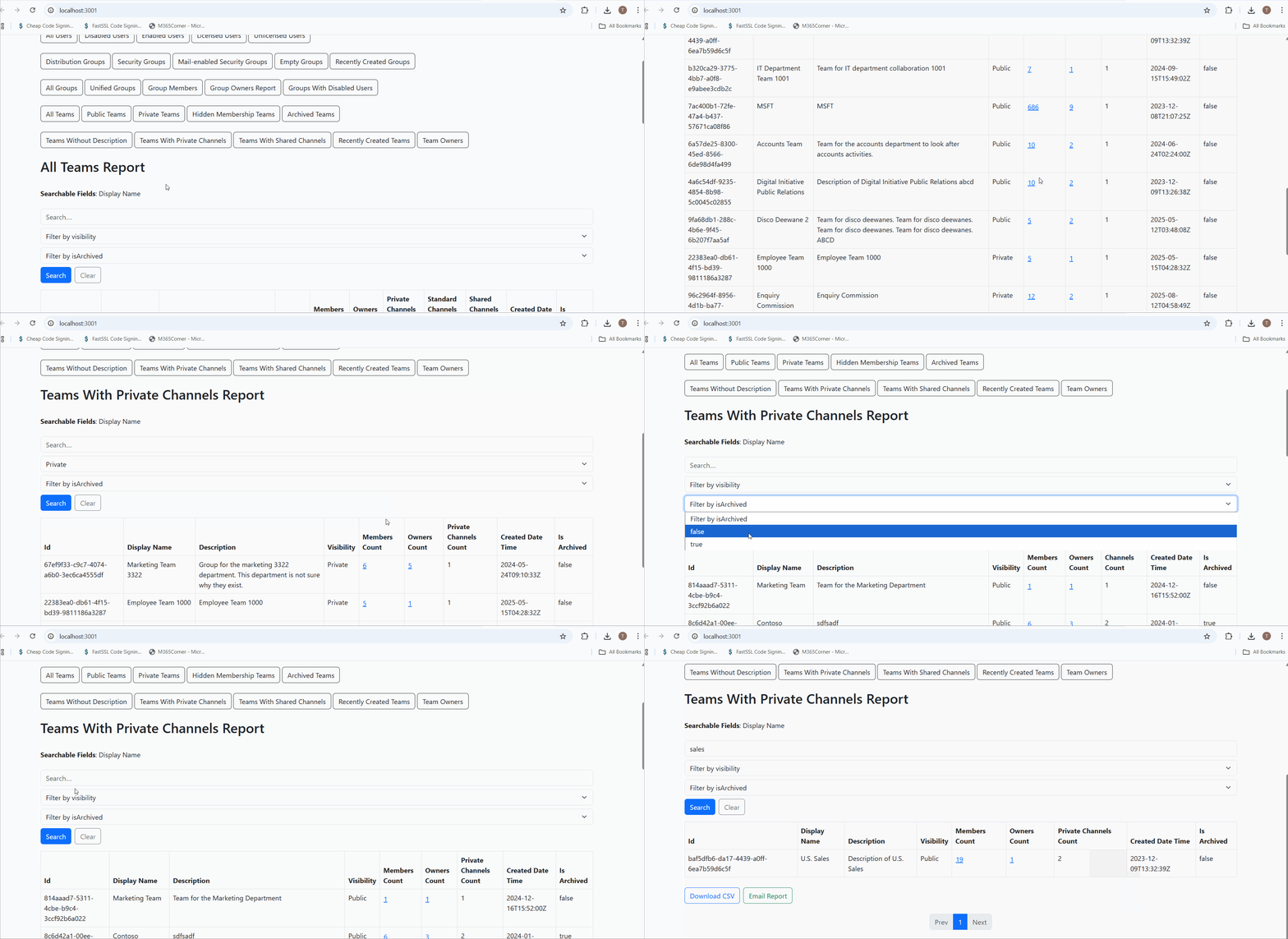
Why this helps admins
This dramatically quickens reporting, giving administrators immediate clarity into restricted collaboration areas and helping strengthen governance oversight.
Explore Teams With Private Channels Report
🔗 Learn More About Teams With Private Channels Report
- https://m365corner.com/m365-free-tools/microsoft-teams-with-private-channels-report.html
Understand what the report includes and how it supports Teams governance.
🔗 Explore All Reports in the M365 Free Reporting Tool
- https://m365corner.com/m365-free-tools/m365corner-reporting-tool.html
Discover all reports available in the M365 Free Reporting Tool.
🔗 Download the Community Edition
- https://github.com/m365corner/m365corner-reporting-tool-community-edition.git
Start using the M365 Free Reporting Tool Community Edition today.
The M365 Free Reporting Tool transforms private channel visibility from a manual, technical task into a simple, actionable report — helping administrators maintain control and transparency across their Microsoft Teams environment.
Did You Know? Managing Microsoft 365 applications is even easier with automation. Try our Graph PowerShell scripts to automate tasks like generating reports, cleaning up inactive Teams, or assigning licenses efficiently.
Ready to get the most out of Microsoft 365 tools? Explore our free Microsoft 365 administration tools to simplify your administrative tasks and boost productivity.