Microsoft 365 Free Reporting Tool — Private Teams Report
Private Microsoft Teams are essential for confidential collaboration—but they can also become blind spots if admins don’t have clear visibility into where restricted collaboration exists.
Unfortunately, Microsoft’s native admin tools don’t offer an easy way to list only Private Teams. This often forces administrators into manual checks or PowerShell scripts just to answer a simple question: Which Teams in my tenant are private?
The Microsoft 365 Private Teams Report, available in the M365 Free Reporting Tool, solves this problem by giving admins instant, exclusive visibility into Private Teams—without scripting or manual digging.
What Are Private Microsoft Teams?
Private Microsoft Teams are Teams where membership is restricted and controlled by Team owners.
Key characteristics:
- Only invited users can see and join the Team
- Team content is hidden from non-members
- Used for sensitive projects, departments, or leadership collaboration
Because access is tightly controlled, Private Teams are often subject to stricter governance and audit requirements.
How Do Private Microsoft Teams Differ from Public Microsoft Teams?
The difference lies in visibility and access control:
- Private Teams
- Not visible to non-members
- Membership by invitation only
- Used for confidential collaboration
- Public Teams
- Discoverable by everyone in the tenant
- Users can join freely
- Used for open collaboration
From an admin perspective, Private Teams require periodic review to ensure access remains appropriate.
How to Generate Private Microsoft Teams Report?
Let’s examine the available options—and why they fall short.
- Using Microsoft 365 Admin Center
The Microsoft 365 Admin Center does not provide a Private Teams report. - No exclusive listing or filtering of Private Teams
- Privacy setting is visible, but cannot be set to filter only for “private teams”
- No centralized reporting or export
- Using Microsoft Teams Admin Center
The Microsoft Teams Admin Center offers more detail but still lacks reporting flexibility. - No exclusive filter for Private Teams
- Privacy setting is displayed but not filterable
- Owners and members require manual inspection
- No consolidated export
- Report shareable via mail
- Using Graph PowerShell
Graph PowerShell allows admins to programmatically fetch only Private Microsoft Teams. - Retrieves Teams-enabled groups
- Filters Teams by visibility = Private
- Formats and exports the results
- Requires Graph and PowerShell expertise
- Script maintenance required
- Manual CSV formatting and export
- Not ideal for quick or recurring reporting
- Using M365Corner Microsoft 365 Free Reporting Tool
With the M365Corner Microsoft 365 Free Reporting Tool, generating an exclusive Private Teams Report is effortless. - No scripts required
- Exclusive listing of Private Teams only
- Clear visibility into Team names and attributes
- One-click CSV export
- Report Shareable via Mail
❌ Limitations
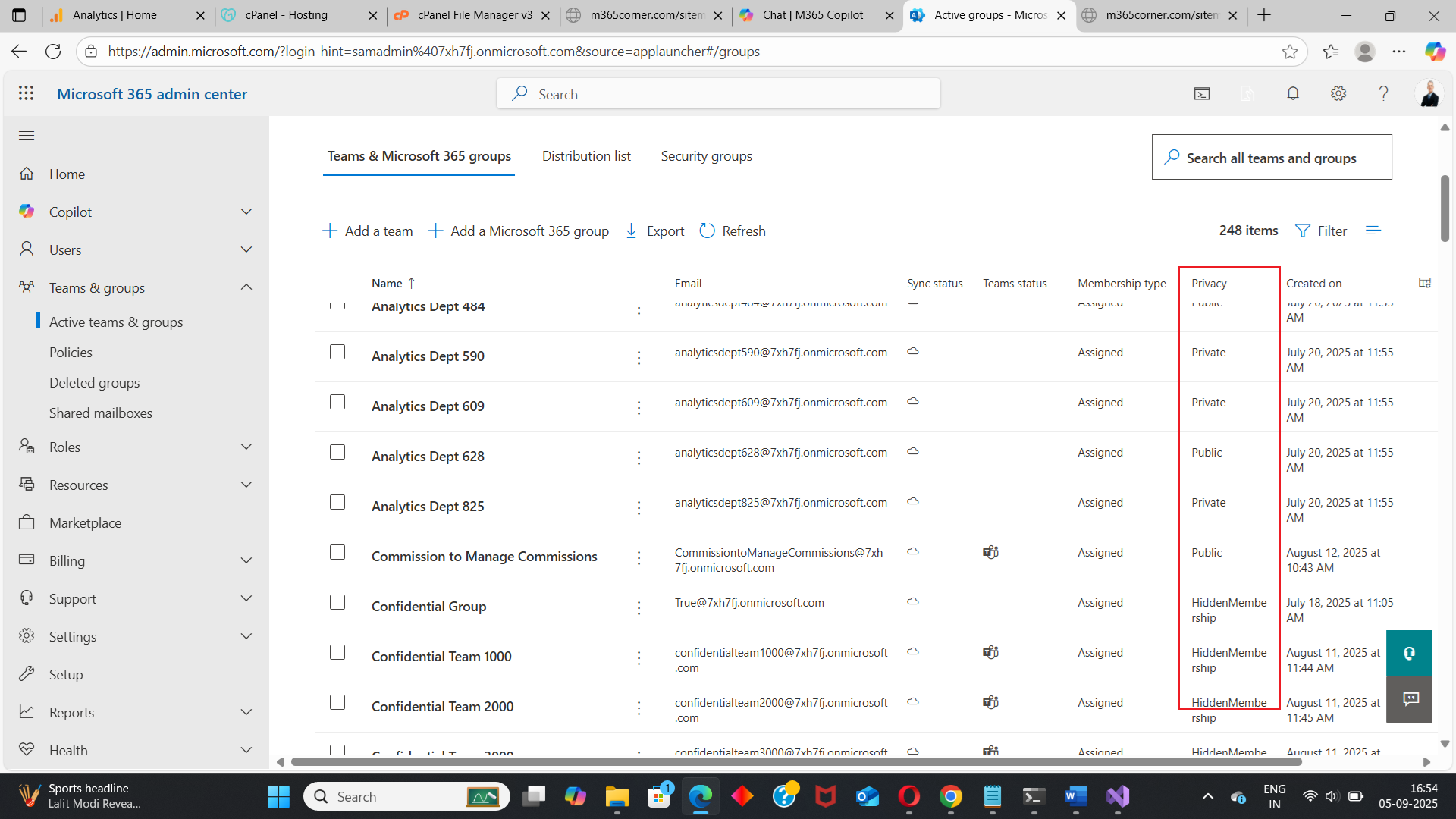
Admins must manually inspect each Team to check its visibility.
❌ Limitations
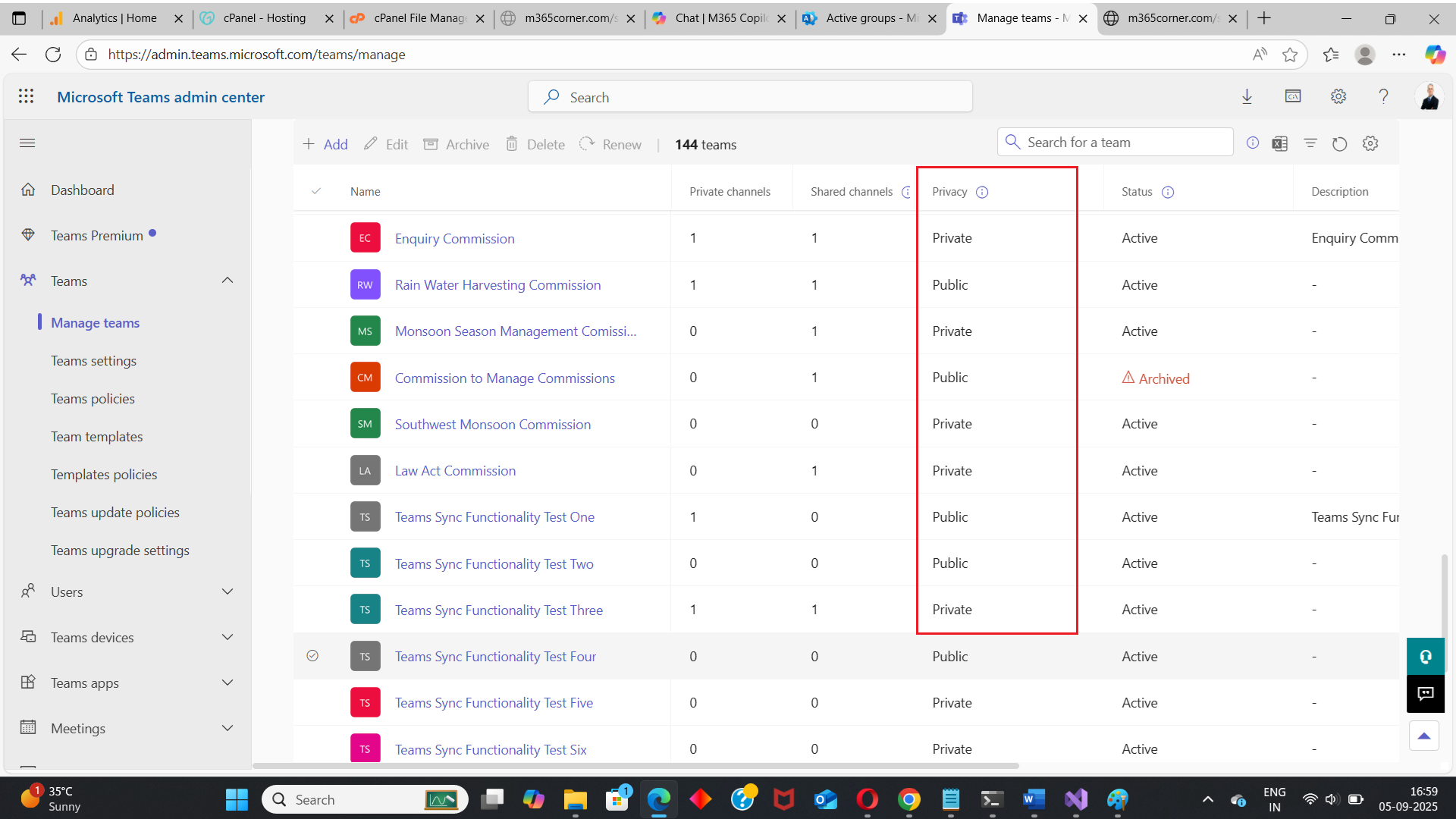
This approach does not scale for large tenants.
📘 Reference Script:
https://m365corner.com/m365-powershell/email-private-teams-list-to-M365-admin-powershell.html
This approach typically:
⚠️ Downsides of PowerShell
For many admins, this is unnecessary complexity for routine visibility tasks.
👉 You can generate the Microsoft 365 Private Teams Report at the click of a button.
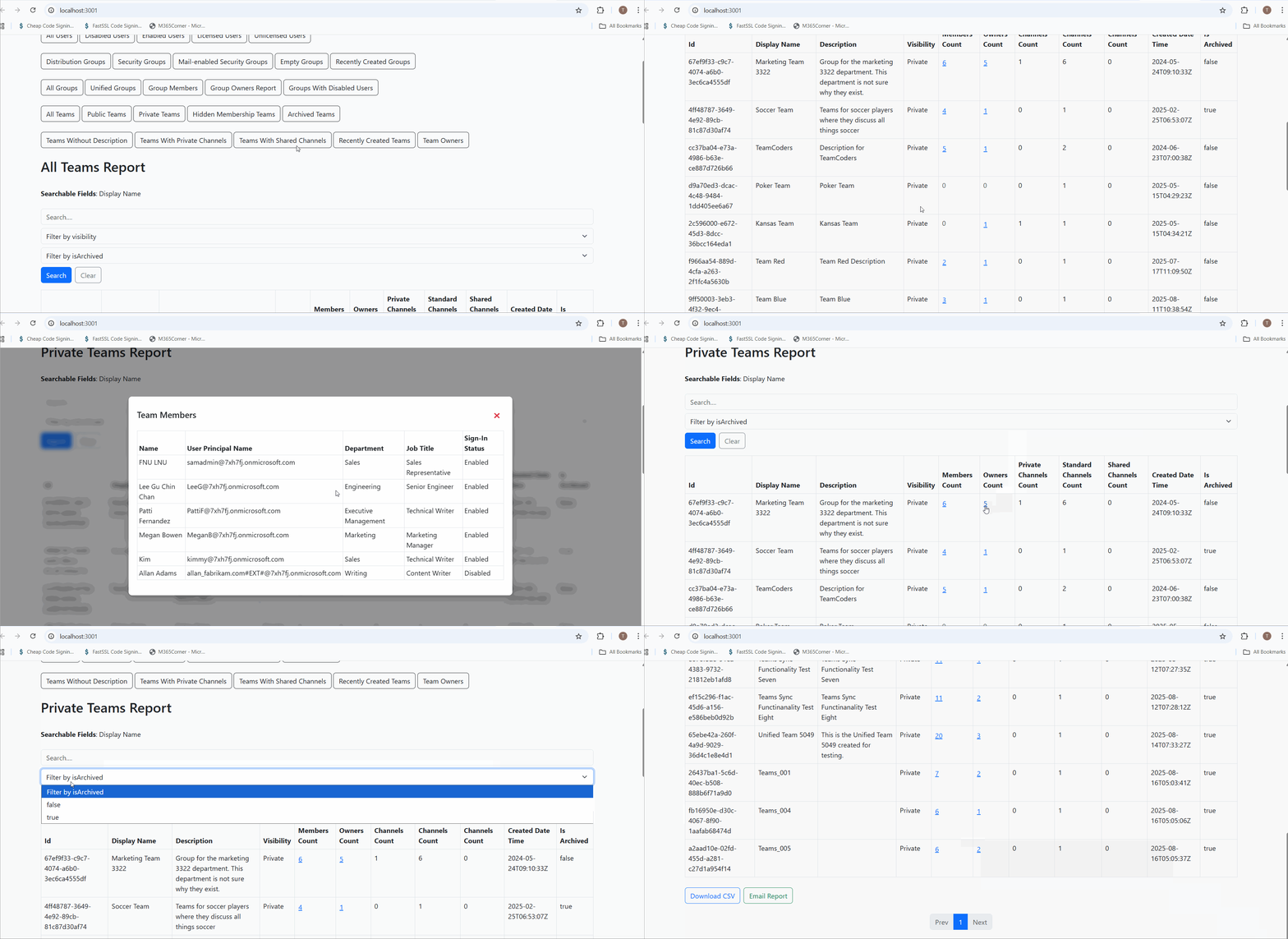
Why this helps admins
This dramatically quickens reporting, giving admins immediate clarity into restricted collaboration spaces and helping maintain governance with confidence.
Explore Private Teams Report
- 🔗 Learn More About Microsoft 365 Private Teams Report
- 🔗 Explore All Reports in the M365 Free Reporting Tool
- 🔗 Download the Community Edition
https://m365corner.com/m365-free-tools/private-microsoft-teams-report.html
Understand what the report includes and how it supports Teams governance.
https://m365corner.com/m365-free-tools/m365corner-reporting-tool.html
Discover all reports available in the M365 Free Reporting Tool.
https://github.com/m365corner/m365corner-reporting-tool-community-edition.git
Start using the M365 Free Reporting Tool Community Edition today.
The M365 Free Reporting Tool removes guesswork from Private Teams visibility and replaces manual checks with clear, actionable insights—without Admin Center limitations or PowerShell overhead.
Did You Know? Managing Microsoft 365 applications is even easier with automation. Try our Graph PowerShell scripts to automate tasks like generating reports, cleaning up inactive Teams, or assigning licenses efficiently.
Ready to get the most out of Microsoft 365 tools? Explore our free Microsoft 365 administration tools to simplify your administrative tasks and boost productivity.