Microsoft 365 Free Reporting Tool — Microsoft Teams Report
Microsoft Teams has become the backbone of collaboration in Microsoft 365. From project discussions to organization-wide communication, Teams are created constantly — by users, admins, and automation.
But when it comes to getting a clean, exclusive list of Microsoft Teams, administrators quickly run into limitations with native tools.
That’s where the Microsoft Teams Report, available in the M365 Free Reporting Tool, makes managing Teams simple, fast, and transparent.
What Are Microsoft Teams?
Microsoft Teams are collaboration spaces built on top of Microsoft 365 Groups. Each Team includes:
- Channels for conversations
- File storage via SharePoint
- Meetings and chat
- Owners and members
- Optional private and shared channels
Every Team is backed by a Microsoft 365 Group, but not every Microsoft 365 Group becomes a Team.
How Do Microsoft Teams Differ from Microsoft Groups??
The distinction is important for reporting and governance.
- Microsoft 365 Groups
- Identity objects for collaboration
- Power Outlook, SharePoint, Planner, etc.
- May or may not have Teams enabled
- Microsoft Teams
- Are Microsoft 365 Groups with Teams provisioning
- Include chat, channels, meetings, and Teams-specific settings
- Have additional properties like visibility, archived status, and channel types
Admins often need to report only on Teams, not all Microsoft 365 Groups — something native tools don’t make easy.
How to Generate Exclusive Microsoft Teams Report?
Let’s look at the available options and why they fall short.
- Using Microsoft 365 Admin Center
The Microsoft 365 Admin Center provides a general view, but with several drawbacks. - No exclusive listing of Microsoft Teams (groups and Teams are mixed)
- No support for public/private Teams filtering
- Identifying owners or members requires opening each Team manually
- No support for identifying archived Teams
- Using Microsoft Teams Admin Center
The Microsoft Teams Admin Center improves visibility but still has major limitations. - Owners and members must be reviewed Team by Team
- No filter for public vs private Teams
- Visibility setting is shown but not filterable
- Archived status is displayed but not filterable
- No consolidated export view
- Using Graph PowerShell
- Queries Microsoft 365 Groups
- Filters groups provisioned with Teams
- Formats the results for export or email
- Requires Graph and PowerShell expertise
- Script logic must be maintained
- Manual formatting and CSV export required
- Not ideal for quick or recurring reporting
- Using M365Corner Microsoft 365 Free Reporting Tool
- No scripts required
- Clean, exclusive listing of Microsoft Teams
- Clear visibility into Teams details
- One-click CSV export
- Consistent UI across all reports
❌ Limitations
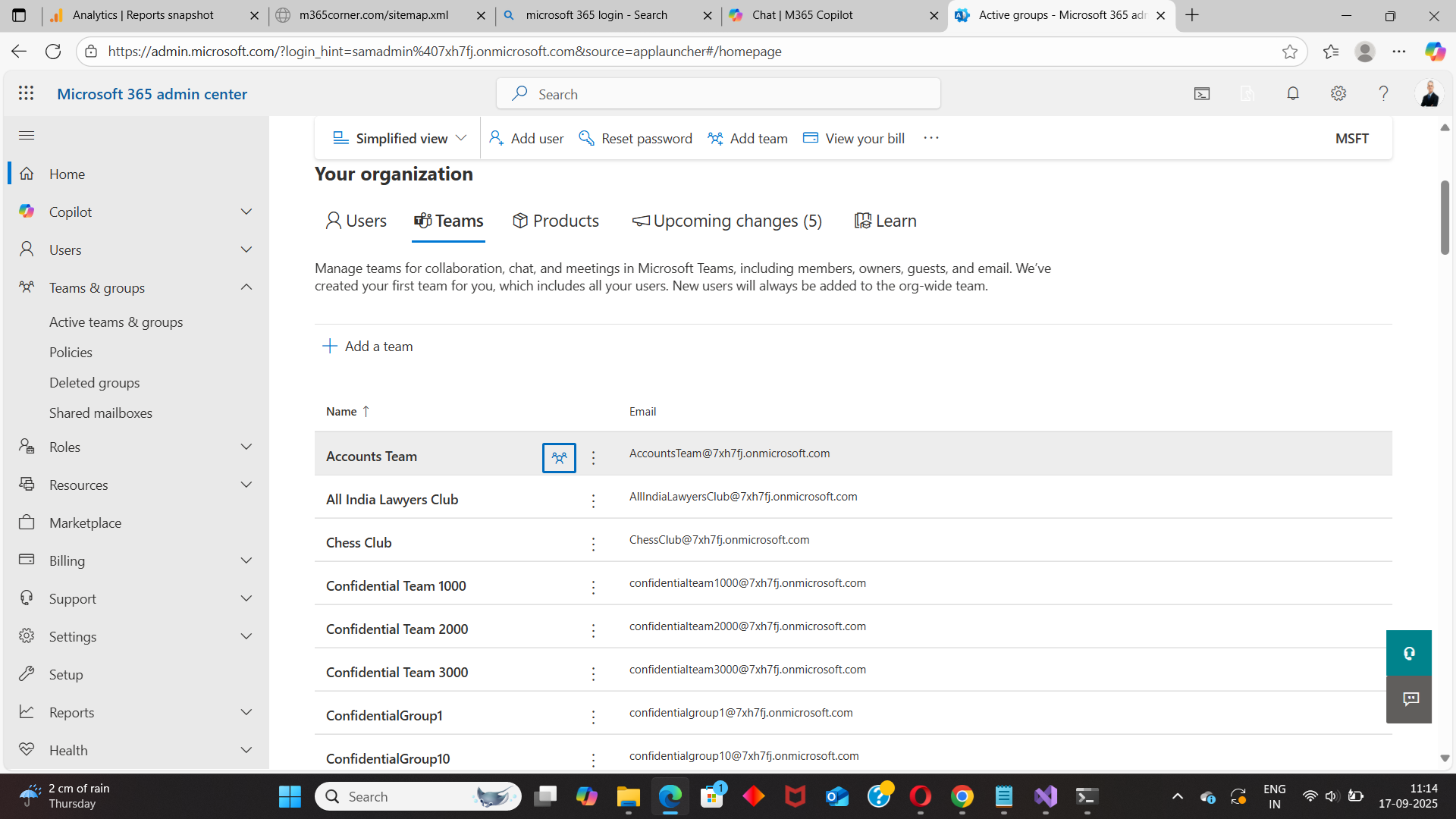
This makes it unsuitable for Teams-focused reporting.
❌ Limitations
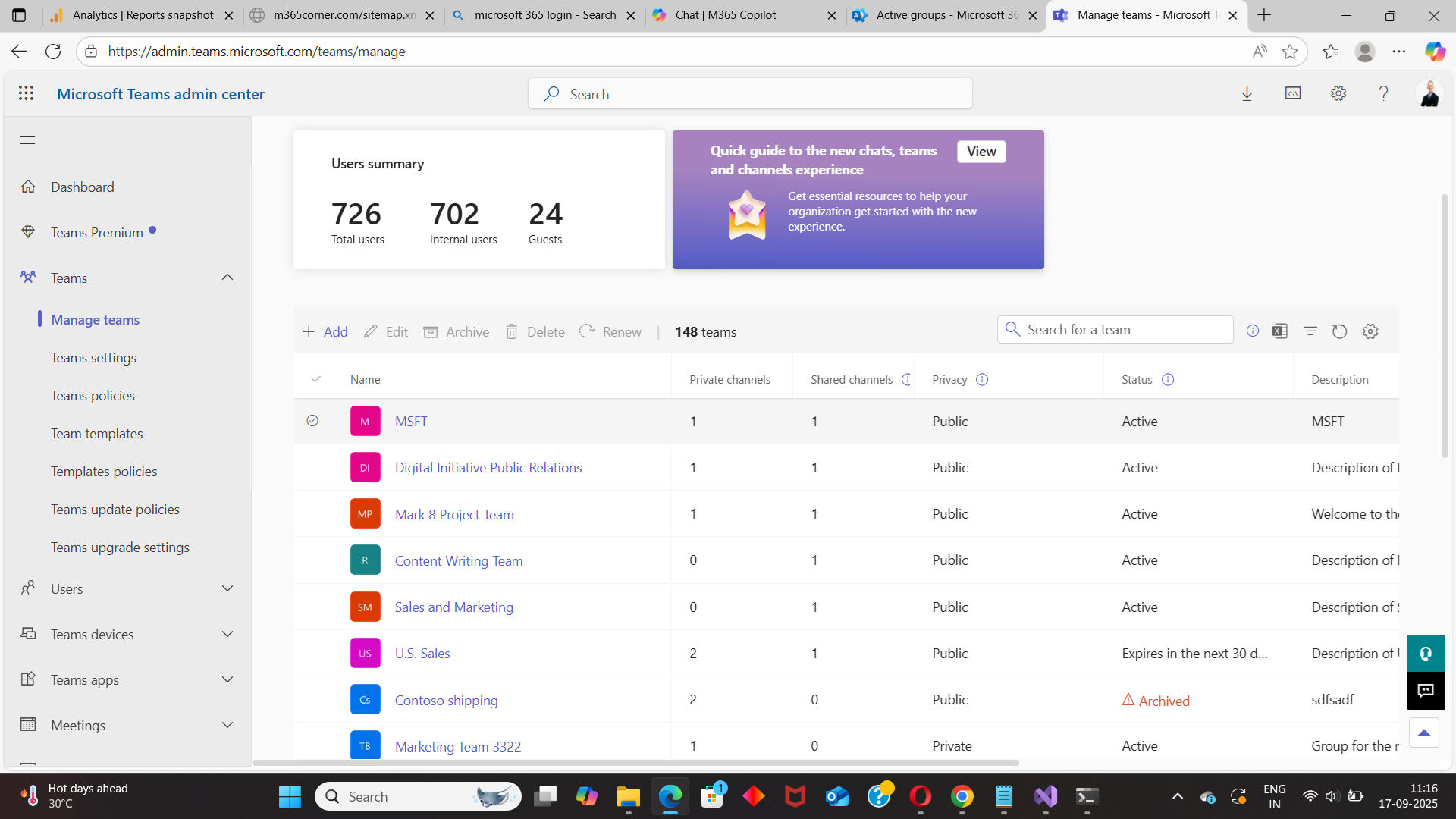
For large tenants, this approach quickly becomes time-consuming.
Graph PowerShell allows admins to programmatically fetch Teams-enabled groups (i.e., Microsoft Teams).
Reference Script:
https://m365corner.com/m365-powershell/fetch-and-email-teams-enabled-groups-report.html
This approach typically:
⚠️ Downsides of PowerShell
While powerful, this method isn’t admin-friendly for day-to-day visibility.
With the M365Corner Microsoft 365 Free Reporting Tool, generating an exclusive Microsoft Teams Report is effortless.
👉 You can generate the exclusive Microsoft 365 Teams Report at the click of a button.
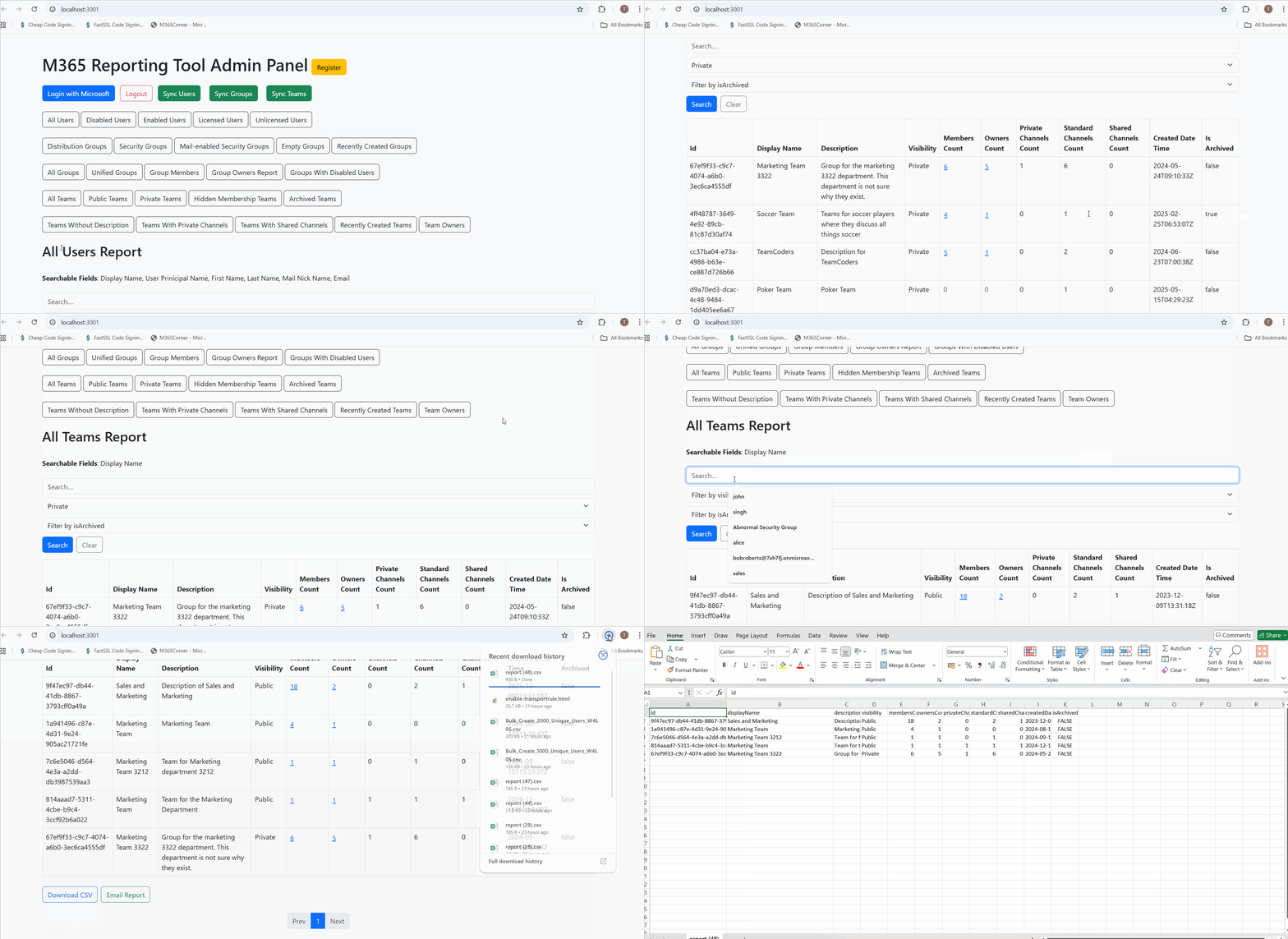
Why this helps admins
This dramatically quickens reporting, giving admins instant clarity into their Teams environment and helping them manage collaboration sprawl with confidence.
Explore Microsoft Teams Report
- 🔗 Learn More About Microsoft 365 Teams Report
- 🔗 Explore All Reports in the M365 Free Reporting Tool
- 🔗 Download the Community Edition
https://m365corner.com/m365-free-tools/all-microsoft-teams-report.html
Understand what the report includes and how it simplifies Teams management.
https://m365corner.com/m365-free-tools/m365corner-reporting-tool.html
Discover all reports available in the M365 Free Reporting Tool.
https://github.com/m365corner/m365corner-reporting-tool-community-edition.git
Start using the M365 Free Reporting Tool Community Edition today.
The M365 Free Reporting Tool removes complexity from Microsoft Teams reporting and delivers clear, exclusive, and actionable insights—without Admin Center limitations or PowerShell overhead.
Did You Know? Managing Microsoft 365 applications is even easier with automation. Try our Graph PowerShell scripts to automate tasks like generating reports, cleaning up inactive Teams, or assigning licenses efficiently.
Ready to get the most out of Microsoft 365 tools? Explore our free Microsoft 365 administration tools to simplify your administrative tasks and boost productivity.