Report Enterprise Applications Without Owners Using Graph PowerShell
Enterprise applications (service principals) are usually created for SaaS access, automation, and integrations across Microsoft 365. Over time, tenants collect apps from pilots, third-party deployments, and legacy projects. A common governance gap is enterprise apps that have no owners assigned.
Apps without owners create real operational and security pain points:
- no accountable person to review permissions or renew secrets
- app configuration drifts over time
- access stays enabled even after the business need ends
- audits often flag “unowned applications” as risk
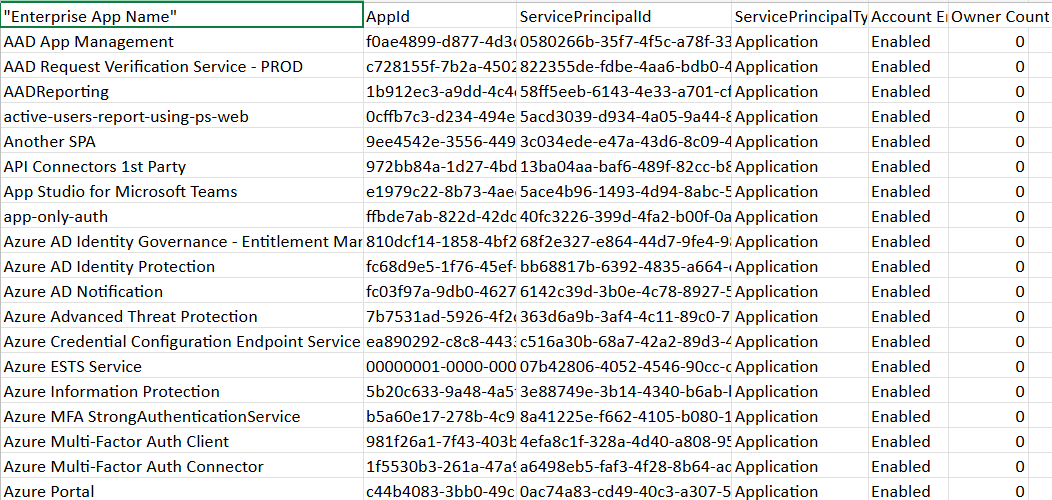
This Graph PowerShell script finds all enterprise applications with zero owners, generates a clean report, exports an Excel-safe CSV, and emails it automatically to administrators or stakeholders.
🚀 Community Edition Released!
Try the M365Corner Microsoft 365 Reporting Tool — your DIY pack with 20+ out-of-the-box M365 reports for Users, Groups, and Teams.
i) The Script
$SenderUPN = "admin@yourtenant.onmicrosoft.com"
$Recipients = @(
    "admin@yourtenant.onmicrosoft.com",
    "securityteam@yourtenant.onmicrosoft.com"
)
Connect-MgGraph -Scopes "Application.Read.All","Directory.Read.All","Mail.Send"
$ServicePrincipals = Get-MgServicePrincipal -All -Property Id,DisplayName,AppId,ServicePrincipalType,AccountEnabled

$Report = @()

foreach ($sp in $ServicePrincipals) {

    try {
        $Owners = Get-MgServicePrincipalOwner -ServicePrincipalId $sp.Id -All -ErrorAction Stop
    } catch {
        $Owners = @()
    }

    if (-not $Owners -or $Owners.Count -eq 0) {
        $Report += [PSCustomObject]@{
            "Enterprise App Name"   = $sp.DisplayName
            "AppId"                 = $sp.AppId
            "ServicePrincipalId"    = $sp.Id
            "ServicePrincipalType"  = $sp.ServicePrincipalType
            "Account Enabled"       = if ($sp.AccountEnabled) { "Enabled" } else { "Disabled" }
            "Owner Count"           = 0
        }
    }
}

$ReportPath = "$env:TEMP\EnterpriseApps_WithoutOwners.csv"

if ($Report.Count -gt 0) {
    $Report | Sort-Object "Enterprise App Name" |
        Export-Csv -Path $ReportPath -NoTypeInformation -Encoding utf8
} else {
    "No enterprise applications without owners were found." |
        Set-Content -Path $ReportPath -Encoding utf8
}

$Bytes = [System.IO.File]::ReadAllBytes($ReportPath)
$Utf8Bom = New-Object System.Text.UTF8Encoding($true)
[System.IO.File]::WriteAllText($ReportPath, [System.Text.Encoding]::UTF8.GetString($Bytes), $Utf8Bom)

$Count = $Report.Count
$Subject = "Enterprise Applications Without Owners — $(Get-Date -Format 'yyyy-MM-dd')"

$Body = @"
Hello Team,<br><br>
Attached is the <b>Enterprise Applications Without Owners</b> report.<br>
These service principals have zero assigned owners and should be reviewed for governance.<br><br>
Total unowned enterprise apps found: <b>$Count</b><br><br>
Regards,<br>
Graph PowerShell Automation
"@

$AttachmentContent = [System.Convert]::ToBase64String([System.IO.File]::ReadAllBytes($ReportPath))
$Attachments = @(
    @{
        "@odata.type" = "#microsoft.graph.fileAttachment"
        Name          = "EnterpriseApps_WithoutOwners.csv"
        ContentBytes  = $AttachmentContent
    }
)

$ToRecipients = $Recipients | ForEach-Object {
    @{ EmailAddress = @{ Address = $_ } }
}

$Message = @{
    Message = @{
        Subject = $Subject
        Body    = @{
            ContentType = "HTML"
            Content     = $Body
        }
        ToRecipients = $ToRecipients
        Attachments  = $Attachments
    }
    SaveToSentItems = "true"
}
Send-MgUserMail -UserId $SenderUPN -BodyParameter $Message
Write-Host "Unowned enterprise applications report emailed successfully." -ForegroundColor Green
ii) How the Script Works
- Connects to Microsoft Graph
Uses delegated scopes: - Application.Read.All → read service principals
- Directory.Read.All → resolve directory objects
- Mail.Send → email the report
- Retrieves all enterprise applications
Get-MgServicePrincipal -All returns every service principal (enterprise app) in the tenant. - Checks ownership for each app
For each service principal, the script calls: - Get-MgServicePrincipalOwner -ServicePrincipalId $sp.Id
- Builds the report
Each unowned app entry includes: - app name
- AppId
- ServicePrincipalId
- enabled/disabled status
- owner count
- Exports Excel-safe CSV
The CSV is exported as UTF-8 and rewritten with UTF-8 BOM so columns always display correctly in Excel. - Emails the report automatically
The script base64-encodes the CSV and sends it to recipients using Send-MgUserMail.
If the result is empty, the app is treated as “unowned.”
iii) Further Enhancements
- Add owner display names when owners exist
Extend the script to include the list of owners for easier reassignment. - Exclude Microsoft first-party apps
Filter out apps where ServicePrincipalType is “ManagedIdentity” or Microsoft-owned if you only want third-party coverage. - Include sign-in activity
Highlight unowned apps that are still actively used. - Auto-notify a Teams channel
Push a Teams webhook alert if high-risk unowned apps are detected. - Schedule monthly governance emails
Run via Task Scheduler / Azure Automation for continuous hygiene.
iv) Possible Errors & Solutions
| Error | Cause | Solution |
|---|---|---|
| Authorization_RequestDenied / 403 | Missing Graph permissions. | Grant admin consent and reconnect with:
|
| Report is empty | Every enterprise app has at least one owner. | Valid scenario; script writes a friendly message instead. |
| Throttling in large tenants | Many apps → many owner calls. | Rerun later or batch requests if needed. |
| Owner lookup warnings | Some objects may not allow ownership retrieval. | Script handles this by treating lookup failures as “no owners” and continuing. |
v) Conclusion
Enterprise applications without owners are a governance blind spot. They can remain enabled indefinitely without accountability, increasing security and operational risk.
This Graph PowerShell script provides a simple automated way to detect unowned enterprise apps, generate an Excel-friendly report, and email it to administrators. Running it regularly keeps enterprise app ownership transparent and audit-ready.