Report Inactive Guest Users in Microsoft 365 Using Graph PowerShell
Guest users are necessary for collaboration, but they often turn into long-term security baggage. Over time, tenants accumulate guests who were invited for a one-off project, never used again, or haven’t signed in for months/years. These stale guests increase external access risk and frequently show up in audits.
This Graph PowerShell script identifies guest accounts that haven’t signed in for the last 90 days (or never signed in at all), generates a CSV report (Excel-safe), and emails it automatically to administrators or security stakeholders.
🚀 Community Edition Released!
Try the M365Corner Microsoft 365 Reporting Tool — your DIY pack with 20+ out-of-the-box M365 reports for Users, Groups, and Teams.
i) The Script
$SenderUPN = "admin@yourtenant.onmicrosoft.com"
$Recipients = @(
    "admin@yourtenant.onmicrosoft.com",
    "securityteam@yourtenant.onmicrosoft.com"
)
$InactiveDays = 90
$CutoffDate = (Get-Date).ToUniversalTime().AddDays(-$InactiveDays)

Connect-MgGraph -Scopes "User.Read.All","Directory.Read.All","AuditLog.Read.All","Mail.Send"
Select-MgProfile beta

$Guests = Get-MgUser -All -Filter "userType eq 'Guest'" -Property Id,DisplayName,UserPrincipalName,Mail,CreatedDateTime,SignInActivity,AccountEnabled

$Report = @()

foreach ($g in $Guests) {

    $LastSignIn = $null
    if ($g.SignInActivity -and $g.SignInActivity.LastSignInDateTime) {
        $LastSignIn = ([datetime]$g.SignInActivity.LastSignInDateTime).ToUniversalTime()
    }

    $NeverSignedIn = -not $LastSignIn
    $Inactive = $LastSignIn -and ($LastSignIn -lt $CutoffDate)

    if ($NeverSignedIn -or $Inactive) {
        $Report += [PSCustomObject]@{
            "Guest Name"            = $g.DisplayName
            "Guest UPN"             = $g.UserPrincipalName
            "Guest Email"           = $g.Mail
            "Account Enabled"       = if ($g.AccountEnabled) { "Enabled" } else { "Disabled" }
            "Created Date"          = $g.CreatedDateTime
            "Last Sign-In"          = if ($LastSignIn) { $g.SignInActivity.LastSignInDateTime } else { "Never Signed In" }
            "Inactive Days"         = if ($LastSignIn) { [int]((Get-Date).ToUniversalTime() - $LastSignIn).TotalDays } else { "N/A" }
            "Inactive Status"       = if ($NeverSignedIn) { "Never Signed In" } else { "Inactive > $InactiveDays days" }
            "User Id"               = $g.Id
        }
    }
}

$ReportPath = "$env:TEMP\Inactive_Guest_Users_Report.csv"

if ($Report.Count -gt 0) {
    $Report | Sort-Object "Inactive Status","Guest Name" |
        Export-Csv -Path $ReportPath -NoTypeInformation -Encoding utf8
} else {
    "No inactive guest users (>$InactiveDays days) or never-signed-in guests were found." |
        Set-Content -Path $ReportPath -Encoding utf8
}

$Bytes = [System.IO.File]::ReadAllBytes($ReportPath)
$Utf8Bom = New-Object System.Text.UTF8Encoding($true)
[System.IO.File]::WriteAllText($ReportPath, [System.Text.Encoding]::UTF8.GetString($Bytes), $Utf8Bom)

$Count = $Report.Count
$Subject = "Inactive Guest Users Report — $(Get-Date -Format 'yyyy-MM-dd')"

$Body = @"
Hello Team,<br><br>
Attached is the <b>Inactive Guest Users Report</b>.<br>
Guests included are those who have<br>
1) never signed in, or<br>
2) not signed in for more than <b>$InactiveDays days</b>.<br><br>
Total inactive guests found: <b>$Count</b><br><br>
Regards,<br>
Graph PowerShell Automation
"@

$AttachmentContent = [System.Convert]::ToBase64String([System.IO.File]::ReadAllBytes($ReportPath))
$Attachments = @(
    @{
        "@odata.type" = "#microsoft.graph.fileAttachment"
        Name          = "Inactive_Guest_Users_Report.csv"
        ContentBytes  = $AttachmentContent
    }
)

$ToRecipients = $Recipients | ForEach-Object {
    @{ EmailAddress = @{ Address = $_ } }
}

$Message = @{
    Message = @{
        Subject = $Subject
        Body    = @{
            ContentType = "HTML"
            Content     = $Body
        }
        ToRecipients = $ToRecipients
        Attachments  = $Attachments
    }
    SaveToSentItems = "true"
}
Send-MgUserMail -UserId $SenderUPN -BodyParameter $Message
Write-Host "Inactive guest users report emailed successfully." -ForegroundColor Green
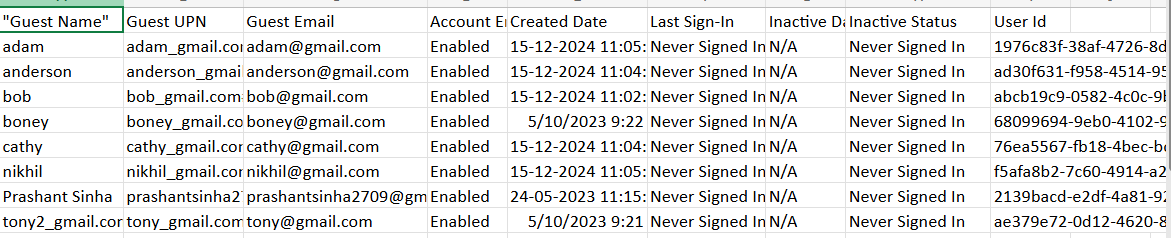
ii) How the Script Works
- Connects to Graph with required scopes
- Reads users and sign-in activity, and sends email.
- Defines inactivity cutoff
- Any guest whose last sign-in is older than 90 days is considered stale.
- Fetches all guest users
- Uses userType eq 'Guest' and pulls SignInActivity (beta profile).
- Classifies guests as inactive
- If never signed in, they are included.
- If last sign-in exists but older than cutoff, they’re included.
- Exports an Excel-safe CSV
- UTF-8 export + BOM rewrite ensures Excel shows columns properly.
- Emails the report
- CSV is base64-attached and sent to admins/stakeholders.
iii) Further Enhancements
- Add guest inviter details
- Split report into two tabs
- never-signed-in guests
- inactive-for-X-days guests
- Auto-disable stale guests
- Filter by domain
- Schedule weekly cleanup
Pull createdBy/audit context so admins know who invited the guest.
Generate a second remediation script that disables these accounts after approval.
Example: report only guests from external partner domains.
Run via Task Scheduler / Azure Automation.
iv) Possible Errors & Solutions
| Error | Cause | Solution |
|---|---|---|
| Empty report | No guests meet inactivity rules. | Valid outcome. Reduce $InactiveDays to test. |
| Access denied (403) | Missing scopes/admin consent. | Grant admin consent for:
|
v) Conclusion
Inactive guest accounts are one of the most common external access risks in Microsoft 365. Without continuous review, they accumulate quietly and expand attack surface.
This script makes guest hygiene easy by surfacing stale guests, producing an Excel-friendly report, and emailing it automatically to administrators. Running it regularly helps maintain tighter B2B governance and keeps the tenant audit-ready.