Note: While user mailbox creation/removal is typically handled automatically as users are provisioned/deprovisioned through Azure AD/Entra and licensing workflows, Graph PowerShell cannot be used to remove shared, room, and equipment mailboxes. For this, you need Exchange Powershell.
Cmdlet Syntax
Remove-Mailbox -Identity <MailboxIdParameter> [-Permanent $true] [-Force] [-Confirm] [-WhatIf]Key notes
- -Identity: Alias, UPN, GUID, or other resolvable identifier.
- -Permanent $true: Bypass soft-delete/recovery window (use with extreme caution).
- -WhatIf: Dry run; see what would be deleted without making changes.
- -Confirm: Prompt before deletion (default prompt behavior may already apply).
Remove-Mailbox vs Disable-Mailbox
Although both cmdlets affect Exchange mailboxes, they behave differently.
| Cmdlet | Action |
| Remove-Mailbox | Removes both the mailbox and associated user account (depending on environment/configuration) |
| Disable-Mailbox | Disconnects the mailbox while keeping the user account intact |
When to Use Remove-Mailbox
Use Remove-Mailbox when:
- Permanently deleting users
- Cleaning up obsolete mailboxes
- Removing shared/resource mailboxes
When to Use Disable-Mailbox
Use Disable-Mailbox when:
- Retaining the user account
- Performing temporary deprovisioning
- Preserving Active Directory objects
Usage Examples
- Example 1 — Single Mailbox Removal
- Example 2 — Simulate Before You Delete
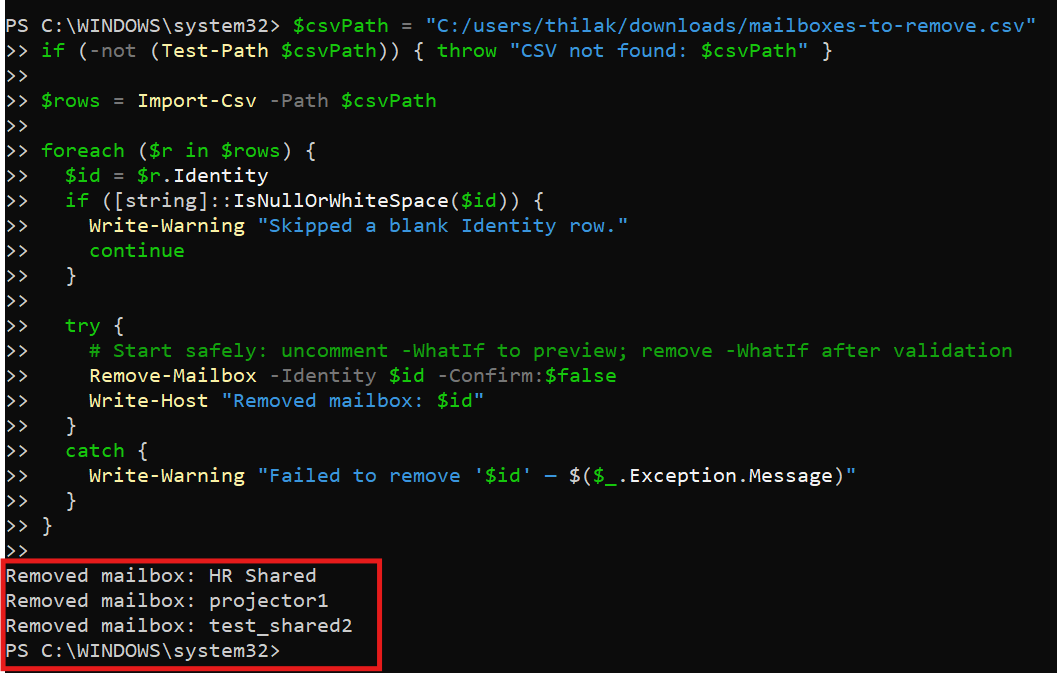
- Example 3 — Bulk Mailbox Removal from CSV (with details)
- Example 4 — Permanently Delete a Mailbox
- Example 5 — Remove Mailbox but Keep User Account
Remove-Mailbox -Identity "test_shared"Removes the test_shared mailbox (e.g., a shared mailbox). You’ll be prompted to confirm unless suppressed.
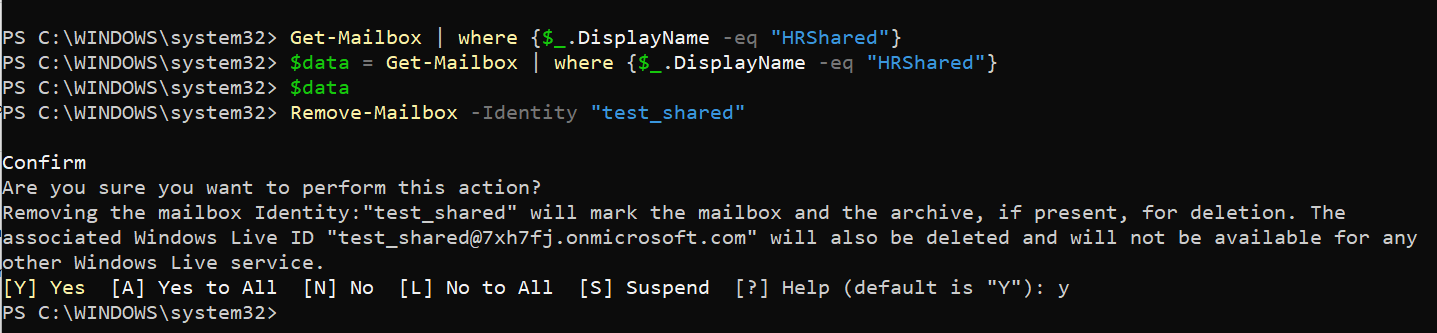
Remove-Mailbox -Identity "test_shared" -WhatIf
Shows the actions that would be taken—no changes are made.
CSV file (save as mailboxes-to-remove.csv):
Identity
marketing_shared
room-nyc-12a
equip-printer-4f
Script:
Connect-ExchangeOnline

$csvPath = "C:\Temp\mailboxes-to-remove.csv"
if (-not (Test-Path $csvPath)) { throw "CSV not found: $csvPath" }

$rows = Import-Csv -Path $csvPath

foreach ($r in $rows) {
$id = $r.Identity
if ([string]::IsNullOrWhiteSpace($id)) {
Write-Warning "Skipped a blank Identity row."
continue
}

try {
# Start safely: uncomment -WhatIf to preview; remove -WhatIf after validation
Remove-Mailbox -Identity $id -Confirm:$false
Write-Host "Removed mailbox: $id"
}
catch {
Write-Warning "Failed to remove '$id' — $($_.Exception.Message)"
}
}
Remove-Mailbox -Identity "marketing_shared" -Permanent $trueBy setting -Permanent to $true, you delete the mailbox permanently, skipping the retention period typically offered for mailboxes.
Disable-Mailbox -Identity john@contoso.comUnderstanding Soft-Deleted and Inactive Mailboxes
When a mailbox is removed in Exchange Online, it may remain in a soft-deleted state for a retention period before permanent deletion occurs.
Soft-Deleted Mailboxes
Soft-deleted mailboxes can often be restored within the retention window.
Inactive Mailboxes
Inactive mailboxes are preserved due to retention policies or litigation holds and require additional administrative actions before permanent removal.
Cmdlet Tips
- Always connect first: Connect-ExchangeOnline.
- Start with -WhatIf: Validate scope and impact before real deletions.
- Back up/Export metadata:
Get-Mailbox -Identity  | Format-List *
Get-MailboxPermission -Identity
Mailbox Removal Best Practices
Before removing mailboxes in Exchange Online, administrators should follow several best practices to avoid accidental data loss and compliance issues.
Recommended Best Practices
- Verify mailbox backup and retention requirements
- Check whether litigation hold is enabled
- Export mailbox data if necessary
- Confirm mailbox ownership and usage
- Review shared mailbox dependencies
- Use -WhatIf before bulk removal
- Disable auto-forwarding and mailbox rules before deletion
- Maintain audit documentation for compliance
Use Cases
- Decommissioning shared mailboxes after projects or organizational changes.
- Retiring room/equipment mailboxes when spaces or assets are repurposed.
- Tenant hygiene to reduce confusion in the GAL and keep compliance simpler.
- Incident response to quickly remove risky, unused mailboxes that could be abused.
v) Possible Errors & Solutions
| Error | Cause | Solution |
|---|---|---|
| The term 'Remove-Mailbox' is not recognized | Not connected to Exchange Online module | Install/import EXO V3 module; run Connect-ExchangeOnline. |
| Cannot find object 'XYZ' | Wrong Identity (alias/UPN/ID) or mailbox already removed | Verify with Get-Mailbox -Identity XYZ or list with Get-Mailbox. Check soft-deleted mailboxes. |
| Insufficient permissions | Missing Exchange RBAC role | Use an account with Organization/Recipient Management roles. |
| Deletion blocked by litigation hold / retention | Mailbox under hold/retention policy | Remove/adjust holds and retention first; involve compliance/legal before proceeding. |
| Need irreversible removal | Soft-delete retains recoverability | Add -Permanent $true (only after approvals). |
| Bulk script stops on one failure | Unhandled exception breaks loop | Use try/catch per row (as shown) so the script continues. |
Frequently Asked Questions
- What does Remove-Mailbox do in Exchange Online?
The Remove-Mailbox cmdlet removes mailboxes from Exchange Online and may also remove the associated user account depending on the environment configuration. - Can I recover a removed mailbox?
Yes. Soft-deleted mailboxes can often be recovered within the retention period configured in Microsoft 365. - What is the difference between Remove-Mailbox and Disable-Mailbox?
Remove-Mailbox removes the mailbox entirely, while Disable-Mailbox disconnects the mailbox but retains the user account. - Can I bulk remove mailboxes using PowerShell?
Yes. Administrators commonly use CSV imports and PowerShell loops to remove multiple mailboxes simultaneously. - Does Remove-Mailbox permanently delete emails immediately?
No. Exchange Online typically retains deleted mailboxes for a retention period before permanent deletion. - Can shared mailboxes be removed using Remove-Mailbox?
Yes. Shared mailboxes can be removed using the Remove-Mailbox cmdlet. - What permissions are required to remove mailboxes?
Administrators typically require Exchange Administrator or Organization Management roles.
vi) Conclusion
Remove-Mailbox is the safest way to retire legacy mailboxes at scale while staying in control: preview with -WhatIf, use CSV-driven workflows, and respect compliance constraints like holds and retention. Keep in mind that Graph PowerShell doesn’t support mailbox deletion (shared/room/equipment)—use Exchange Online PowerShell for that, while user mailboxes generally follow your provisioning/deprovisioning lifecycle automatically. With clear process and a small dose of automation, your address lists stay clean, compliant, and easy to manage.