Disabled User License Reclaimer Using Graph PowerShell
Automatically Reclaim All Licenses from Disabled Accounts
In Microsoft 365 environments, disabled user accounts often continue consuming valuable licenses. Over time, this leads to unnecessary costs and inefficient license utilization. When employees leave the organization or accounts are disabled for compliance reasons, licenses should be reclaimed immediately.
Instead of manually reviewing each account in the admin center, this guide demonstrates how to automatically:
- ✔ Detect disabled users
- ✔ Identify assigned licenses
- ✔ Remove all licenses from those accounts
- ✔ Skip users with no licenses
- ✔ Export a detailed audit report
This script works dynamically. FLOW_FREE, DEVELOPERPACK_E5 and Power_Pages_vTrial_for_Makers licenses have been used for demo purpose:
- FLOW_FREE
- DEVELOPERPACK_E5
- Power_Pages_vTrial_for_Makers
It will reclaim all assigned licenses from disabled users — regardless of SKU type.
🚀 Community Edition Released!
Try the M365Corner Microsoft 365 Reporting Tool — your DIY pack with 20+ out-of-the-box M365 reports for Users, Groups, and Teams.
I) The Script
# Connect to Microsoft Graph
Connect-MgGraph -Scopes User.ReadWrite.All, Organization.Read.All

Write-Host "Fetching disabled users..." -ForegroundColor Cyan

# Get all disabled users with assigned licenses
$DisabledUsers = Get-MgUser -Filter "accountEnabled eq false" -All -Property Id,UserPrincipalName,AssignedLicenses

if (-not $DisabledUsers) {
    Write-Host "No disabled users found." -ForegroundColor Yellow
    break
}

$Results = @()

foreach ($User in $DisabledUsers) {

    try {

        # Get assigned license SKUs
        $AssignedSkuIds = $User.AssignedLicenses.SkuId

        if (-not $AssignedSkuIds) {

            Write-Host "$($User.UserPrincipalName) has no assigned licenses. Skipping." -ForegroundColor Yellow

            $Results += [PSCustomObject]@{
                UserPrincipalName = $User.UserPrincipalName
                Status            = "Skipped - No Licenses"
                Timestamp         = (Get-Date)
            }

            continue
        }

        # Remove all assigned licenses
        Set-MgUserLicense -UserId $User.Id `
            -AddLicenses @() `
            -RemoveLicenses $AssignedSkuIds

        Write-Host "Licenses reclaimed from $($User.UserPrincipalName)" -ForegroundColor Green

        $Results += [PSCustomObject]@{
            UserPrincipalName = $User.UserPrincipalName
            LicensesRemoved   = ($AssignedSkuIds -join ", ")
            Status            = "Success"
            Timestamp         = (Get-Date)
        }

    }
    catch {

        Write-Host "Failed for $($User.UserPrincipalName)" -ForegroundColor Red
        Write-Host $_.Exception.Message

        $Results += [PSCustomObject]@{
            UserPrincipalName = $User.UserPrincipalName
            Status            = "Failed"
            ErrorMessage      = $_.Exception.Message
            Timestamp         = (Get-Date)
        }
    }
}

# Export Report
$ReportPath = "C:\Path\DisabledUserLicenseReclaimReport.csv"
$Results | Export-Csv $ReportPath -NoTypeInformation

Write-Host "Report exported to $ReportPath" -ForegroundColor Cyan
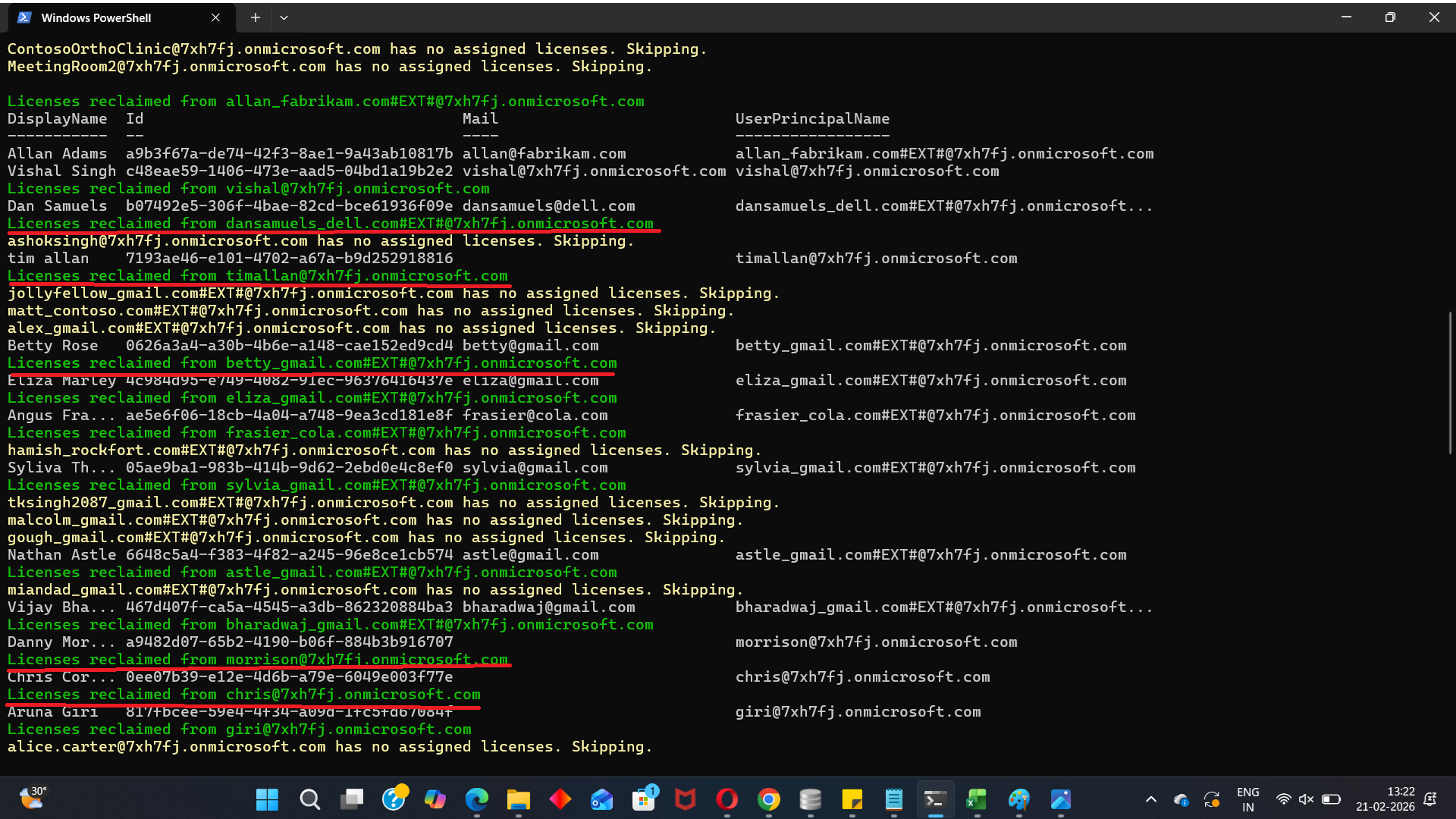

II) How the Script Works
- Connect to Microsoft Graph
- Graph Scopes:
- User.ReadWrite.All
- Organization.Read.All
- Azure AD Role:
- Global Administrator
OR - License Administrator
- Identify Disabled Users
- Check for Assigned Licenses
- Skips the account
- Logs it as “Skipped - No Licenses”
- Remove All Assigned Licenses
- Export Execution Report
- UserPrincipalName
- LicensesRemoved
- Status
- ErrorMessage (if any)
- Timestamp
Connect-MgGraph -Scopes User.ReadWrite.All, Organization.Read.AllRequired:
Get-MgUser -Filter "accountEnabled eq false"This retrieves only users where:
AccountEnabled = FalseOnly disabled accounts are processed.
$User.AssignedLicenses.SkuIdIf a user has no licenses, the script:
Set-MgUserLicense `
  -AddLicenses @() `
  -RemoveLicenses $AssignedSkuIds
All assigned SKUs are removed in one operation.
Important: -AddLicenses @() Is Mandatory
Even when you are not adding licenses, this parameter must be included.
If omitted, you may encounter:
Cannot convert the literal 'System.Collections.Hashtable' to the expected type 'Edm.Guid'Always include:
-AddLicenses @()
The script exports:
DisabledUserLicenseReclaimReport.csv
Report includes:
This provides a compliance-ready audit trail.
III) Further Enhancements
This foundational script can be extended to:
- Reclaim only specific SKUs (exclude free licenses)
- Reclaim licenses only if disabled for 30+ days
- Calculate estimated license cost savings
- Email report automatically
- Add simulation mode (WhatIf logic)
- Integrate with Azure Automation
These can each become dedicated M365Corner articles.
IV) Possible Errors & Solutions
| Error | Cause | Solution |
|---|---|---|
| Insufficient Privileges | Missing Graph scopes or role permissions | Connect-MgGraph -Scopes User.ReadWrite.All, Organization.Read.All Ensure you are Global Admin or License Admin. |
| No Disabled Users Found | No accounts with AccountEnabled = False | Get-MgUser -All | Select UserPrincipalName,AccountEnabled |
| License Removal Fails | Transient Graph issue or permission boundary | Re-run script after verifying permissions. |
V) Conclusion
Disabled accounts consuming licenses lead to: Wasted subscription capacity, Increased operational cost and Poor license governance. This script transforms license management from: Manual Review → Automated Reclamation → Reported Governance. It is ideal for:
- Offboarding processes
- Cost optimization
- License cleanup exercises
- Quarterly compliance audits
For growing Microsoft 365 tenants, automated license reclamation is not optional — it is essential.