List Template Based Entra Apps Using PowerShell
Microsoft Entra ID supports both custom-built applications and template-based applications. Template-based applications are typically created from pre-defined templates (such as SaaS integrations) and often follow standardized configurations.
For administrators, identifying these applications is important for:
- Governance and auditing
- Security reviews
- Application lifecycle management
- SaaS integration tracking
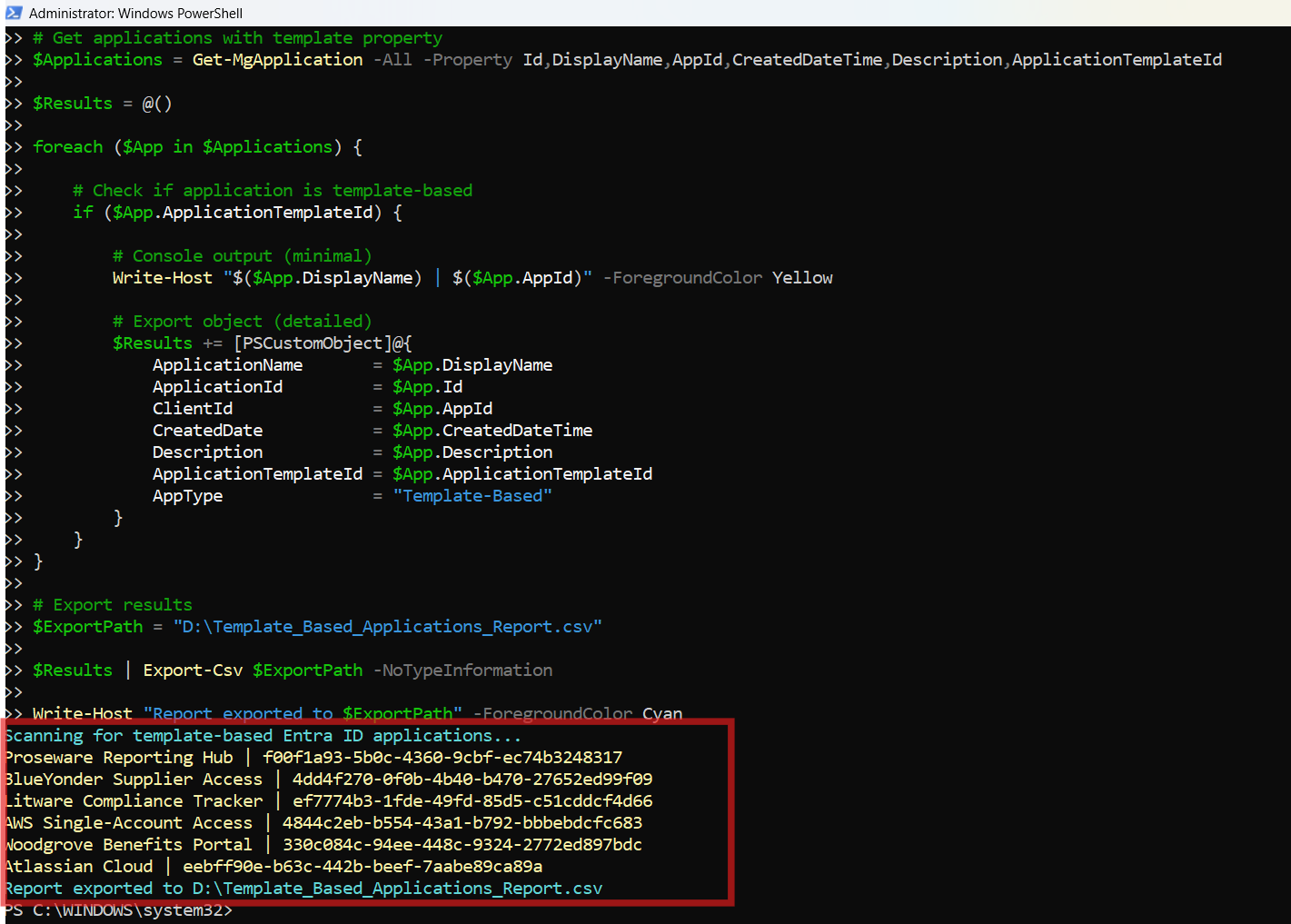
Using Microsoft Graph PowerShell, you can easily retrieve and export all template-based Entra applications. The script below scans all applications and filters only those created using templates.
🚀 Community Edition Released!
Try the M365Corner Microsoft 365 Reporting Tool — your DIY pack with 20+ out-of-the-box M365 reports for Users, Groups, and Teams.
The Script
# Connect to Microsoft Graph
Connect-MgGraph -Scopes Application.Read.All

Write-Host "Scanning for template-based Entra ID applications..." -ForegroundColor Cyan

# Get applications with template property
$Applications = Get-MgApplication -All -Property Id,DisplayName,AppId,CreatedDateTime,Description,ApplicationTemplateId

$Results = @()

foreach ($App in $Applications) {

    # Check if application is template-based
    if ($App.ApplicationTemplateId) {

        # Console output (minimal)
        Write-Host "$($App.DisplayName) | $($App.AppId)" -ForegroundColor Yellow

        # Export object (detailed)
        $Results += [PSCustomObject]@{
            ApplicationName       = $App.DisplayName
            ApplicationId         = $App.Id
            ClientId              = $App.AppId
            CreatedDate           = $App.CreatedDateTime
            Description           = $App.Description
            ApplicationTemplateId = $App.ApplicationTemplateId
            AppType               = "Template-Based"
        }
    }
}

# Export results
$ExportPath = "D:\Template_Based_Applications_Report.csv"

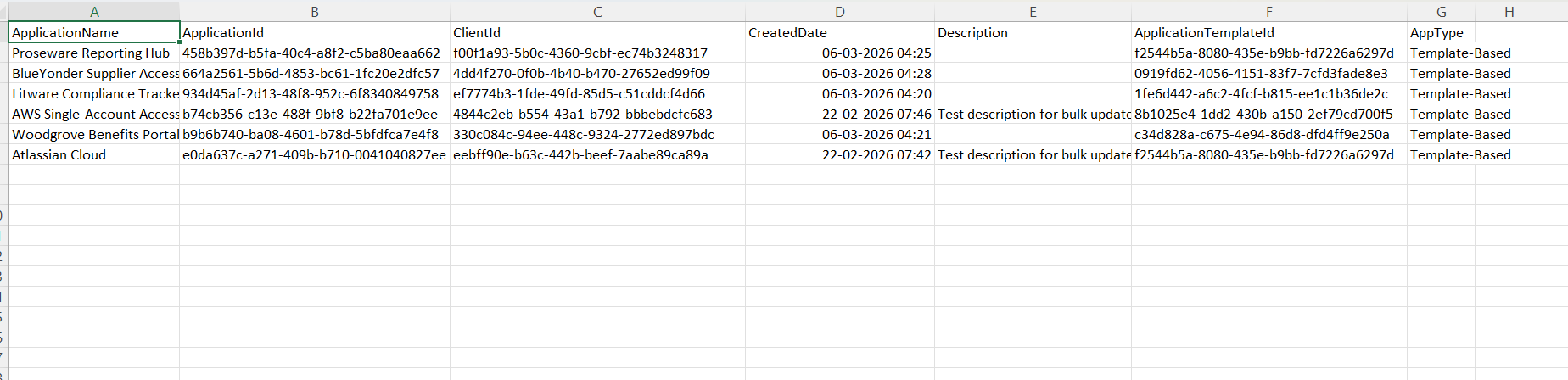
$Results | Export-Csv $ExportPath -NoTypeInformation

Write-Host "Report exported to $ExportPath" -ForegroundColor Cyan
Download this script from our M365Corner GitHub Repo: https://github.com/m365corner/M365Corner-Scripts/tree/main/Entra-Apps-Related-Scripts/List-Template-Based-Entra-Apps
How the Script Works
| Step | Description |
|---|---|
| Connect to Graph | Uses Connect-MgGraph -Scopes Application.Read.All to authenticate and allow reading application data |
| Fetch Applications | Retrieves all applications using Get-MgApplication -All along with required properties |
| Identify Template Apps | Checks ApplicationTemplateId property to determine if the app is template-based |
| Display Output | Prints application name and client ID to console for quick visibility |
| Build Report | Creates a structured object containing detailed application metadata |
| Export Results | Saves all template-based applications into a CSV file for auditing |
Further Enhancements
| Enhancement | Description |
|---|---|
| Include Owner Details | Extend the script to fetch application owners using Get-MgApplicationOwner |
| Add Sign-In Audience | Include SignInAudience to understand app scope (single vs multi-tenant) |
| Filter by Template Type | Filter specific templates using ApplicationTemplateId |
| Add Last Modified Date | Include additional properties like LastModifiedDateTime for auditing |
| Schedule Execution | Automate via Task Scheduler or Azure Automation for periodic reporting |
Frequently Asked Questions
| Question | Answer |
|---|---|
| What is a template-based Entra app? | It is an application created using a predefined template, usually for SaaS integrations |
| How is a template-based Entra app identified? | By the presence of the ApplicationTemplateId property |
| Are all enterprise entra apps template-based? | No, only those created via templates will have ApplicationTemplateId |
| Can this script detect custom apps? | No, it only lists entra apps with a template ID |
| Why export to CSV? | CSV helps in auditing, reporting, and sharing application data |
Admin Usecases
| Use Case | Description |
|---|---|
| SaaS Application Audit | Identify all template-based integrations in the tenant |
| Security Review | Review pre-configured apps for compliance and risk |
| Governance Tracking | Maintain visibility over third-party integrations |
| Cleanup Activity | Identify unused or redundant template apps |
| Documentation | Maintain records of all template-based applications |
Possible Errors & Solutions
| Error | Cause | Solution |
|---|---|---|
| Insufficient privileges | Missing required permissions | Use Application.Read.All and ensure admin consent |
| Cmdlet not recognized | Graph module not installed | Run Install-Module Microsoft.Graph |
| Empty results | No template-based apps exist | Verify tenant has template apps configured |
| Access token expired | Session timeout | Re-run Connect-MgGraph |
| Export path error | Directory does not exist | Ensure D:\ path is valid or modify path |
Conclusion
Template-based applications play a critical role in enabling seamless SaaS integrations within Microsoft Entra ID. However, without proper visibility, these applications can become difficult to manage and audit.
This Microsoft Graph PowerShell script provides a simple yet powerful way to identify, list, and export all template-based Entra applications. By leveraging properties like ApplicationTemplateId, administrators can quickly distinguish template apps from custom applications.
With further enhancements and automation, this script can become a valuable tool in your Entra governance, security audits, and application lifecycle management strategy.