List Recent Entra ID Apps With Creator, App Owner & API Permissions Info
Tracking newly created Entra ID applications is not enough anymore—modern governance demands deeper visibility. Administrators need to know:
- Who created the application
- Who owns it
- What API permissions it has
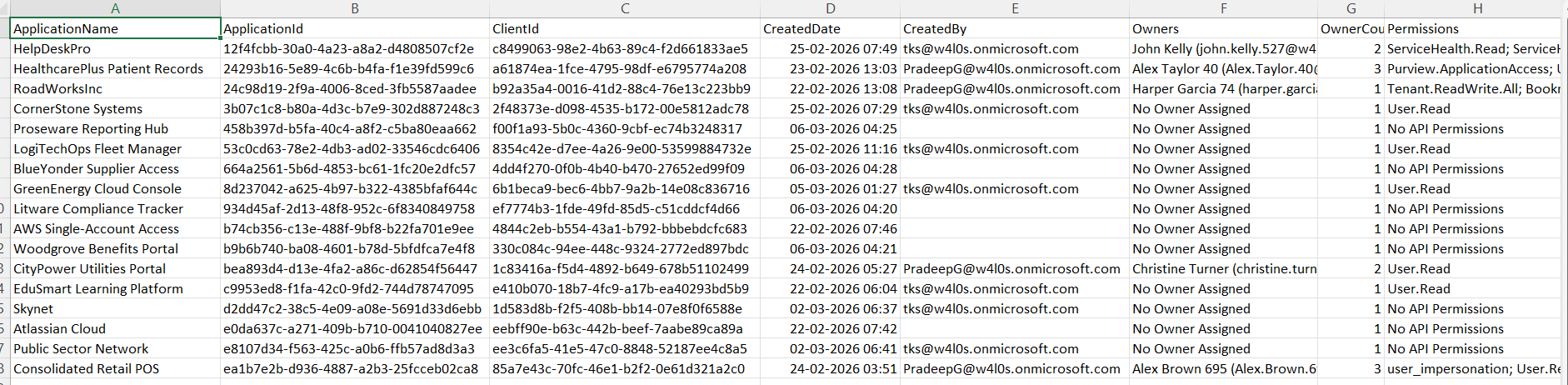
This script builds a premium governance report by combining application data, audit logs, owners, and API permissions into a single export.
🚀 Community Edition Released!
Try the M365Corner Microsoft 365 Reporting Tool — your DIY pack with 20+ out-of-the-box M365 reports for Users, Groups, and Teams.
i) Script
# Connect to Microsoft Graph
Connect-MgGraph -Scopes AuditLog.Read.All, Application.Read.All

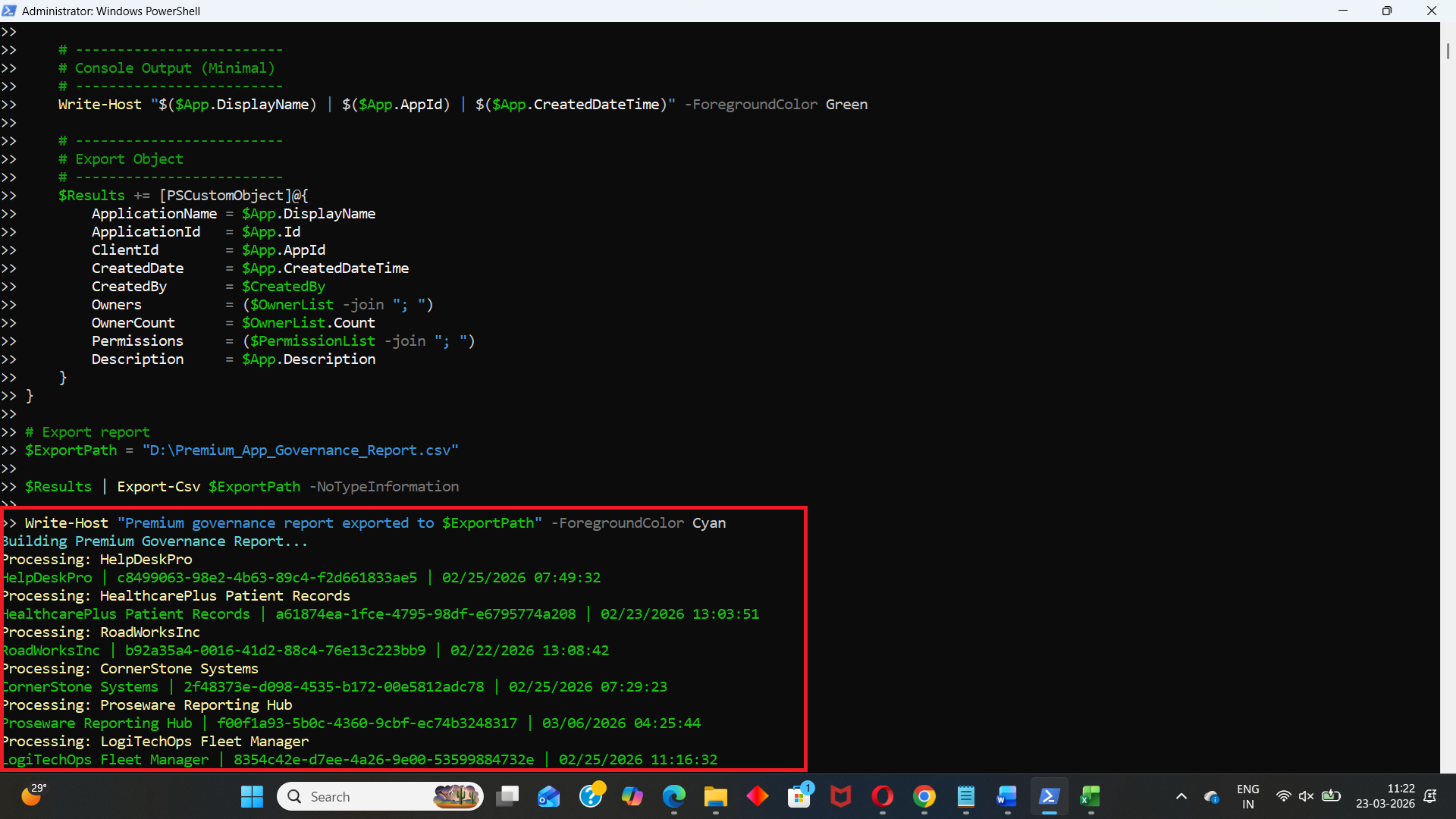
Write-Host "Building Premium Governance Report..." -ForegroundColor Cyan

# Threshold (last 30 days)
$ThresholdDate = (Get-Date).AddDays(-30)

# Get applications
$Applications = Get-MgApplication -All -Property Id,DisplayName,CreatedDateTime,Description,AppId,RequiredResourceAccess

# Get audit logs for app creation
$AuditLogs = Get-MgAuditLogDirectoryAudit -Filter "activityDisplayName eq 'Add application'" -All

$Results = @()

foreach ($App in $Applications) {

    if ($App.CreatedDateTime -lt $ThresholdDate) {
        continue
    }

    Write-Host "Processing: $($App.DisplayName)" -ForegroundColor Yellow

    # -------------------------
    # Get Created By (Audit Log)
    # -------------------------
    $CreationLog = $AuditLogs | Where-Object {
        $_.TargetResources.DisplayName -contains $App.DisplayName
    } | Sort-Object ActivityDateTime -Descending | Select-Object -First 1

    $CreatedBy = $CreationLog.InitiatedBy.User.UserPrincipalName

    # -------------------------
    # Get Owners
    # -------------------------
    $Owners = Get-MgApplicationOwner -ApplicationId $App.Id

    $OwnerList = @()

    foreach ($Owner in $Owners) {
        $OwnerDetails = Get-MgUser -UserId $Owner.Id -ErrorAction SilentlyContinue
        if ($OwnerDetails) {
            $OwnerList += "$($OwnerDetails.DisplayName) ($($OwnerDetails.UserPrincipalName))"
        }
    }

    if (-not $OwnerList) {
        $OwnerList = @("No Owner Assigned")
    }

    # -------------------------
    # Get Permissions
    # -------------------------
    $PermissionList = @()

    foreach ($Resource in $App.RequiredResourceAccess) {

        $SP = Get-MgServicePrincipal -Filter "appId eq '$($Resource.ResourceAppId)'" -Property AppRoles,Oauth2PermissionScopes

        foreach ($Access in $Resource.ResourceAccess) {

            $Perm = ($SP.AppRoles + $SP.Oauth2PermissionScopes | Where-Object {$_.Id -eq $Access.Id}).Value

            if ($Perm) {
                $PermissionList += $Perm
            }
        }
    }

    if (-not $PermissionList) {
        $PermissionList = @("No API Permissions")
    }

    # -------------------------
    # Console Output (Minimal)
    # -------------------------
    Write-Host "$($App.DisplayName) | $($App.AppId) | $($App.CreatedDateTime)" -ForegroundColor Green

    # -------------------------
    # Export Object
    # -------------------------
    $Results += [PSCustomObject]@{
        ApplicationName = $App.DisplayName
        ApplicationId   = $App.Id
        ClientId        = $App.AppId
        CreatedDate     = $App.CreatedDateTime
        CreatedBy       = $CreatedBy
        Owners          = ($OwnerList -join "; ")
        OwnerCount      = $OwnerList.Count
        Permissions     = ($PermissionList -join "; ")
        Description     = $App.Description
    }
}

# Export report
$ExportPath = "D:\Premium_App_Governance_Report.csv"

$Results | Export-Csv $ExportPath -NoTypeInformation

Write-Host "Premium governance report exported to $ExportPath" -ForegroundColor Cyan
ii) How the Script Works
This script combines multiple Graph data sources to produce a rich governance report.
🔹 Connects with Required Permissions
- AuditLog.Read.All → Fetch app creation logs
- Application.Read.All → Read app registrations
🔹 Filters Apps Created in Last 30 Days
- Uses:
- Skips older applications using a continue condition.
(Get-Date).AddDays(-30)
🔹 Identifies App Creator (Audit Logs)
- Pulls "Add application" events from directory audit logs
- Matches application name with audit log target
- Extracts:
- InitiatedBy.User.UserPrincipalName
👉 This gives who created the app
🔹 Retrieves Application Owners
- Uses Get-MgApplicationOwner
- Then resolves owner details via: Get-MgUser
👉 Outputs:
- Owner names
- UPNs
- Owner count
🔹 Extracts API Permissions
- Reads RequiredResourceAccess
- Matches permission IDs against:
- AppRoles (Application permissions)
- Oauth2PermissionScopes (Delegated permissions)
- User.Read
- Mail.Read
- Directory.Read.All
👉 Produces a readable list of permissions like:
🔹 Builds Exportable Report
Each app is converted into a structured object containing:
- Creator
- Owners
- Permissions
- Metadata
🔹 Exports to CSV
- Final report is saved for:
- Auditing
- Compliance reviews
- Security analysis
iii) Further Enhancements
🔹 Include Risk Classification
- Tag apps based on:
- High-risk permissions (e.g., Directory.ReadWrite.All)
🔹 Add Last Sign-In Activity
- Identify unused or dormant apps.
🔹 Integrate Service Principal Data
- Fetch enterprise app usage alongside app registrations.
🔹 Automate Weekly Governance Reports
- Schedule via Task Scheduler or Azure Automation.
🔹 Send Alerts for High-Risk Apps
- Trigger email/Teams notification when:
- New app has sensitive permissions
- App has no owner
iv) Frequently Asked Questions
Why is "CreatedBy" sometimes empty?
Because audit logs may not retain older entries or matching may fail.
Does this script include delegated and application permissions?
Yes, it resolves both from:
- Oauth2PermissionScopes
- AppRoles
Can this script detect orphaned apps?
Yes — apps with "No Owner Assigned" are clearly identified.
Is this suitable for large tenants?
Yes, but performance can be improved with filtering and batching.
v) Admin Usecases
🔹 Security Audits
- Identify who created apps and what access they requested.
🔹 Governance & Compliance
- Ensure every app:
- Has an owner
- Has justified permissions
🔹 Detect Shadow IT
- Spot apps created outside IT processes.
🔹 Permission Review Campaigns
- Quickly list apps with excessive privileges.
🔹 Incident Investigation
- Trace suspicious apps back to their creators.
vi) Possible Errors & Solutions
Below are some common issues administrators may encounter.
| Error | Cause | Solution |
|---|---|---|
| Insufficient privileges | Missing Graph permissions | Connect-MgGraph -Scopes AuditLog.Read.All, Application.Read.All Ensure admin consent is granted. |
| CreatedBy is blank |
|
|
| Get-MgApplicationOwner returns no data | No owners assigned | Handled in script → returns "No Owner Assigned" |
| Permissions not resolving correctly | Service principal lookup mismatch | Verify: Get-MgServicePrincipal -Filter "appId eq '...'" |
| Export path not found | Invalid directory | Ensure: D:\ exists Or update the path accordingly. |
vii) Conclusion
This script goes beyond basic reporting and delivers a complete governance view of newly created Entra ID applications.
With insights into: 1) Creator, 2) Ownership, 3) API permissions, it empowers administrators to: 1) Strengthen security posture, 2) Enforce governance policies, 3) Detect risky or unmanaged applications early.
This is exactly the kind of real-world, high-impact reporting every M365 administrator should have in their toolkit.