List Entra Apps with No Redirect URIs
Redirect URIs are essential for applications that use OAuth 2.0 or OpenID Connect flows. Applications without configured redirect URIs may indicate:
- Incomplete app configuration
- Misconfigured authentication setup
- Unused or abandoned applications
This script helps administrators identify Entra ID applications that do not have any redirect URIs configured across all supported types.
🚀 Community Edition Released!
Try the M365Corner Microsoft 365 Reporting Tool — your DIY pack with 20+ out-of-the-box M365 reports for Users, Groups, and Teams.
i) Script
# Connect to Microsoft Graph
Connect-MgGraph -Scopes Application.Read.All

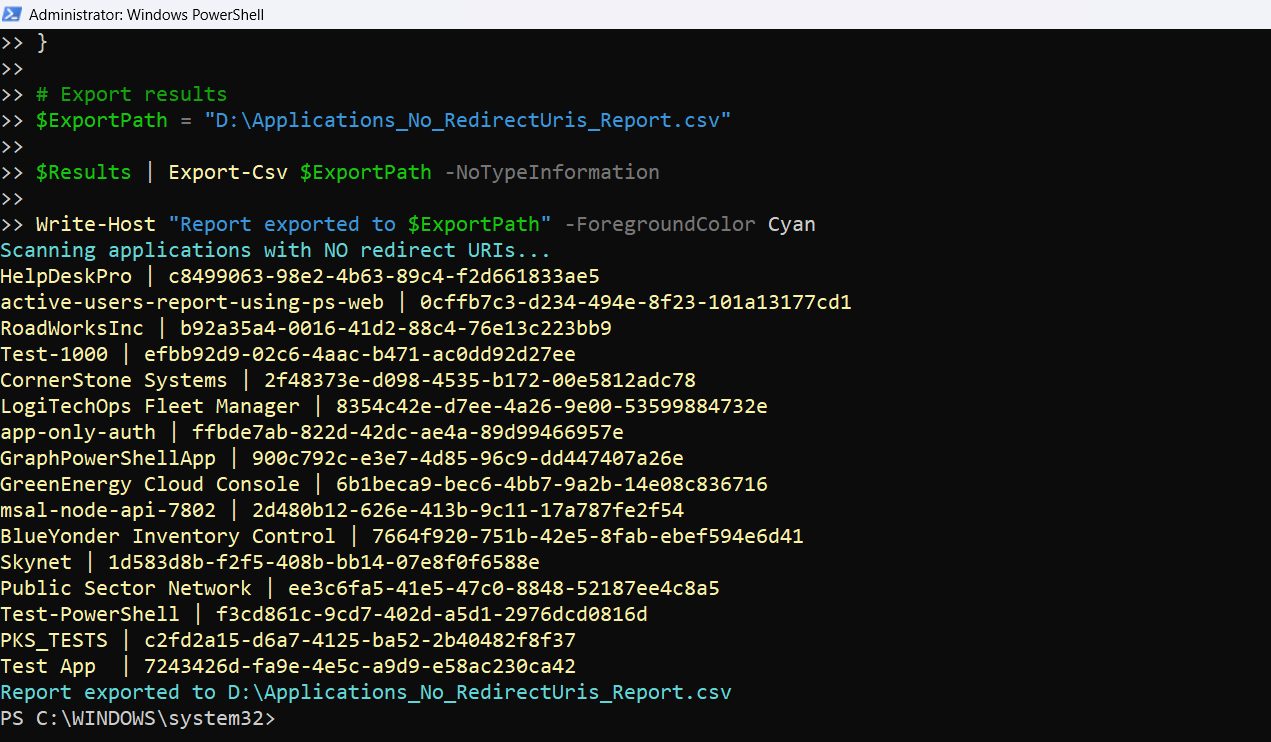
Write-Host "Scanning applications with NO redirect URIs..." -ForegroundColor Cyan

# Get applications with redirect URI properties
$Applications = Get-MgApplication -All -Property Id,DisplayName,AppId,CreatedDateTime,Description,Web,Spa,PublicClient

$Results = @()

foreach ($App in $Applications) {

    # Extract redirect URIs from all supported types
    $WebUris    = $App.Web.RedirectUris
    $SpaUris    = $App.Spa.RedirectUris
    $PublicUris = $App.PublicClient.RedirectUris

    # Check if all are empty
    if ((-not $WebUris) -and (-not $SpaUris) -and (-not $PublicUris)) {

        # Console output (minimal)
        Write-Host "$($App.DisplayName) | $($App.AppId)" -ForegroundColor Yellow

        # Export object (detailed)
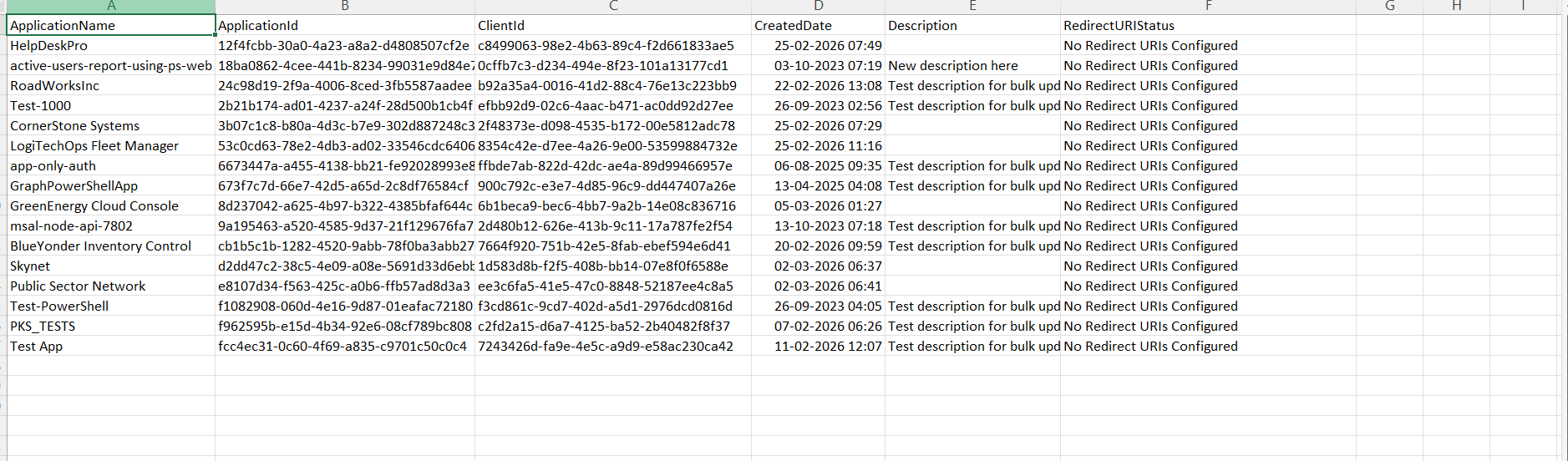
        $Results += [PSCustomObject]@{
            ApplicationName    = $App.DisplayName
            ApplicationId      = $App.Id
            ClientId           = $App.AppId
            CreatedDate        = $App.CreatedDateTime
            Description        = $App.Description
            RedirectURIStatus  = "No Redirect URIs Configured"
        }
    }
}

# Export results
$ExportPath = "C:\Path\Applications_No_RedirectUris_Report.csv"

$Results | Export-Csv $ExportPath -NoTypeInformation

Write-Host "Report exported to $ExportPath" -ForegroundColor Cyan
ii) How the Script Works
| Step | Explanation |
|---|---|
| Connect to Graph | Uses Application.Read.All to retrieve application configuration |
| Fetch Applications | Retrieves apps including Web, Spa, and PublicClient properties |
| Extract Redirect URIs | Pulls redirect URIs from all supported app types |
| Validate URI Presence | Checks if all redirect URI lists are empty |
| Identify Misconfigured Apps | Flags apps without any redirect URIs configured |
| Console Output | Displays app name and client ID |
| Build Report Object | Captures app metadata and redirect URI status |
| Export to CSV | Saves results for audit and remediation |
iii) Further Enhancements
🔹 Identify Apps Using Auth Flows
- Combine with:
- OAuth permissions
- Sign-in logs
🔹 Include Owner Information
- Add: Get-MgApplicationOwner
🔹 Add CreatedBy Details
- Use audit logs to track creator of misconfigured apps
🔹 Filter by Recently Created Apps
- Focus on newly created apps missing redirect URIs
🔹 Combine with Risk Analysis
- Flag apps with:
- No redirect URIs
- High API permissions
iv) Frequently Asked Questions
| Question | Answer |
|---|---|
| What are redirect URIs? | URLs where authentication responses are sent after login |
| Are redirect URIs mandatory? | Required for most OAuth/OpenID flows |
| Can apps work without redirect URIs? | Yes, but only for specific scenarios (e.g., daemon apps) |
| Does this script cover all URI types? | Yes, Web, SPA, and Public Client |
v) Admin Usecases
| Use Case | Description |
|---|---|
| Configuration Audits | Identify apps with incomplete authentication setup |
| Security Review | Detect potentially misconfigured or unused apps |
| Governance Enforcement | Ensure apps follow authentication standards |
| App Cleanup | Remove or fix unused applications |
| Compliance Checks | Maintain proper app configuration policies |
vi) Possible Errors & Solutions
| Error | Cause | Solution |
|---|---|---|
| Insufficient privileges | Missing Graph permission | Use Connect-MgGraph -Scopes Application.Read.All |
| No results returned | All apps have redirect URIs | Validate environment or refine filters |
| Property not found (Web/Spa/PublicClient) | Properties not included | Ensure properties are specified (already handled) |
| Export path not found | Invalid directory | Ensure C:\Path\ exists or update path |
vii) Conclusion
This script helps identify Entra ID applications that lack redirect URIs, providing valuable insight into potential misconfigurations or unused apps.
By regularly reviewing such applications, administrators can:
- Improve authentication configurations
- Eliminate unused or incomplete apps
- Strengthen governance and compliance
A simple yet effective report to maintain a well-configured and secure application environment.