List Entra Apps with No Owners and No Assigned Roles
Applications without owners and without defined roles represent a high-risk governance gap in Entra ID. These apps:
- Lack accountability (no owner)
- Lack proper authorization design (no roles)
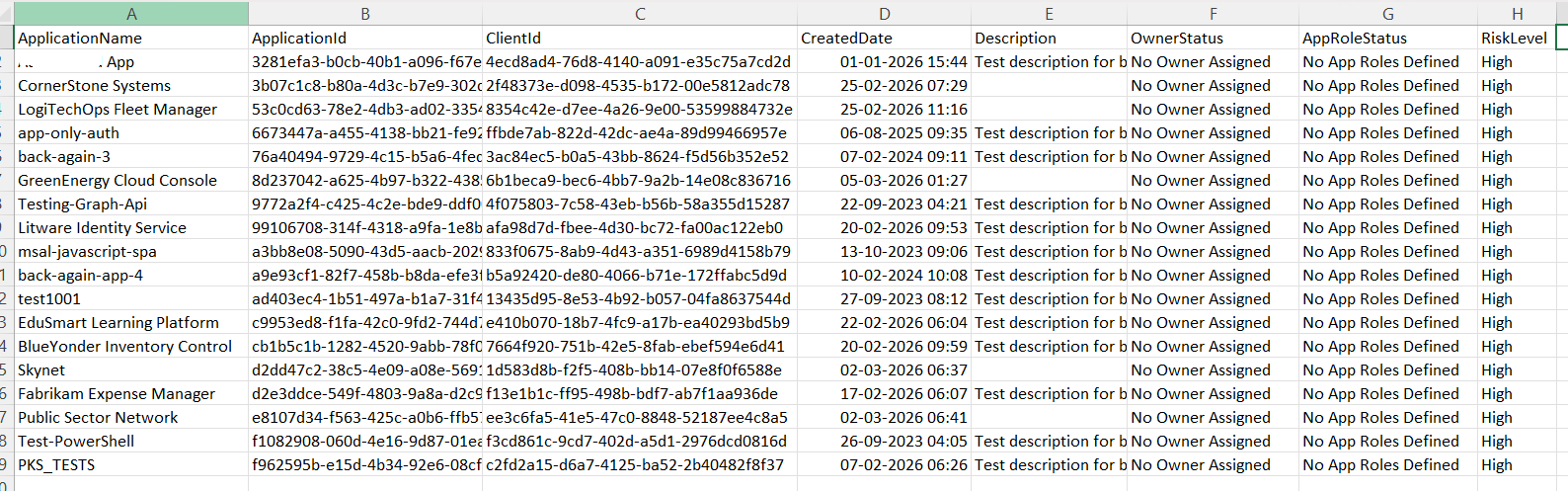
This script identifies such applications, helping administrators quickly detect and remediate high-risk, unmanaged apps.
🚀 Community Edition Released!
Try the M365Corner Microsoft 365 Reporting Tool — your DIY pack with 20+ out-of-the-box M365 reports for Users, Groups, and Teams.
i) Script
# Connect to Microsoft Graph
Connect-MgGraph -Scopes Application.Read.All, Directory.Read.All

Write-Host "Scanning applications with NO owners AND NO app roles..." -ForegroundColor Cyan

# Get applications with required properties
$Applications = Get-MgApplication -All -Property Id,DisplayName,AppId,CreatedDateTime,Description,AppRoles

$Results = @()

foreach ($App in $Applications) {

    # -------------------------
    # Check App Roles
    # -------------------------
    $NoRoles = (-not $App.AppRoles -or $App.AppRoles.Count -eq 0)

    if (-not $NoRoles) {
        continue
    }

    # -------------------------
    # Check Owners
    # -------------------------
    $Owners = Get-MgApplicationOwner -ApplicationId $App.Id

    if ($Owners) {
        continue
    }

    # -------------------------
    # Console Output (Minimal)
    # -------------------------
    Write-Host "$($App.DisplayName) | $($App.AppId)" -ForegroundColor Red

    # -------------------------
    # Export Object (Detailed)
    # -------------------------
    $Results += [PSCustomObject]@{
        ApplicationName = $App.DisplayName
        ApplicationId   = $App.Id
        ClientId        = $App.AppId
        CreatedDate     = $App.CreatedDateTime
        Description     = $App.Description
        OwnerStatus     = "No Owner Assigned"
        AppRoleStatus   = "No App Roles Defined"
        RiskLevel       = "High"
    }
}

# Export results
$ExportPath = "C:\Path\Apps_NoOwners_NoRoles_Report.csv"

$Results | Export-Csv $ExportPath -NoTypeInformation

Write-Host "Report exported to $ExportPath" -ForegroundColor Cyan

ii) How the Script Works
| Step | Explanation |
|---|---|
| Connect to Graph | Uses Application.Read.All and Directory.Read.All to access app and owner data |
| Fetch Applications | Retrieves all applications with AppRoles and metadata |
| Check App Roles | Identifies apps where no roles are defined |
| Skip Valid Apps | Continues loop if roles exist |
| Fetch Owners | Retrieves owners using Get-MgApplicationOwner |
| Check Owner Presence | Skips apps that have assigned owners |
| Identify Risky Apps | Flags apps with no owners AND no roles |
| Console Output | Displays high-risk apps for quick visibility |
| Build Report Object | Adds metadata along with risk classification |
| Export to CSV | Saves the report for governance and remediation |
iii) Further Enhancements
🔹 Add API Permissions Check
- Flag apps that also have:
- High permissions
- No owners → critical risk
🔹 Include App Activity Data
- Identify inactive apps for cleanup
🔹 Add CreatedBy (Audit Logs)
- Track who created the orphaned app
🔹 Integrate Risk Scoring
- Combine:
- No owner
- No roles
- High permissions
🔹 Automate Governance Reports
- Schedule periodic scans for continuous monitoring
iv) Frequently Asked Questions
| Question | Answer |
|---|---|
| Why are apps without owners risky? | No accountability for management or security |
| What does no AppRoles mean? | No role-based access control is defined |
| Are all such apps unsafe? | Not always, but they require review |
| Can owners be assigned later? | Yes, owners can be added anytime |
v) Admin Usecases
| Use Case | Description |
|---|---|
| High-Risk App Detection | Identify unmanaged and poorly configured apps |
| Governance Audits | Enforce ownership and role assignment standards |
| Security Reviews | Detect apps with weak or missing controls |
| App Cleanup | Remove or fix unused/orphaned apps |
| Compliance Reporting | Demonstrate proper app governance practices |
vi) Possible Errors & Solutions
| Error | Cause | Solution |
|---|---|---|
| Insufficient privileges | Missing required Graph permissions | Use Connect-MgGraph -Scopes Application.Read.All, Directory.Read.All and ensure admin consent |
| No results returned | All apps have owners or roles | Validate environment or remove conditions |
| Get-MgApplicationOwner returns empty | App has no owners | Expected behavior; script handles this scenario |
| AppRoles property missing | Property not included in query | Ensure -Property AppRoles is used (already included) |
| Export path not found | Invalid directory path | Ensure C:\Path\ exists or update to a valid path |
vii) Conclusion
This script highlights one of the most critical governance gaps in Entra ID—applications that have no owners and no assigned roles.
By identifying these high-risk apps, administrators can:
- Assign ownership
- Define proper access roles
- Eliminate unused or insecure applications
Regular monitoring of such apps ensures stronger governance, improved security posture, and better control over your application landscape.