List Entra Apps with Disabled Roles
App roles in Entra ID define how applications expose permissions to users and services. However, over time, some roles may become disabled—either intentionally or due to configuration changes.
Identifying applications with disabled roles helps administrators:
- Clean up unused roles
- Detect misconfigurations
- Improve governance and security
🚀 Community Edition Released!
Try the M365Corner Microsoft 365 Reporting Tool — your DIY pack with 20+ out-of-the-box M365 reports for Users, Groups, and Teams.
i) Script
# Connect to Microsoft Graph
Connect-MgGraph -Scopes Application.Read.All

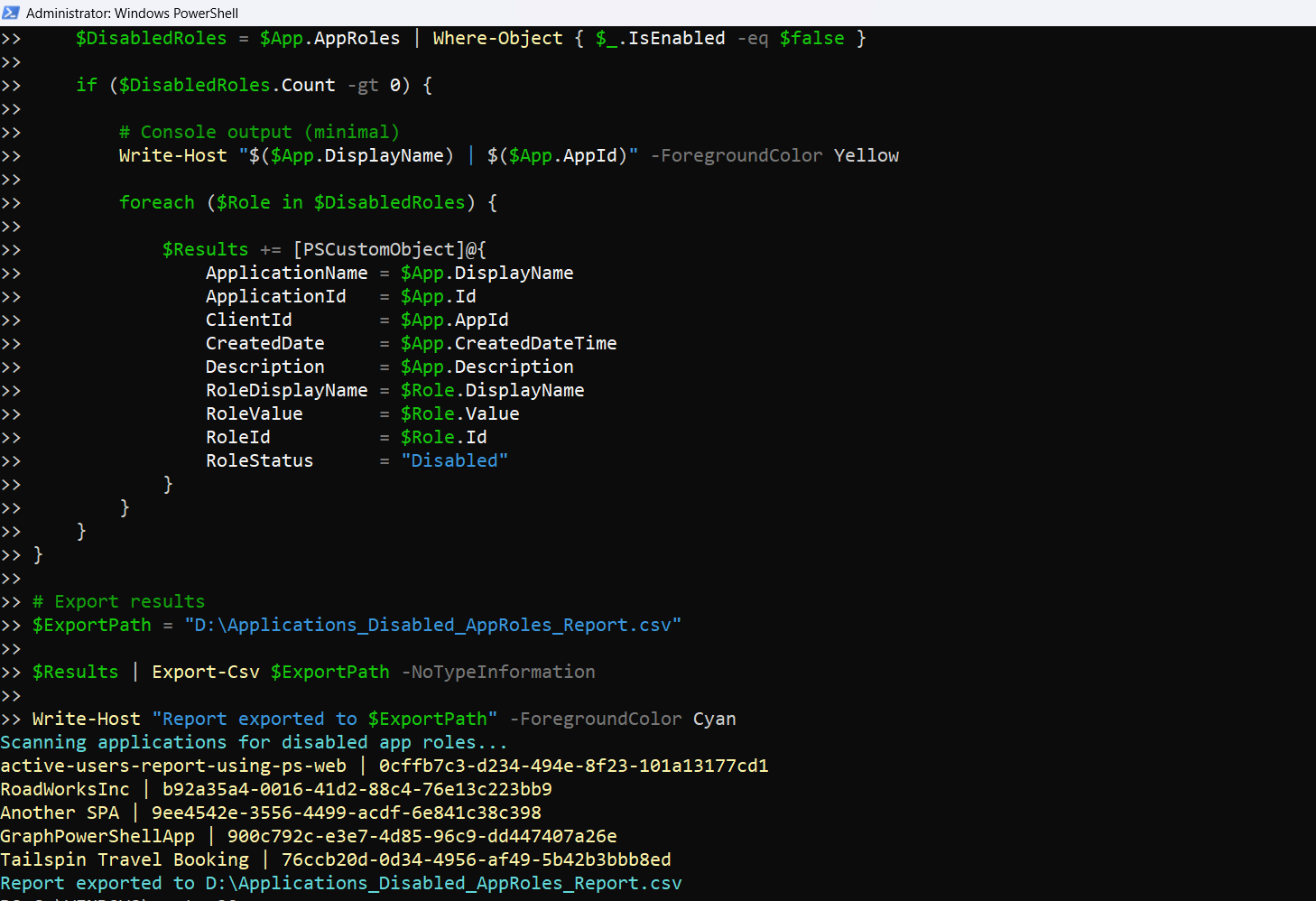
Write-Host "Scanning applications for disabled app roles..." -ForegroundColor Cyan

# Get applications with AppRoles
$Applications = Get-MgApplication -All -Property Id,DisplayName,AppId,CreatedDateTime,Description,AppRoles

$Results = @()

foreach ($App in $Applications) {

     if (-not $App.AppRoles) {
        continue
     }

    $DisabledRoles = $App.AppRoles | Where-Object { $_.IsEnabled -eq $false }

    if ($DisabledRoles.Count -gt 0) {

        # Console output (minimal)
        Write-Host "$($App.DisplayName) | $($App.AppId)" -ForegroundColor Yellow

        foreach ($Role in $DisabledRoles) {

            $Results += [PSCustomObject]@{
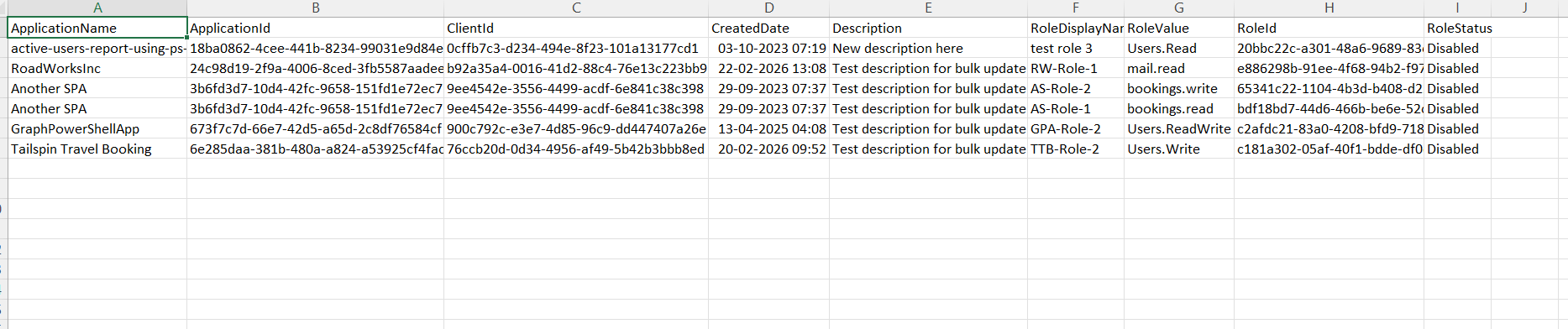
                ApplicationName = $App.DisplayName
                ApplicationId   = $App.Id
                ClientId        = $App.AppId
                CreatedDate     = $App.CreatedDateTime
                Description     = $App.Description
                RoleDisplayName = $Role.DisplayName
                RoleValue       = $Role.Value
                RoleId          = $Role.Id
                RoleStatus      = "Disabled"
        }
    }
    }
 }

# Export results
$ExportPath = "C:\Path\Applications_Disabled_AppRoles_Report.csv"

$Results | Export-Csv $ExportPath -NoTypeInformation

Write-Host "Report exported to $ExportPath" -ForegroundColor Cyan
Download this script from our M365Corner GitHub Repo: https://github.com/m365corner/M365Corner-Scripts/tree/main/Entra-Apps-Related-Scripts/List-Entra-Apps-With-Disabled-Roles
ii) How the Script Works
| Step | Explanation |
|---|---|
| Connect to Graph | Uses Application.Read.All permission to read application details |
| Fetch Applications | Retrieves all applications along with AppRoles property |
| Skip Apps Without Roles | Ignores applications that do not have any roles defined |
| Identify Disabled Roles | Filters roles where IsEnabled is set to $false |
| Console Output | Displays app name and client ID for quick visibility |
| Loop Through Disabled Roles | Processes each disabled role within the application |
| Build Report Object | Captures role details such as name, value, and ID |
| Export to CSV | Saves the report for auditing and action |
iii) Further Enhancements
Include Enabled Roles for Comparison
- Add logic to show both enabled and disabled roles for better visibility
Fetch Role Assignments
- Identify whether disabled roles are still assigned to users or apps
Add Owner Information
- Use: Get-MgApplicationOwner
- Helps track accountability
Combine with Permissions Analysis
- Identify apps with: i) Disabled roles and ii) High API permissions
Automate Cleanup Insights
- Suggest removal of unused disabled roles
iv) Frequently Asked Questions
| Question | Answer |
|---|---|
| What are disabled app roles? | Roles defined in an app but marked as inactive (IsEnabled = false) |
| Do disabled roles affect access? | No, these are roles that cannot be assigned or used |
| Why keep disabled roles? | For backward compatibility or future use |
| Can disabled roles be re-enabled? | Yes, by updating the app configuration |
v) Admin Usecases
| Use Case | Description |
|---|---|
| Governance Audits | Identify unused or deprecated roles |
| Security Review | Ensure no inactive roles pose hidden risks |
| App Cleanup | Remove unnecessary disabled roles |
| Compliance Checks | Maintain proper role lifecycle management |
| Development Oversight | Track role changes across applications |
vi) Possible Errors & Solutions
| Error | Cause | Solution |
|---|---|---|
| Insufficient privileges | Missing Graph permissions |
Use: Connect-MgGraph -Scopes Application.Read.All Grant admin consent if required. |
| No results returned | No applications have disabled roles |
Validate environment Confirm disabled roles exist in applications |
| AppRoles property missing | Property not included in query | Ensure: -Property AppRoles is included (already handled in script) . |
| Export path not found | Invalid directory |
Update path: C:\Path\Applications_Without_AppRoles_Report.csv Ensure folder exists. |
vii) Conclusion
This script provides valuable insights into disabled app roles across Entra ID applications, helping administrators:
- Identify unused or deprecated roles
- Maintain clean and secure app configurations
- Strengthen governance practices
Regular monitoring of disabled roles ensures that your application environment remains structured, secure, and compliant.