List Custom Entra Apps Using PowerShell
In Microsoft Entra ID, applications can broadly be categorized into:
- Template-based applications (pre-configured SaaS integrations)
- Custom applications (manually created or registered by developers/admins)
While template-based apps are standardized, custom applications often require closer monitoring since they may include: i) Custom permissions, ii) API integrations, iii) Internal business logic and iv) App registrations used in automation. Identifying these custom applications is critical for security audits, governance, and lifecycle management.
Using Microsoft Graph PowerShell, administrators can easily list all custom (non-template) Entra applications by excluding those entra apps populated with an ApplicationTemplateId field.
🚀 Community Edition Released!
Try the M365Corner Microsoft 365 Reporting Tool — your DIY pack with 20+ out-of-the-box M365 reports for Users, Groups, and Teams.
The Script
# Connect to Microsoft Graph
Connect-MgGraph -Scopes Application.Read.All

Write-Host "Scanning for custom (non-template) Entra ID applications..." -ForegroundColor Cyan

# Get applications with template property
$Applications = Get-MgApplication -All -Property Id,DisplayName,AppId,CreatedDateTime,Description,ApplicationTemplateId

$Results = @()

foreach ($App in $Applications) {

    # Identify non-template apps
    if (-not $App.ApplicationTemplateId) {

        # Console output (minimal)
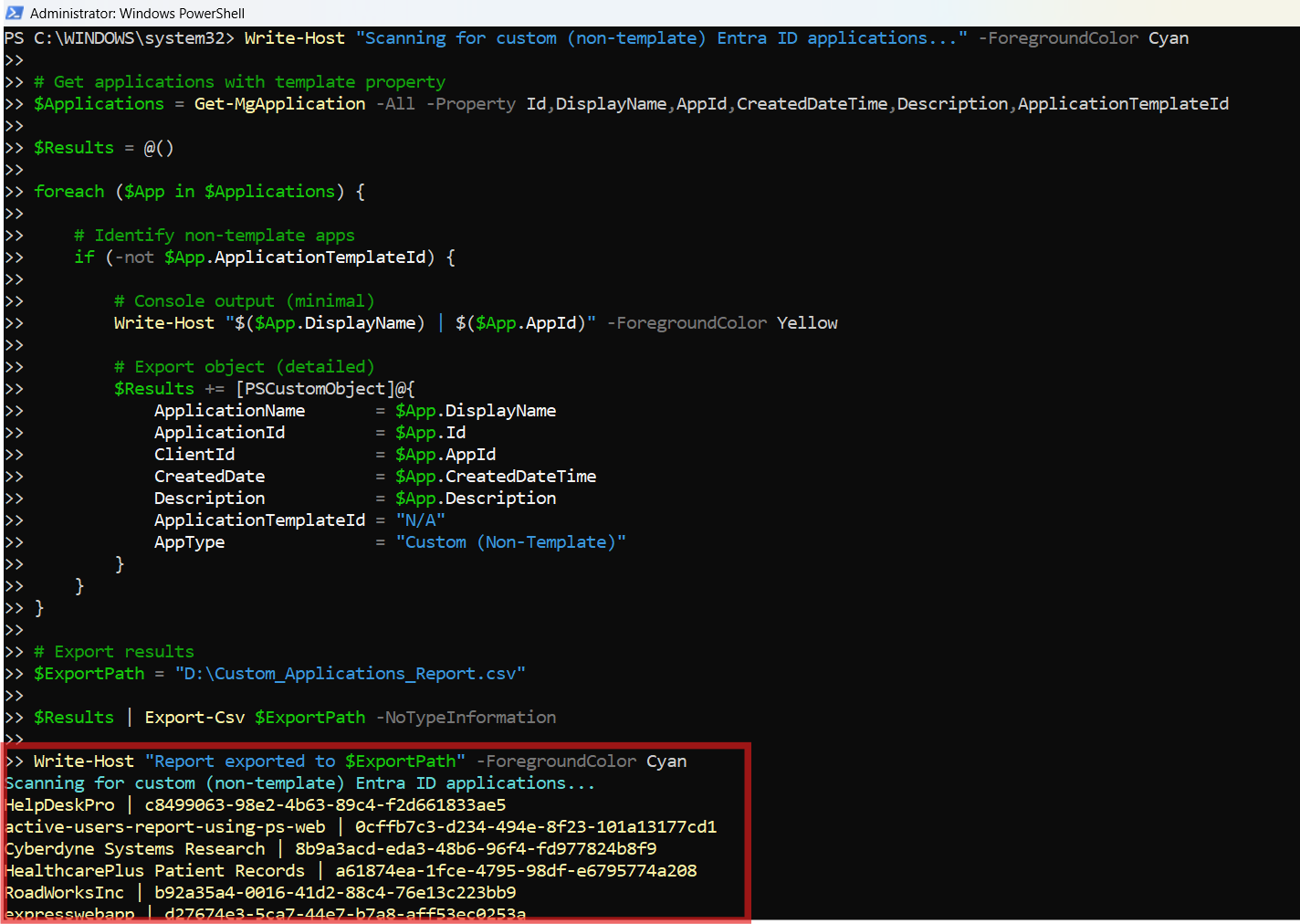
        Write-Host "$($App.DisplayName) | $($App.AppId)" -ForegroundColor Yellow

        # Export object (detailed)
        $Results += [PSCustomObject]@{
            ApplicationName       = $App.DisplayName
            ApplicationId         = $App.Id
            ClientId              = $App.AppId
            CreatedDate           = $App.CreatedDateTime
            Description           = $App.Description
            ApplicationTemplateId = "N/A"
            AppType               = "Custom (Non-Template)"
        }
    }
}

# Export results
$ExportPath = "C:\Path\Custom_Applications_Report.csv"

$Results | Export-Csv $ExportPath -NoTypeInformation

Write-Host "Report exported to $ExportPath" -ForegroundColor Cyan
Download this script from our M365Corner GitHub Repo: https://github.com/m365corner/M365Corner-Scripts/tree/main/Entra-Apps-Related-Scripts/List-Custom-Entra-Apps
How the Script Works
| Step | Description |
|---|---|
| Connect to Graph | Uses Connect-MgGraph -Scopes Application.Read.All to authenticate and gain read access to Entra applications |
| Retrieve Applications | Fetches all applications using Get-MgApplication -All along with required properties |
| Identify Custom Apps | Filters applications where ApplicationTemplateId is not present |
| Console Output | Displays application name and client ID for quick visibility |
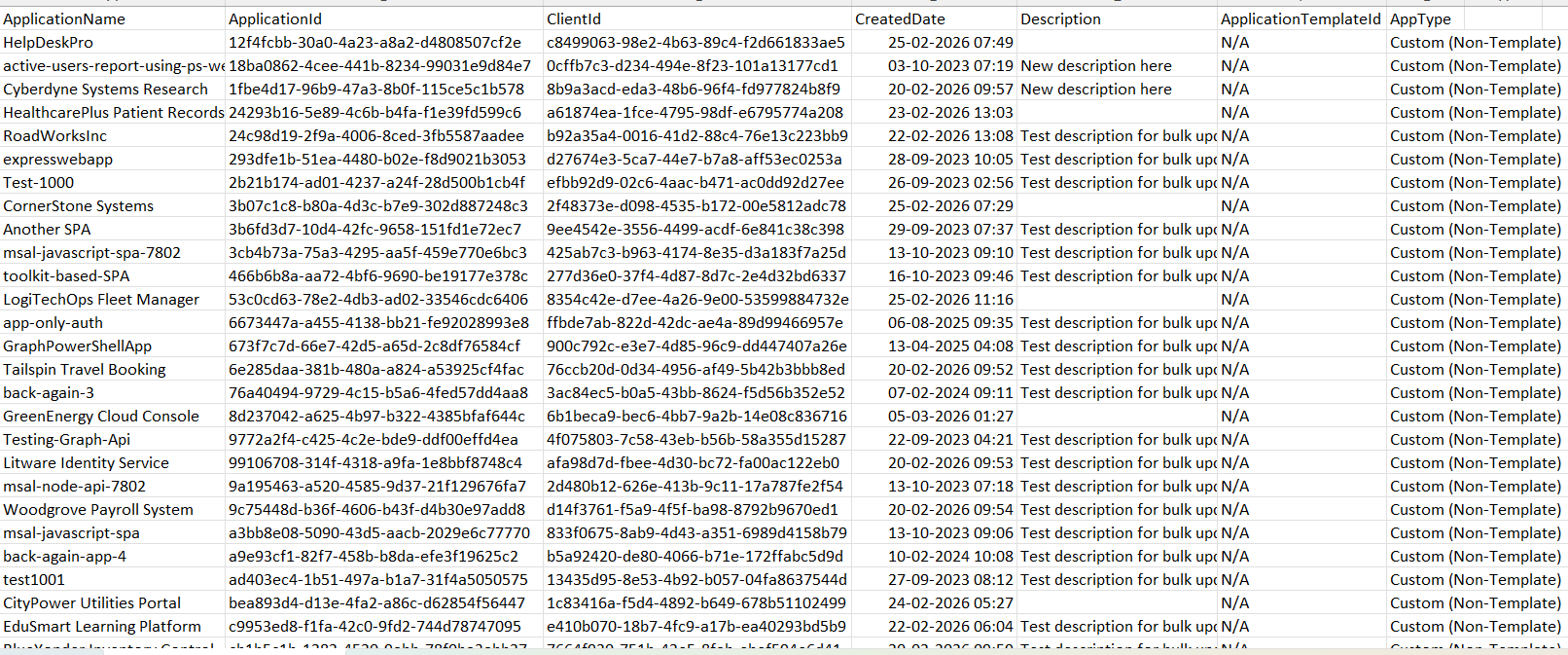
| Build Report | Creates a structured object with application metadata |
| Export Data | Exports results into a CSV file for reporting and auditing |
Further Enhancements
| Enhancement | Description |
|---|---|
| Include Owner Details | Fetch owners using Get-MgApplicationOwner for accountability tracking |
| Add Permission Details | Include API permissions assigned to each app |
| Filter by Creation Date | Identify recently created custom apps for monitoring |
| Add SignInAudience | Determine whether apps are single-tenant or multi-tenant |
| Schedule Reporting | Automate script execution for periodic governance audits |
Frequently Asked Questions
| Question | Answer |
|---|---|
| What is a custom Entra app? | An application created manually (not from a template) in Entra ID |
| How does the script identify custom entra apps? | By checking if ApplicationTemplateId is missing or empty. |
| Are all entra app registrations custom apps? | Most app registrations are custom unless created from templates |
| Why exclude entra template apps? | Template apps are standardized and less likely to require deep inspection |
| Can this script detect entra enterprise apps? | Yes, if they do not have a template ID |
Admin Usecases
| Use Case | Description |
|---|---|
| Security Audits | Identify custom apps with elevated permissions |
| Governance | Maintain visibility over internally developed applications |
| Compliance Reviews | Ensure all custom apps follow organizational policies |
| Cleanup Activity | Detect unused or outdated custom applications |
| API Monitoring | Track applications interacting with Microsoft Graph APIs |
Possible Errors & Solutions
| Error | Cause | Solution |
|---|---|---|
| Insufficient privileges | Missing Graph permissions | Use Application.Read.All and ensure admin consent |
| Cmdlet not recognized | Graph module not installed | Run Install-Module Microsoft.Graph |
| Empty results | No custom apps present | Verify tenant has app registrations |
| Access token expired | Session timeout | Reconnect using Connect-MgGraph |
| Invalid export path | Folder does not exist | Update path to a valid directory |
Conclusion
Custom Entra applications form the backbone of many internal and external integrations within an organization. However, these applications also introduce potential risks if not properly monitored.
This Microsoft Graph PowerShell script provides a straightforward way to identify, list, and export all custom (non-template) Entra applications, helping administrators gain better visibility into their environment.