Identify Admin Users Without MFA Enabled Using Graph PowerShell
Multi-Factor Authentication (MFA) remains the strongest baseline security control for protecting privileged accounts in Microsoft 365. Admin accounts without MFA pose a significant security risk and are considered one of the top identity vulnerabilities in any organization.
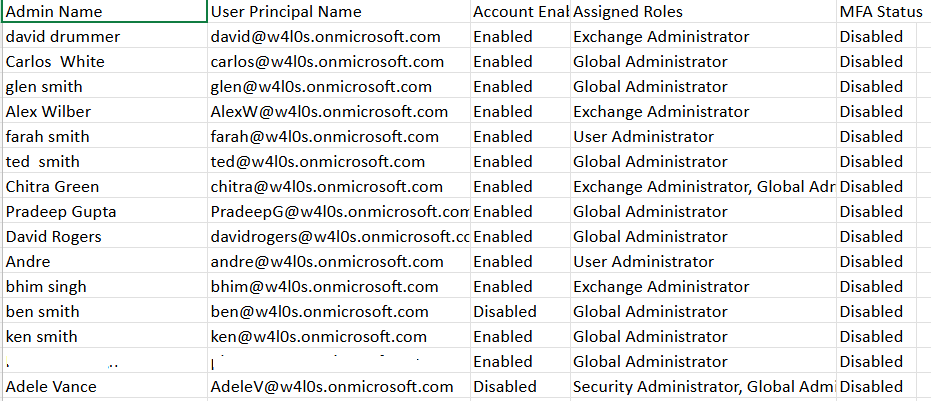
This Graph PowerShell script identifies only those admin accounts that do not have MFA enabled, compiles their assigned roles, and emails the complete report to the administrator for immediate attention.
🚀 Community Edition Released!
Try the M365Corner Microsoft 365 Reporting Tool — your DIY pack with 20+ out-of-the-box M365 reports for Users, Groups, and Teams.
i) The Script
$AdminUPN = "admin@yourtenant.onmicrosoft.com"
Connect-MgGraph -Scopes "Directory.Read.All","User.Read.All","Mail.Send"
$Roles = Get-MgDirectoryRole -All
$AdminsWithoutMFA = @{}

foreach ($role in $Roles) {
    try {
        $Members = Get-MgDirectoryRoleMember -DirectoryRoleId $role.Id -All
    } catch {
        continue
    }

    foreach ($member in $Members) {

        if ($member.AdditionalProperties.'@odata.type' -ne "#microsoft.graph.user") { continue }

        $UserId = $member.Id

        if (-not $AdminsWithoutMFA.ContainsKey($UserId)) {
            try {
                $User = Get-MgUser -UserId $UserId -Property DisplayName,UserPrincipalName,AccountEnabled
            } catch {
                continue
            }

            try {
                $AuthMethods = Get-MgUserAuthenticationMethod -UserId $UserId
            } catch {
                continue
            }

            $MFAEnabled = $false

            foreach ($method in $AuthMethods) {
                switch ($method.AdditionalProperties.'@odata.type') {
                   "#microsoft.graph.microsoftAuthenticatorAuthenticationMethod" { $MFAEnabled = $true }
                   "#microsoft.graph.fido2AuthenticationMethod"                   { $MFAEnabled = $true }
                   "#microsoft.graph.phoneAuthenticationMethod"                  { $MFAEnabled = $true }
                   "#microsoft.graph.windowsHelloForBusinessAuthenticationMethod" { $MFAEnabled = $true }
                   "#microsoft.graph.temporaryAccessPassAuthenticationMethod"    { $MFAEnabled = $true }
                }
            }

            if (-not $MFAEnabled) {
                $AdminsWithoutMFA[$UserId] = @{
                    DisplayName         = $User.DisplayName
                    UserPrincipalName   = $User.UserPrincipalName
                    AccountEnabled      = $User.AccountEnabled
                    AdminRoles          = @($role.DisplayName)
                }
            }

        } else {
            $AdminsWithoutMFA[$UserId].AdminRoles += $role.DisplayName
        }
    }
}

$Report = $AdminsWithoutMFA.Values | ForEach-Object {
    [PSCustomObject]@{
        "Admin Name"         = $_.DisplayName
        "User Principal Name"= $_.UserPrincipalName
        "Account Enabled"    = if ($_.AccountEnabled) { "Enabled" } else { "Disabled" }
        "Assigned Roles"     = ($_.AdminRoles -join ", ")
        "MFA Status"         = "Disabled"
    }
}

$ReportPath = "$env:TEMP\Admins_Without_MFA.csv"
$Report | Export-Csv -Path $ReportPath -NoTypeInformation -Encoding UTF8

$Count = @($Report).Count
$Subject = "Admins Without MFA Enabled — $(Get-Date -Format 'yyyy-MM-dd')"

$Body = @"
Hello Admin,<br><br>
Attached is the latest <b>Admins Without MFA Enabled</b> report.<br>
Total Admin Accounts With MFA Disabled: <b>$Count</b><br><br>
It is strongly recommended to enforce MFA for these accounts.<br><br>
Regards,<br>
Graph PowerShell Script
"@

$AttachmentContent = [System.Convert]::ToBase64String([System.IO.File]::ReadAllBytes($ReportPath))

$Attachments = @(
    @{
        "@odata.type" = "#microsoft.graph.fileAttachment"
        Name          = [System.IO.Path]::GetFileName($ReportPath)
        ContentBytes  = $AttachmentContent
    }
)

$Message = @{
    Message = @{
        Subject = $Subject
        Body = @{
            ContentType = "HTML"
            Content     = $Body
        }
        ToRecipients = @(
            @{ EmailAddress = @{ Address = $AdminUPN } }
        )
        Attachments = $Attachments
    }
    SaveToSentItems = "true"
}

Send-MgUserMail -UserId $AdminUPN -BodyParameter $Message
Write-Host "Admins without MFA report emailed successfully to $AdminUPN" -ForegroundColor Green
ii) How the Script Works
- Connects to Microsoft Graph
- Directory.Read.All – to read roles and user accounts
- User.Read.All – to retrieve each user’s directory properties
- Mail.Send – to email the final report
- Retrieves All Activated Directory Roles
- Identifies Actual User Objects
- Users
- Groups
- Service principals
- Determines Whether MFA Is Enabled
- Authenticator App
- Phone (SMS/Voice)
- FIDO2 keys
- Temporary Access Pass
- Windows Hello for Business
- Builds a Final MFA-Disabled Admin Report
- Admin Name
- User Principal Name
- Account enabled/disabled
- All assigned admin roles
- MFA Status (always “Disabled”)
- Generates and Emails a CSV Report
- Exports the collected data to a CSV
- Creates a Base64-encoded file attachment
- Sends the email using Send-MgUserMail
- Saves the message in Sent Items
The script authenticates with delegated Graph scopes:
These permissions must be granted with admin consent.
The script pulls all active directory roles (e.g., Global Admin, SharePoint Admin, Teams Admin, Exchange Admin).
Each role is then processed individually.
Members of directory roles may include:
The script processes only user objects by checking their @odata.type.
The script calls:
Get-MgUserAuthenticationMethod
This returns each authentication method registered for the user, such as:
The script marks MFA as enabled if any supported MFA-capable method exists. Otherwise → MFA Disabled.
Only users with zero MFA authentication methods are collected.
For each admin, the report includes:
The script:
This ensures consistent reporting and easy compliance checks.
iii) Further Enhancements
Here are enhancements administrators frequently implement:
- Include User Last Sign-In Activity
- Notify Administrators via Teams Webhook
- Upload the CSV to SharePoint
- Highlight Disabled Admin Accounts Separately
- Trigger Conditional Access Enforcement
Add SignInActivity fields to see whether the admin actually logs in.
Send a Teams notification whenever MFA-disabled accounts are found.
Store historical MFA audit logs automatically.
Identify accounts that are disabled but still assigned administrator roles.
Integrate with CA policies for remediation workflows.
iv) Possible Errors & Solutions
| Error | Cause | Solution |
| 403 Forbidden – accessDenied | Insufficient privileges to read authentication methods. |
Sign in as:
UserAuthenticationMethod.Read.All has admin consent. |
| User Has No Authentication Methods but Still Appears Enabled | Some organizations use legacy MFA methods not represented in authentication methods. | Switch to fully modern MFA registration. |
| Email Sending Fails | AdminUPN mailbox does not exist or is unlicensed. | Use a mailbox-enabled account for sending email. |
| Script Returns Empty Report |
All admins have MFA enabled No activated directory roles Graph throttling |
Validate MFA registration or retry after throttling cooldown. |
v) Conclusion
This script delivers a high-impact security audit by identifying administrator accounts without MFA enabled—one of the biggest security gaps in Microsoft 365 environments. Automating this report ensures ongoing visibility and proactively reduces identity risk. With email delivery baked in, administrators get timely insights without having to run manual checks, strengthening your overall security posture.