Get-MgUserSponsor — Retrieve Sponsor Details for Guest Users in Graph PowerShell
Get-MgUserSponsor is a Microsoft Graph PowerShell cmdlet used to retrieve the sponsor (inviter/owner) of a guest user in Entra ID. The cmdlet returns sponsor user IDs, which can be resolved using Get-MgUser.
Managing guest users in Microsoft 365 is already challenging — but one question comes up frequently: Who invited or sponsors this guest user? That’s where the Get-MgUserSponsor cmdlet becomes extremely useful. In Microsoft Entra ID (Azure AD), guest users can have one or more sponsors, which typically represent the internal users responsible for that guest’s access.
In this article, we’ll explore how to use Get-MgUserSponsor to retrieve sponsor information for guest accounts, both individually and in bulk.
🚀 Community Edition Released!
Try the M365Corner Microsoft 365 Reporting Tool — your DIY pack with 20+ out-of-the-box M365 reports for Users, Groups, and Teams.
Cmdlet Syntax
The basic syntax of Get-MgUserSponsor is:
Get-MgUserSponsor -UserId <String>Key Parameter
| Parameter | Description |
| -UserId | The Guest User’s Object ID or User Principal Name (UPN) |
Usage Examples
Let’s walk through the most common and practical use cases.
Example 1: Listing User Sponsor for a Single Guest User
To retrieve sponsor references for one guest account:
Get-MgUserSponsor -UserId "guestuser@domain.com"✅ Note: The returned ID must be passed to Get-MgUser to fetch sponsor details.
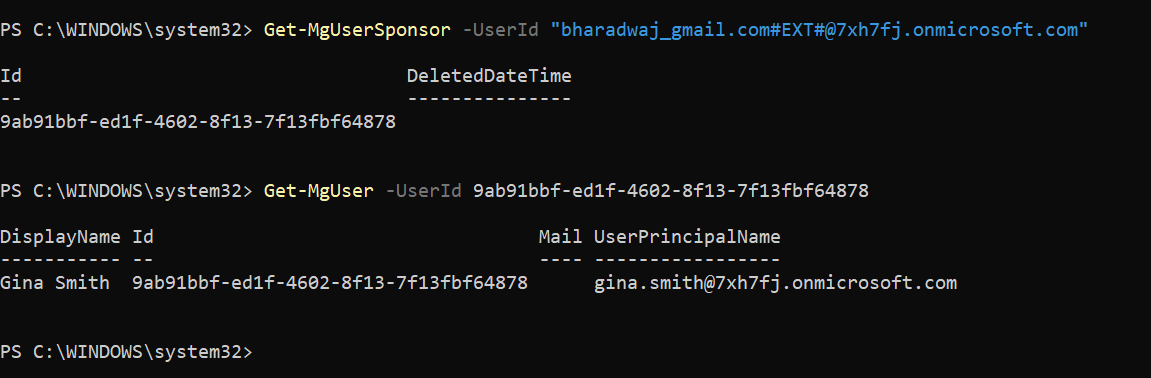
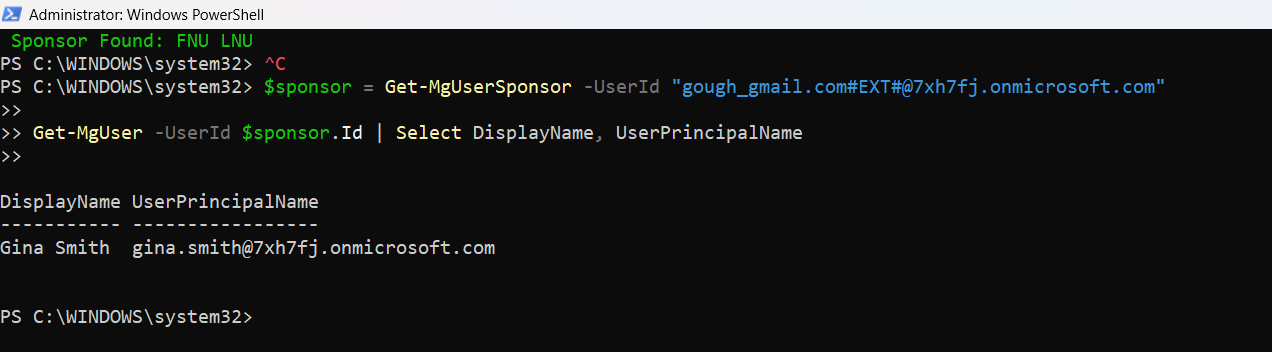
Example 2: Fetch Full Sponsor Details Using Get-MgUser
To retrieve sponsor name and email:
$sponsor = Get-MgUserSponsor -UserId "guestuser@domain.com"
Get-MgUser -UserId $sponsor.Id | Select DisplayName, UserPrincipalName
Example 3: Bulk List Sponsors for All Guest Users (Export + Console Output)
In real tenant environments, admins often need to audit all guest users and their sponsors.
The script below:
- Filters only guest accounts
- Loops through each guest
- Retrieves sponsor IDs using Get-MgUserSponsor
- Fetches sponsor details using Get-MgUser
- Outputs results on screen
- Exports results to CSV
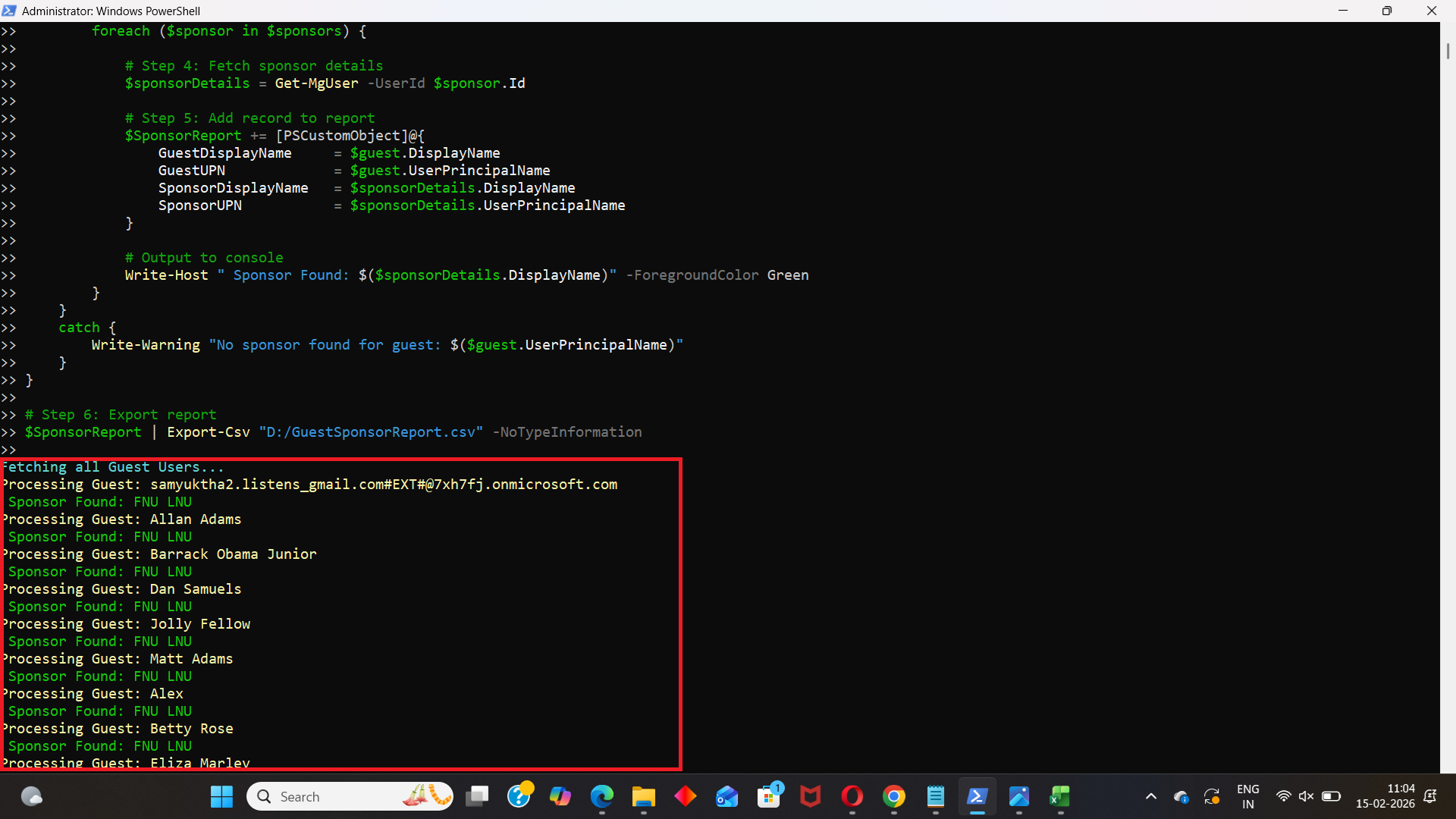
Bulk Guest Sponsor Report Script
Write-Host "Fetching all Guest Users..." -ForegroundColor Cyan

# Step 1: Get all Guest users
$ GuestUsers = Get-MgUser -Filter "userType eq 'Guest'" -All

# Store results
$SponsorReport = @()

# Step 2: Loop through each guest user
foreach ($guest in $GuestUsers) {

    Write-Host "Processing Guest: $($guest.DisplayName)" -ForegroundColor Yellow

    try {
        # Step 3: Get sponsor ID(s)
        $sponsors = Get-MgUserSponsor -UserId $guest.Id

        foreach ($sponsor in $sponsors) {

            # Step 4: Fetch sponsor details
            $sponsorDetails = Get-MgUser -UserId $sponsor.Id

            # Step 5: Add record to report
            $SponsorReport += [PSCustomObject]@{
                GuestDisplayName     = $guest.DisplayName
                GuestUPN             = $guest.UserPrincipalName
                SponsorDisplayName   = $sponsorDetails.DisplayName
                SponsorUPN           = $sponsorDetails.UserPrincipalName
            }

            # Output to console
            Write-Host " Sponsor Found: $($sponsorDetails.DisplayName)" -ForegroundColor Green
        }
    }
    catch {
        Write-Warning "No sponsor found for guest: $($guest.UserPrincipalName)"
    }
}

# Step 6: Export report
$SponsorReport | Export-Csv "GuestSponsorReport.csv" -NoTypeInformation

Write-Host "`nGuest Sponsor Report Exported Successfully!" -ForegroundColor Cyan
Write-Host "File: GuestSponsorReport.csv"
Cmdlet Tips
Tip 1: Sponsors Apply Mostly to Guest Users
This cmdlet is meaningful primarily for:
- userType = Guest
For member users, sponsors may not exist.
Tip 2: Always Use Get-MgUser After Sponsor Lookup
Since the cmdlet returns only IDs, always pair it with:
Get-MgUser -UserId <SponserId>
Tip 3: Use CSV Export for Governance Audits
Sponsor reports are often requested during:
- Security reviews
- Guest access recertification
- External collaboration audits
Tip 4: Ensure Correct Graph Permissions
You typically need:
- User.Read.All
- Directory.Read.All
Admin consent is required in most environments.
Frequently Asked Questions
- What does Get-MgUserSponsor do?
It retrieves sponsor references for guest users in Microsoft Entra ID. - Does Get-MgUserSponsor return sponsor names directly?
No, it returns sponsor user IDs which must be resolved using Get-MgUser. - Can I generate a tenant-wide guest sponsor report?
Yes, by looping through guest users and exporting results to CSV.
Possible Errors and Solutions
Let’s cover common issues admins face.
| Error | Cause | Solution |
| Insufficient privileges to complete the operation | Your account/app lacks required Graph permissions. | Connect with proper scopes: Connect-MgGraph -Scopes "User.Read.All","Directory.Read.All" |
| Resource Not Found | Request_ResourceNotFound | The UserId is invalid or the guest user no longer exists. Verify the guest user: Get-MgUser -UserId guestuser@domain.com |
| No Sponsor Returned | Not all guest accounts have sponsors assigned. | Handle missing sponsors gracefully using try/catch, as shown in the bulk script. |
| Multiple Sponsors Returned | Some guests may have more than one sponsor. | Always loop through sponsor results: foreach ($sponsor in $sponsors) { ... } |
Conclusion
The Get-MgUserSponsor cmdlet is a powerful tool for administrators managing external collaboration in Microsoft 365.
With it, you can:
- Identify internal owners of guest accounts
- Perform sponsor-based governance audits
- Generate tenant-wide guest sponsor reports
- Improve accountability and security posture
If your organization relies heavily on guest access, sponsor reporting should be part of your regular Entra ID audit process.