Get-MgServicePrincipalOwner —
Graph PowerShell Guide for Entra App Owners
In Microsoft Entra ID (Azure AD), every enterprise app has a service principal. And just like app registrations, service principals should have clear ownership. Owners are the people (or other service principals) who are allowed to manage the object. Microsoft also recommends keeping at least two owners for proper governance.
That’s where Get-MgServicePrincipalOwner helps. It lets you quickly list the owners of a service principal so you can:
- identify accountable admins
- fix orphaned enterprise apps
- support audits and security reviews
🚀 Community Edition Released!
Try the M365Corner Microsoft 365 Reporting Tool — your DIY pack with 20+ out-of-the-box M365 reports for Users, Groups, and Teams.
i) Cmdlet Syntax
Module: Microsoft.Graph.Applications
List owners (default)
Get-MgServicePrincipalOwner
-ServicePrincipalId <String>
[-ExpandProperty <String[]>]
[-Property <String[]>]
[-All]
Notes on parameters
- -ServicePrincipalId: Object ID of the service principal (not AppId).
- -ExpandProperty: Expands related objects (useful when you want richer output).
- -Property: Pull only specific fields to speed up results.
- -All: Retrieves all pages (recommended for tenants with many owners).
Required Permissions
To read service principal owners, you need one of the following Graph permissions. These are the same permission families used for service principal read operations.
Delegated:
- Application.Read.All
- Directory.Read.All
- Application.ReadWrite.All
- Directory.ReadWrite.All
Application (app-only):
- Application.Read.All
- Directory.Read.All
- Application.ReadWrite.All
- Directory.ReadWrite.All
- Application.ReadWrite.OwnedBy (in some app-ownership scenarios)
Connect example:
Connect-MgGraph -Scopes "Application.Read.All","Directory.Read.All"ii) Usage Examples
Example 1: Get owners (pass ServicePrincipalId when prompted)
Get-MgServicePrincipalOwner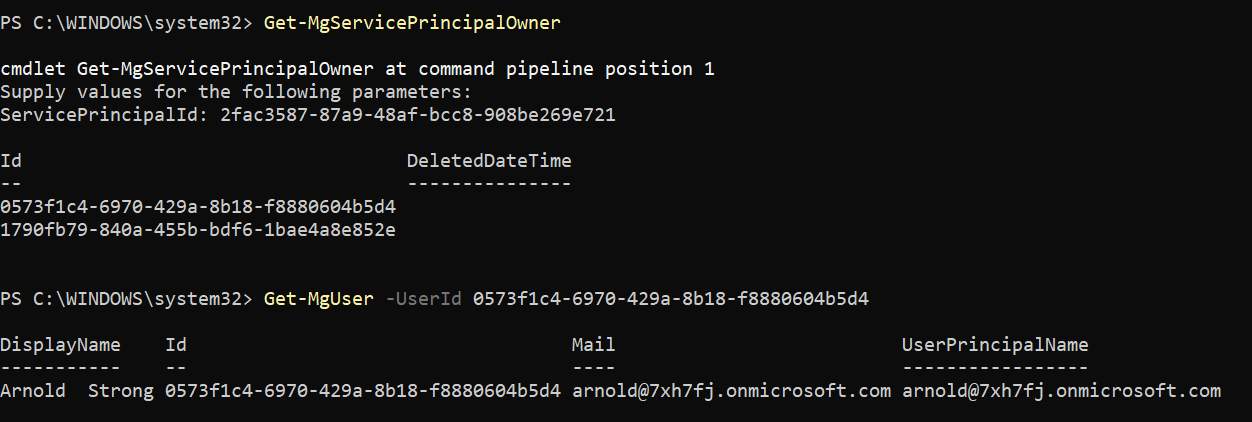
What this does:
Prompts you for the ServicePrincipalId, then returns the owners of that service principal.
Example 2: Get owners by passing ServicePrincipalId directly
Get-MgServicePrincipalOwner -ServicePrincipalId <serviceprincipalid>What this does:
Retrieves owners of the specified service principal. Here you directly pass the -ServicePrincipalId without being prompted by the console.
Example 3: Export service principal owners to CSV
Get-MgServicePrincipalOwner -ServicePrincipalId <serviceprincipalid> | export-csv d:/serviceprincipalowners.csvWhat this does:
Exports the owners list to CSV for governance reviews or audit evidence.
iii) Cmdlet Tips
- Make sure you’re using the right module
- Always pass the Service Principal Object Id
- Use -All to avoid paging issues
- Owners can be users or service principals
So don’t be surprised if the output includes non-user objects. - Pair with Add/Remove owner cmdlets for governance
- Add owner: New-MgServicePrincipalOwnerByRef
- Remove owner: Remove-MgServicePrincipalOwnerByRef
Install-Module Microsoft.Graph.Applications -Scope CurrentUser
Import-Module Microsoft.Graph.Applications
The cmdlet lives in Microsoft.Graph.Applications.
ServicePrincipalId ≠ AppId
If you only have AppId, resolve it first:
$sp = Get-MgServicePrincipalByAppId -AppId ""
Get-MgServicePrincipalOwner -ServicePrincipalId $sp.Id
Note: you can get both app id and service principal id using Get-MgServicePrincipal cmdlet.
Get-MgServicePrincipalOwner -ServicePrincipalId <id> -AllGraph returns paged results by default.
iv) Use Cases
Here’s where admins typically use this cmdlet:
- Enterprise App Ownership Audits
Quickly list owners of all high-risk apps to confirm accountability. - Find Orphaned Service Principals
If an app has no owners, raise it as a governance risk. - Incident Investigations
When an app suddenly gets new permissions or behaves oddly, owners are your first contact. - Automation & Reporting
IdenSchedule a periodic export to keep ownership reviews clean.
v) Possible Errors and Solutions
| Error | Cause | Solution |
|---|---|---|
| The term Get-MgServicePrincipalOwner is not recognized…” | Module missing or not imported. | Install-Module Microsoft.Graph.Applications Import-Module Microsoft.Graph.Applications |
| Insufficient privileges to complete the operation | Missing Graph scopes / admin consent | Connect-MgGraph -Scopes "Application.Read.All","Directory.Read.All" If app-only, ensure those permissions are granted and admin-consented. |
| Resource not found” / empty owners list | Wrong ID (AppId passed instead of ServicePrincipal ObjectId) Service principal really has no owners |
|
vi) Conclusion
Get-MgServicePrincipalOwner is a simple but powerful governance cmdlet. It helps you quickly identify who owns an enterprise app (service principal), which is vital for:
- security accountability
- PIM / access reviews
- audit readiness
- cleaning up orphaned apps
In large tenants, combine it with -All and ensure you pass the ServicePrincipal ObjectId for accurate output.