Get-MgServicePrincipal Cmdlet: A Comprehensive Guide
The Get-MgServicePrincipal cmdlet is a Microsoft Graph PowerShell command used to retrieve service principal objects in Azure Active Directory (Azure AD). Service principals are application identities used to authenticate and access resources securely.
What is a Service Principal in Azure AD?
A service principal is an identity in Azure Active Directory (Azure AD) that applications or services use to authenticate and securely access resources.
- Application Identity in Azure AD:
- When you register an application in Azure AD, it creates an application object, a global definition of the app.
- A service principal is the local instance of that application in a specific tenant, defining what the app can do in that tenant.
- Purpose of a Service Principal:
- It provides a secure way for an app or service to authenticate and access resources without user involvement.
- Applications use service principals to perform actions programmatically instead of relying on user accounts.
- Credentials and Roles:
- A service principal can have credentials like password secrets or certificates for authentication.
- Permissions and roles assigned to a service principal define what resources it can access and what actions it can perform.
Analogy to Understand:
Think of an application object as a blueprint or a universal template for an app. A service principal is like an actual instance of that app, specific to a tenant, that interacts with resources using assigned permissions and credentials.
Example in Action:
- You register an app in Azure AD to interact with Microsoft Graph API.
- The app is given a service principal in your tenant.
- The service principal is assigned permissions (e.g., read user profiles).
- The app uses its service principal's credentials (password or certificate) to authenticate and call APIs securely.
Cmdlet Syntax
Get-MgServicePrincipal [-Filter <String>] [-ConsistencyLevel <String>] [-Search <String>] Parameters
- -Filter: Applies an OData filter to retrieve specific service principals based on attributes.
- -ConsistencyLevel: Specifies the level of consistency for the query, typically set to eventual for large datasets.
- -Search: Enables search functionality, commonly for text-based queries.
- -CountVariable: Stores the total count of service principals matching the query.
Usage Examples
Example 1: Retrieve All Service Principals
Get-MgServicePrincipalThis command lists all service principal objects in the directory.
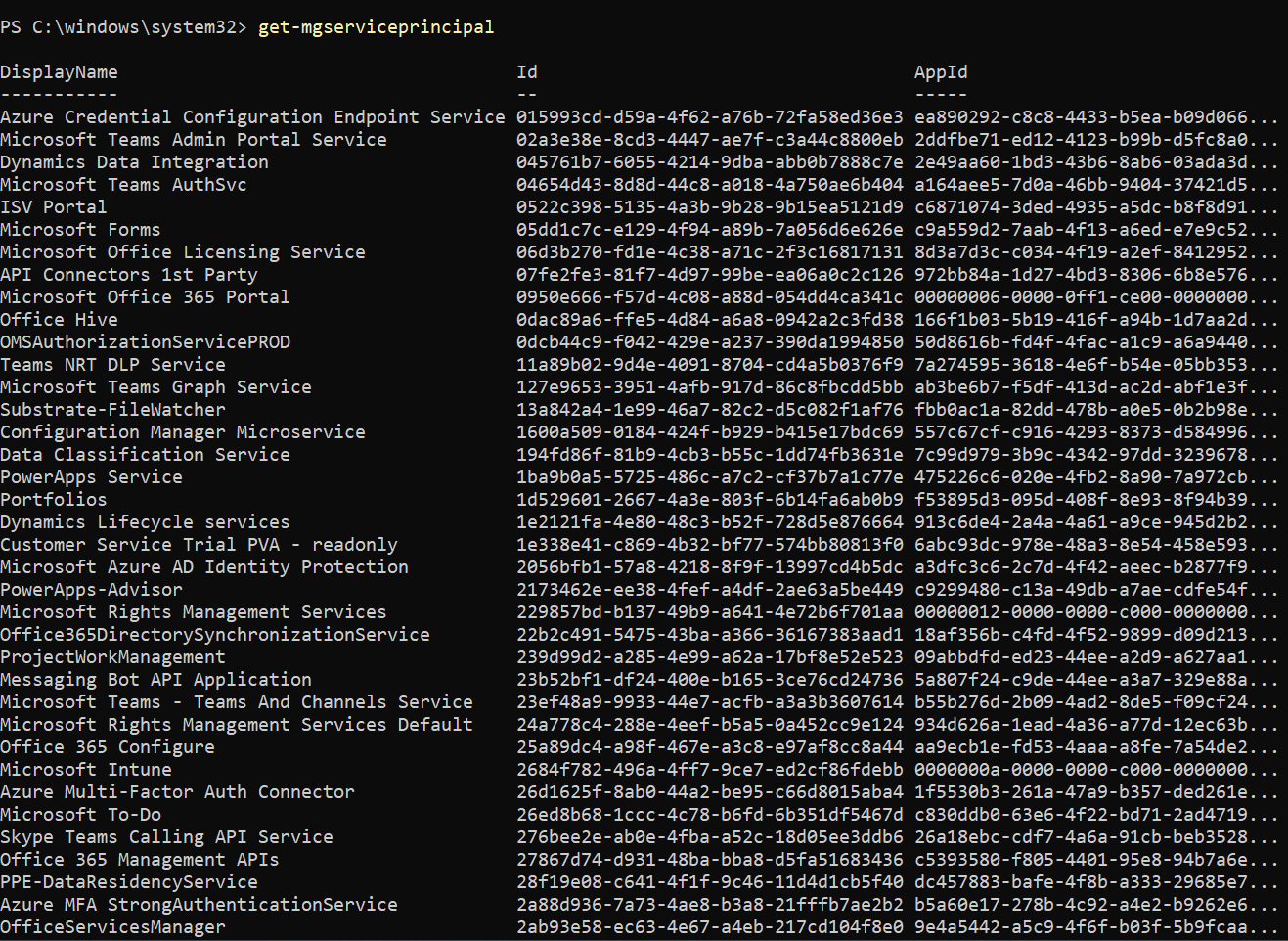
Example 2: Filter by Display Name
Get-MgServicePrincipal -Filter "DisplayName eq 'Power BI Service'" | Format-List Id, DisplayName, AppId, SignInAudienceThis command retrieves service principals matching the display name "Power BI Service" and outputs selected properties.

Example 3: Search for Service Principals and Count Results
Get-MgServicePrincipal -ConsistencyLevel eventual -Count spCount -Search '"DisplayName:Team"This command performs a search and retrieves service principals with "Team" in their display name, storing the count in the variable $spCount.

Example 4: Get Disabled (Unused/Risky) Service Principals
Get-MgServicePrincipal -Filter "accountEnabled eq false" `
    | Select-Object Id, DisplayName, AppId, AccountEnabled
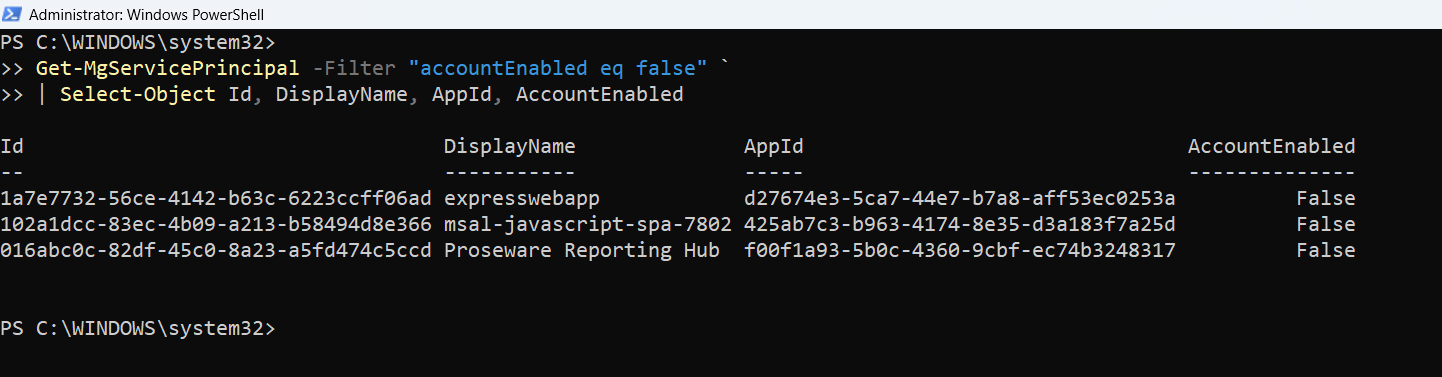
Example 5: Get Service Principals with App Roles
$sp = Get-MgServicePrincipal -Filter "DisplayName eq 'Microsoft Graph'"
$sp.AppRoles | Select-Object Id, Value, DisplayName
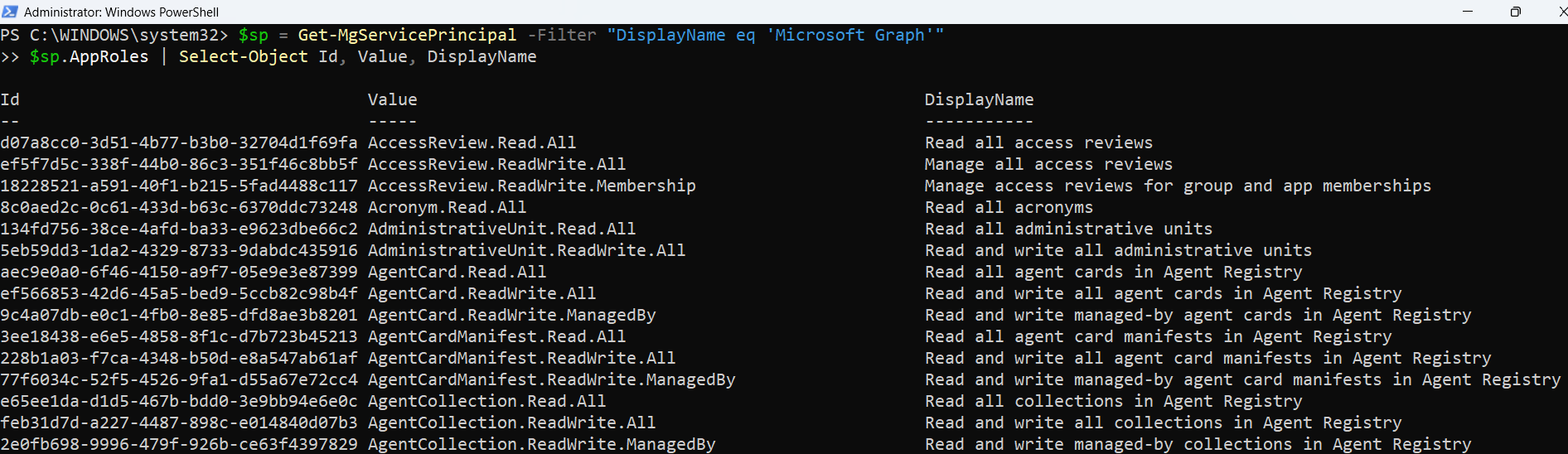
Example 6: Exporting the Results
Get-MgServicePrincipal -All `
    | Select DisplayName, AppId, PublisherName, AccountEnabled `
    | Export-Csv "ServicePrincipalReport.csv" -NoTypeInformation
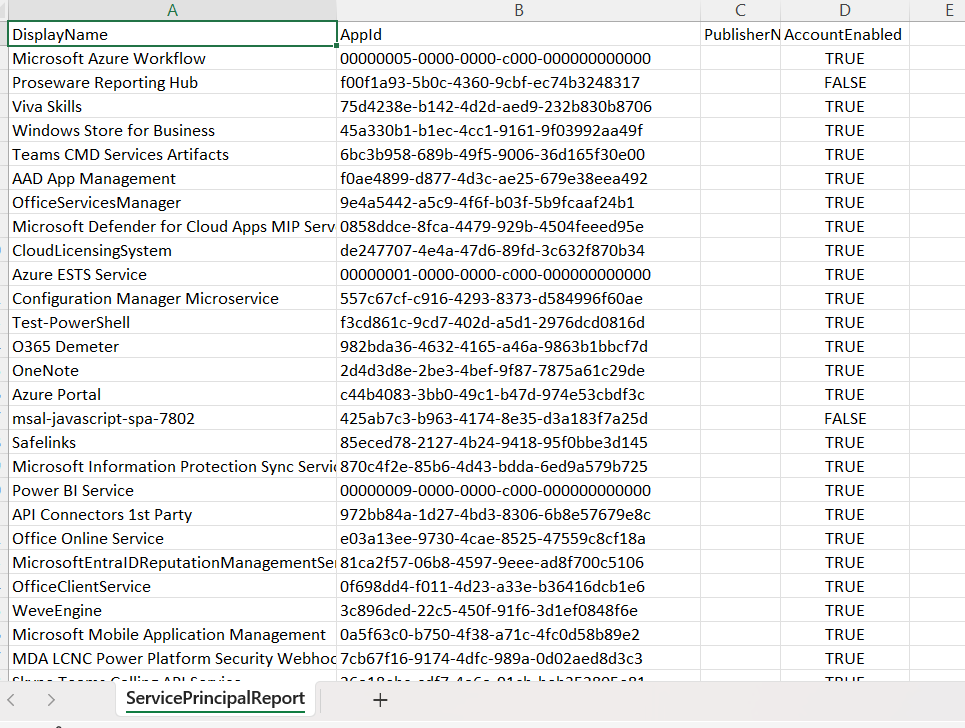
Cmdlet Tips
- Optimize Filtering: Use the -Filter parameter with specific attributes to narrow down results, reducing query time.
- Enable Count: The -ConsistencyLevel eventual parameter is required when using the -Count functionality.
- Handle Large Datasets: When querying large directories, pair -ConsistencyLevel with -Search to efficiently retrieve and count results.
- Understand Permissions: Ensure the connected account has sufficient permissions, such as Directory.Read.All.
- Use Select-Object: Utilize Select-Object or Format-List to display specific attributes for better readability.
Use Cases
- Application Inventory: Retrieve all service principals to audit and manage applications in Azure AD.
- Search Specific Apps: Identify service principals related to a particular application, like Power BI or Microsoft Teams.
- Count Service Principals: Determine the number of service principals matching a specific criterion, useful for reporting.
- Troubleshooting Access Issues: Find and inspect service principals to resolve access or authentication problems.
Possible Errors and Solutions
| Error | Cause | Solution |
| Invalid filter clause | The syntax of the -Filter parameter is incorrect. | Ensure the filter is written in valid OData syntax. For example, use "DisplayName eq 'AppName'". |
| Insufficient privileges to complete the operation | The account used does not have the required permissions. | Assign the Directory.Read.All permission and re-authenticate using Connect-MgGraph. |
| Cannot process argument transformation on parameter 'ConsistencyLevel' | Invalid or missing value for the -ConsistencyLevel parameter. | Use eventual as the value for -ConsistencyLevel when required. |
| Resource not found | The specified service principal does not exist. | Verify the provided filter or search query to ensure it matches an existing service principal. |
Frequently Asked Questions
- What is the difference between an Application and a Service Principal in Microsoft Entra ID?
- Can I retrieve a Service Principal using the app's client ID?
- Why does Get-MgServicePrincipal return multiple results with similar names?
- Can I use Get-MgServicePrincipal to identify Microsoft Graph or other built-in service principals?
- What does the Get-MgServicePrincipal cmdlet do?
- What permissions are required to run Get-MgServicePrincipal?
- Application.Read.All
- Directory.Read.All
- Why is Get-MgServicePrincipal not returning all results?
An Application is the global definition (template) of the app, while a Service Principal is the identity created in your tenant that represents the app and its permissions. Get-MgServicePrincipal helps you interact with this identity.
Yes, use the -Filter parameter like this:
Get-MgServicePrincipal -Filter "appId eq 'your-client-id'"
It's possible that the same app was registered in different ways or exists across multiple tenants (especially for multitenant apps). You can refine results using -Filter or -Search parameters.
Absolutely. Use filters like displayName eq 'Microsoft Graph' or search by known App IDs to identify well-known Microsoft services.
The Get-MgServicePrincipal cmdlet retrieves service principal objects from Microsoft Entra ID (Azure AD). These objects represent applications, services, or APIs that have access to your tenant. Administrators commonly use this cmdlet to audit enterprise applications, review permissions, and manage access control.
To use Get-MgServicePrincipal, you need appropriate Microsoft Graph permissions such as:
Without these permissions, the cmdlet may return incomplete results or fail with authorization errors.
By default, the cmdlet may return limited results. To retrieve all service principals, use the -All parameter:
Get-MgServicePrincipal -AllEven though some service principals are created with default permissions, not all of them have usable or active permissions. Always verify assigned roles or delegated permissions using Get-MgServicePrincipalAppRoleAssignment or Get-MgServicePrincipalOAuth2PermissionGrant to avoid unexpected authorization issues.
When identifying a service principal by name, prefer filtering by AppDisplayName (e.g., "Microsoft Graph PowerShell") instead of DisplayName. The DisplayName value may not always match the registered application's name, especially for multi-tenant or third-party apps.
Conclusion
The Get-MgServicePrincipal cmdlet is a powerful tool for retrieving and managing service principals in Azure AD. With proper use of filtering, searching, and counting, administrators can efficiently manage application identities, audit their environment, and troubleshoot issues. By following best practices and addressing common errors, this cmdlet becomes an essential part of any Azure AD management toolkit.
If You Prefer the Graph API Way
Note: Service principals represent identities for apps or services within your directory. You can retrieve and search them using the /servicePrincipals endpoint. For $search and $count, ensure ConsistencyLevel=eventual is specified in the headers.
- Retrieve All Service Principals
- Filter by Display Name (Exact Match)
- Search for Service Principals and Count Results
$uri = "https://graph.microsoft.com/v1.0/servicePrincipals"

$response = Invoke-MgGraphRequest -Method GET -Uri $uri

if ($response.value) {
    foreach ($sp in $response.value) {
        Write-Output "Display Name : $($sp.displayName)"
        Write-Output "App ID       : $($sp.appId)"
        Write-Output "Object ID    : $($sp.id)"
        Write-Output "`n"
    }
} else {
    Write-Output "No service principals found."
}
✅ Equivalent to:
Get-MgServicePrincipal
# Replace with the target app name
$displayName = "Power BI Service"
$filter = "`$filter=displayName eq '$displayName'"

$uri = "https://graph.microsoft.com/v1.0/servicePrincipals?$filter"

$response = Invoke-MgGraphRequest -Method GET -Uri $uri

if ($response.value) {
    foreach ($sp in $response.value) {
        Write-Output "Display Name : $($sp.displayName)"
        Write-Output "App ID       : $($sp.appId)"
        Write-Output "Sign-in Audience : $($sp.signInAudience)"
        Write-Output "`n"
    }
} else {
    Write-Output "No service principals matched the display name filter."
}
✅ Equivalent to:
Get-MgServicePrincipal -Filter "DisplayName eq 'Power BI Service'"
$search = "`$search=""DisplayName:Team"""
$uri = "https://graph.microsoft.com/v1.0/servicePrincipals?$search&`$count=true"

$response = Invoke-MgGraphRequest -Method GET -Uri $uri -Headers @{ "ConsistencyLevel" = "eventual" }

if ($response.value) {
    Write-Output "Total Results: $($response.'@odata.count')"
    foreach ($sp in $response.value) {
        Write-Output "Display Name: $($sp.displayName)"
    }
} else {
    Write-Output "No matching service principals found."
}
✅ Equivalent to:
Get-MgServicePrincipal -ConsistencyLevel eventual -Count spCount -Search '"DisplayName:Team"'
Required Permissions
You must have one of the following:
Application.Read.All
Directory.Read.All