Get-MgGroupMemberOfAsAdministrativeUnit – Retrieve Administrative Units a Group Belongs To Using Graph PowerShell
In Microsoft Entra ID, Administrative Units (AUs) help scope administrative permissions to specific sets of users, groups, or devices. The Get-MgGroupMemberOfAsAdministrativeUnit cmdlet allows administrators to identify which administrative units a group is a member of.
This is particularly useful for delegated administration, scoped access control, and governance.
🚀 Community Edition Released!
Try the M365Corner Microsoft 365 Reporting Tool — your DIY pack with 20+ out-of-the-box M365 reports for Users, Groups, and Teams.
Cmdlet Syntax
Get-MgGroupMemberOfAsAdministrativeUnit [-GroupId <String>]Usage Examples
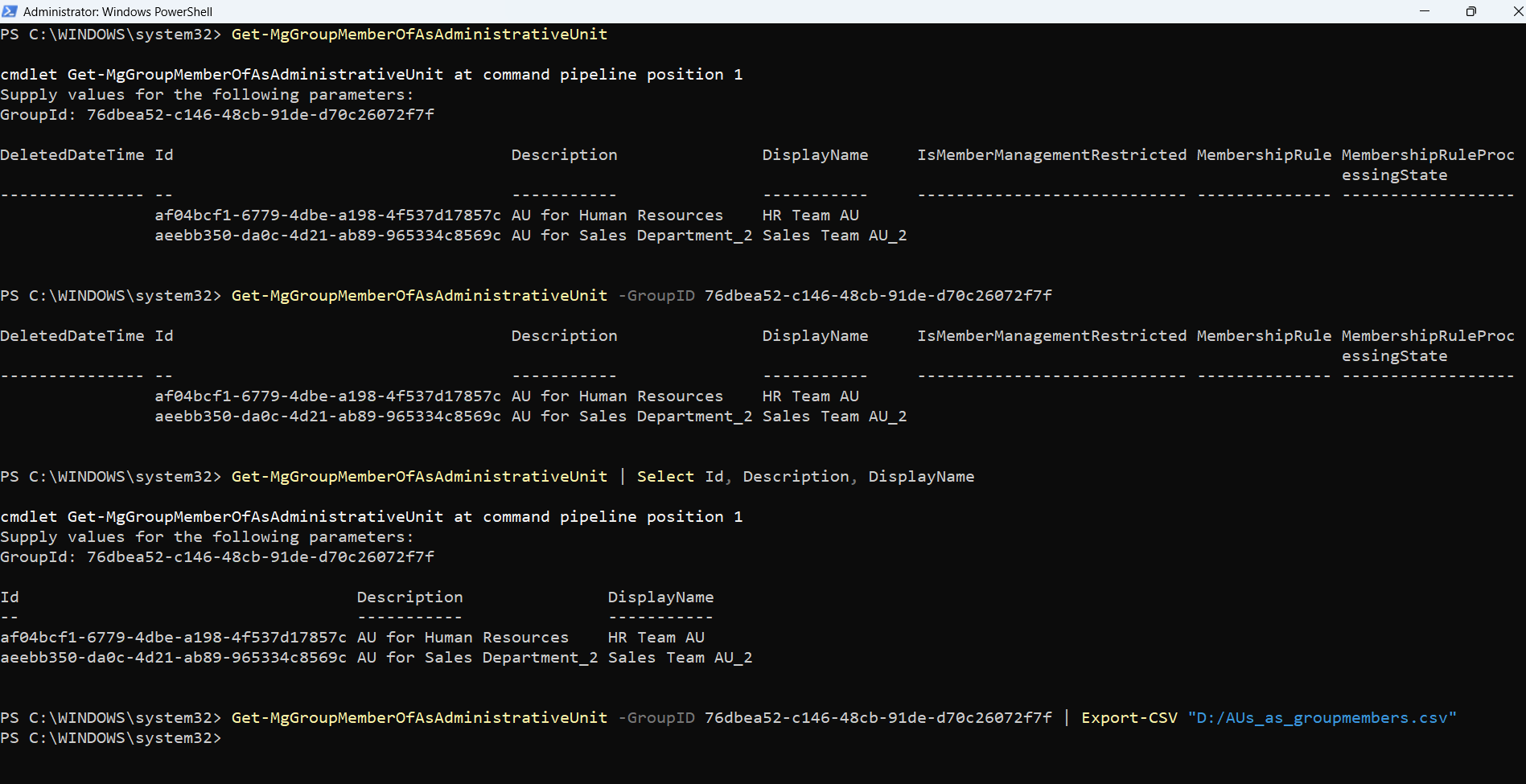
Entering GroupID When Prompted by PS Console
Get-MgGroupMemberOfAsAdministrativeUnit👉 Prompts for Group ID if not provided.
Passing GroupID Parameter Directly
Get-MgGroupMemberOfAsAdministrativeUnit -GroupID 76dbea52-c146-48cb-91de-d70c26072f7f👉 Retrieves all administrative units the specified group belongs to.
Selecting Only Specific Administrative Unit Properties
Get-MgGroupMemberOfAsAdministrativeUnit | Select Id, Description, DisplayName👉 Filters output to only relevant AU properties.
Exporting AU Membership Details to CSV
Get-MgGroupMemberOfAsAdministrativeUnit -GroupID 76dbea52-c146-48cb-91de-d70c26072f7f | Export-CSV "D:/AUs_as_groupmembers.csv"👉 Exports administrative unit memberships for reporting or auditing.
Cmdlet Tips
| Tip | Description |
|---|---|
| AU-Specific Results | Returns only Administrative Unit objects, not users or groups |
| Ideal for Scoped Admin | Helps understand delegated admin boundaries |
| Use Select for Clarity | Reduce output using Select Id, DisplayName |
| Combine with AU Cmdlets | Use with Get-MgAdministrativeUnit for deeper insights |
| Permissions Required | Requires Directory.Read.All or AdministrativeUnit.Read.All |
Use Cases
| Use Case | Description |
|---|---|
| Delegated Admin Analysis | Identify which AUs a group falls under |
| Access Scope Validation | Ensure groups are assigned to correct administrative scopes |
| Compliance Audits | Review AU memberships for governance policies |
| Troubleshooting Access | Understand scoped admin limitations due to AU membership |
| Organizational Structuring | Validate group placement within administrative units |
Frequently Asked Questions
| Question | Answer |
|---|---|
| What does Get-MgGroupMemberOfAsAdministrativeUnit cmdlet return? | Returns Administrative Units the group is a member of |
| Does Get-MgGroupMemberOfAsAdministrativeUnit return users or groups? | No, only Administrative Units |
| Is Get-MgGroupMemberOfAsAdministrativeUnit same as Get-MgGroupMemberOf? | No, this specifically filters for Administrative Units. Where as Get-MgGroupMember of returns roles and groups as well. |
| Is GroupId mandatory? | Optional, but ps console prompts if not provided |
| Can I export results? | Yes, using Export-CSV |
Possible Errors & Solutions
| Error | Cause | Solution |
|---|---|---|
| Insufficient privileges | Missing Graph permissions | Use Connect-MgGraph -Scopes "Directory.Read.All" |
| Resource not found | Resource not found | Validate using Get-MgGroup |
| Empty result | Group not part of any AU | Confirm AU membership manually |
| Access Denied | Lack of admin consent | Grant required API permissions |
| Incorrect output type | Expecting users/groups | Ensure understanding that cmdlet returns AUs only |
Conclusion
The Get-MgGroupMemberOfAsAdministrativeUnit cmdlet is a highly useful tool for understanding administrative scoping in Microsoft Entra ID. By identifying which administrative units a group belongs to, administrators can better manage delegated permissions, enforce governance policies, and troubleshoot access issues.
When used alongside other Graph PowerShell cmdlets, it becomes a key component in maintaining a secure and well-structured administrative environment.