Get-MgGroupMemberOf – Retrieve Group Membership (Parent Objects) Using Graph PowerShell
Understanding what a group is a member of is essential when dealing with nested group structures, role assignments, and administrative scoping in Microsoft Entra ID.
The Get-MgGroupMemberOf cmdlet helps administrators retrieve all directory objects that a group belongs to, including:
- Microsoft 365 Groups
- Security Groups
- Administrative Units
- Directory Roles
🚀 Community Edition Released!
Try the M365Corner Microsoft 365 Reporting Tool — your DIY pack with 20+ out-of-the-box M365 reports for Users, Groups, and Teams.
Cmdlet Syntax
Get-MgGroupMemberOf [-GroupId <String>]Usage Examples
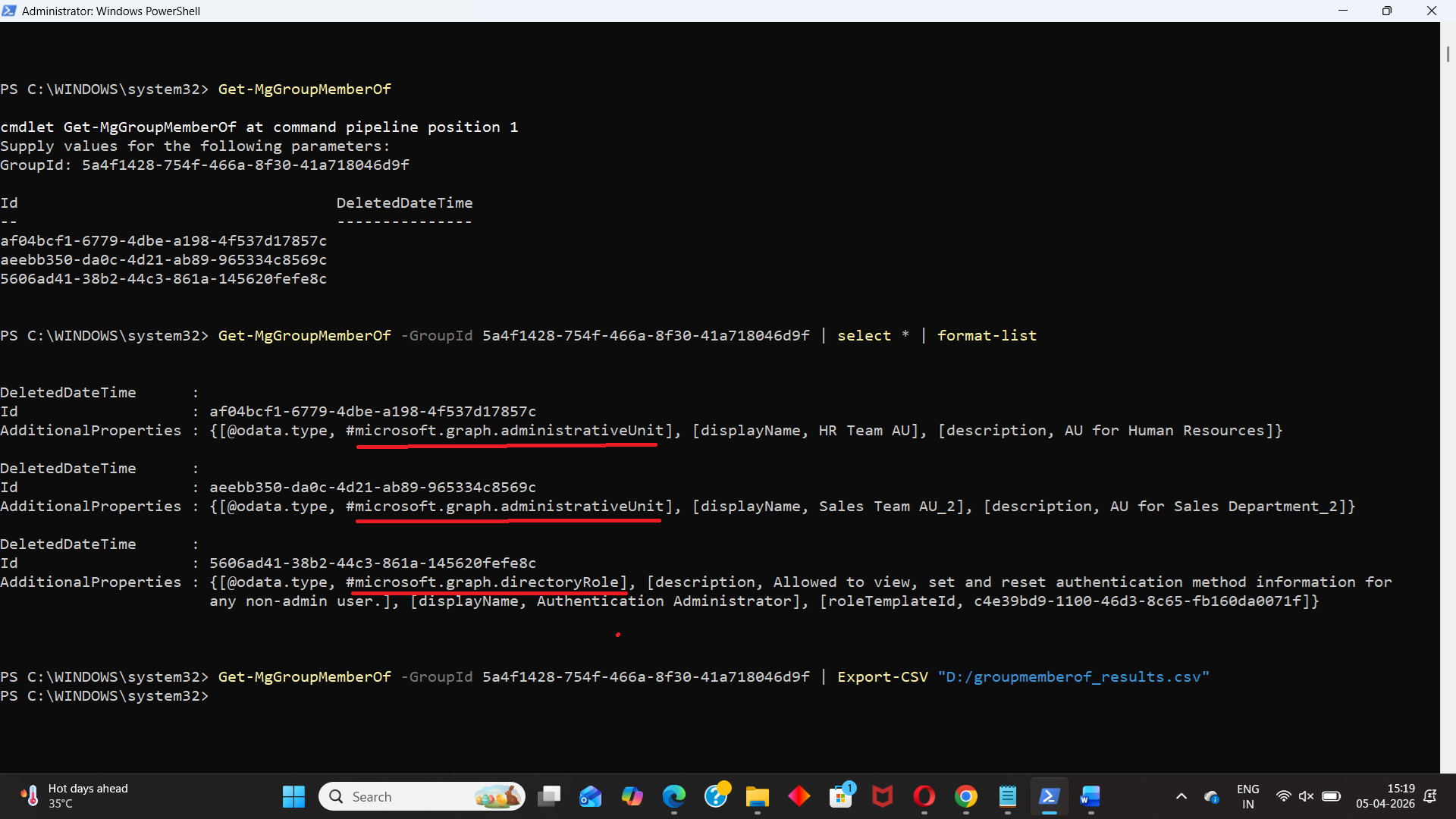
Entering GroupID When Prompted by PS Console
Get-MgGroupMemberOf👉 Prompts for Group ID if not specified.
Passing GroupID Parameter Directly and Selecting All Properties
Get-MgGroupMemberOf -GroupId 5a4f1428-754f-466a-8f30-41a718046d9f | select * | format-list👉 Retrieves all parent objects and displays full property details.
Exporting Results to CSV
Get-MgGroupMemberOf -GroupId 5a4f1428-754f-466a-8f30-41a718046d9f | Export-CSV "D:/groupmemberof_results.csv"👉 Exports results for reporting or auditing purposes.
Cmdlet Tips
| Tip | Description |
|---|---|
| Returns Multiple Object Types | Output may include groups, directory roles, and administrative units |
| Use Format-List for Full View | Format-List helps inspect all properties in detail |
| Use Type Filtering | Filter results using Where-Object to isolate specific object types |
| Combine with Specialized Cmdlets | Use Get-MgGroupMemberOfAsGroup or AsAdministrativeUnit for filtered results |
| Permissions Required | Requires Group.Read.All and Directory.Read.All |
Use Cases
| Use Case | Description |
|---|---|
| Nested Group Analysis | Identify parent groups of a given group |
| Role Assignment Tracking | Detect if a group is assigned to directory roles |
| Administrative Scope Review | Check if a group belongs to administrative units |
| Access Troubleshooting | Understand inherited permissions through group membership |
| Compliance Auditing | Validate group relationships for governance |
Frequently Asked Questions
| Question | Answer |
|---|---|
| What does Get-MgGroupMemberOf cmdlet return? | Returns all directory objects the group is a member of |
| Does Get-MgGroupMemberOf return users? | No, only parent objects (groups, roles, AUs) |
| How is Get-MgGroupMemberOf different from Get-MgGroupMember? | Get-MgGroupMember cmdlet retrieves only members of a group. Whereas Get-MgGroupMemberOf returns directory objects (groups, roles, AUs) the group is a member of. |
| Can I filter specific object types? | Not directly, use Where-Object |
| Is GroupId mandatory? | Optional, but PowerShell prompts if not provided |
Possible Errors & Solutions
| Error | Cause | Solution |
|---|---|---|
| Insufficient privileges | Missing Graph permissions | Run Connect-MgGraph -Scopes "Group.Read.All","Directory.Read.All" |
| Resource not found | Invalid GroupId | Validate using Get-MgGroup |
| Empty result | Group has no parent memberships | Confirm group structure manually |
| Access Denied | Missing admin consent | Grant required permissions |
| Unexpected object types | Mixed directory objects returned | Use filtering with Where-Object |
Conclusion
The Get-MgGroupMemberOf cmdlet is a powerful tool for understanding group relationships and hierarchy in Microsoft Entra ID. By providing visibility into all parent objects, it helps administrators manage nested structures, role assignments, and administrative scopes effectively.
When combined with specialized “As*” cmdlets, it becomes an essential part of your group governance and auditing toolkit.