Get-MgGroupMemberAsServicePrincipal – Retrieve Service Principals from a Group Using Graph PowerShell
Microsoft Graph PowerShell offers powerful ways to manage and query Microsoft Entra ID (Azure AD) objects. One such useful cmdlet is Get-MgGroupMemberAsServicePrincipal, which helps administrators retrieve service principals that are members of a group.
This is particularly useful when dealing with application-based access, automation identities, or service integrations tied to Microsoft 365 groups.
🚀 Community Edition Released!
Try the M365Corner Microsoft 365 Reporting Tool — your DIY pack with 20+ out-of-the-box M365 reports for Users, Groups, and Teams.
Cmdlet Syntax
Get-MgGroupMemberAsServicePrincipal [-GroupId <String>]Usage Examples
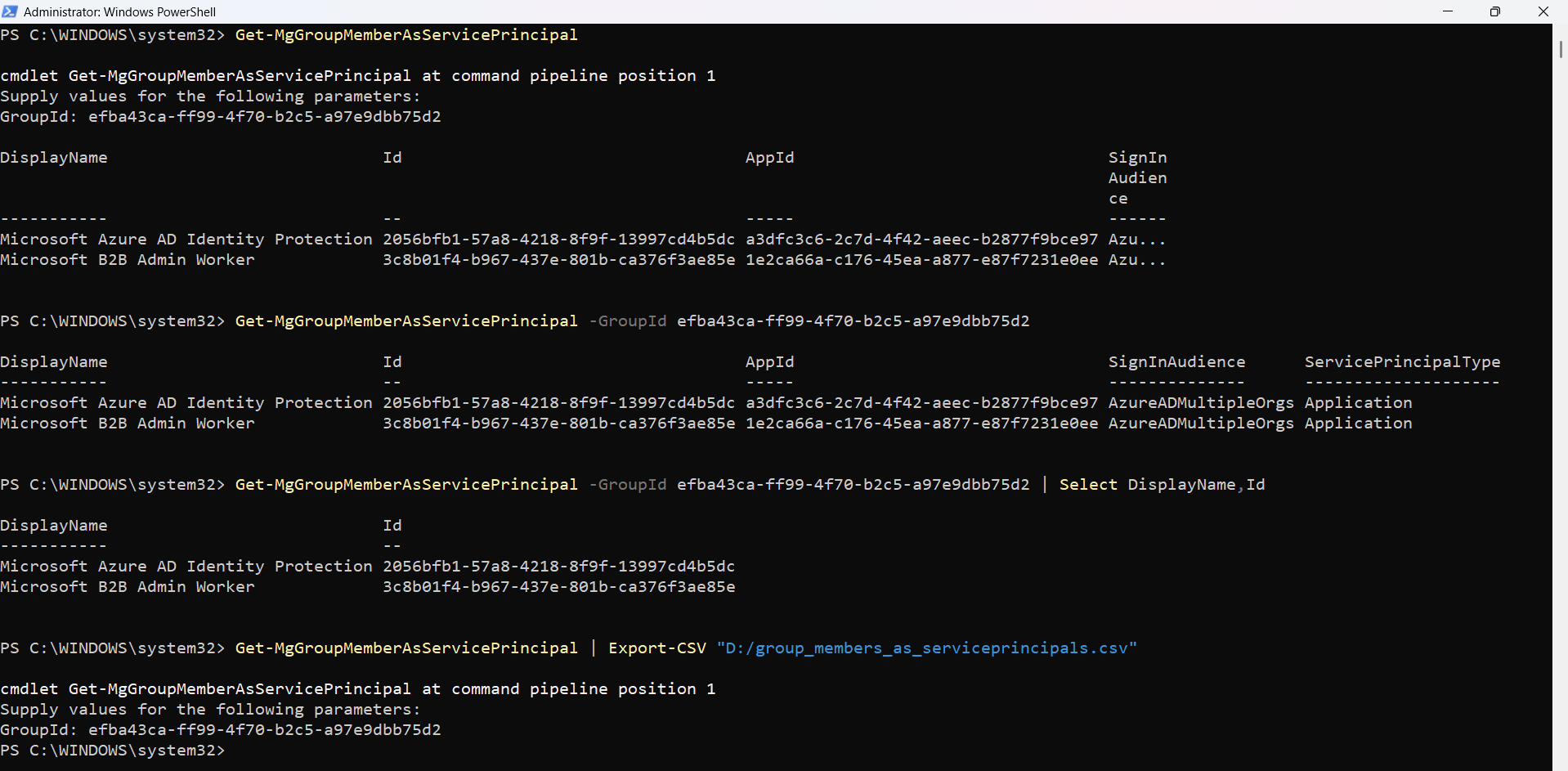
Entering GroupID When Prompted by PS Console
Get-MgGroupMemberAsServicePrincipalIf -GroupId is not provided, PowerShell will prompt you to enter the Group ID manually.
Passing GroupID Parameter Directly
Get-MgGroupMemberAsServicePrincipal -GroupId efba43ca-ff99-4f70-b2c5-a97e9dbb75d2Retrieves all service principals that are members of the specified group.
Selecting Only Specific Service Principal Properties
Get-MgGroupMemberAsServicePrincipal -GroupId efba43ca-ff99-4f70-b2c5-a97e9dbb75d2 | Select DisplayName,IdUseful for reducing output clutter and focusing only on key identifiers.
Exporting Service Principal Group Members to CSV
Get-MgGroupMemberAsServicePrincipal | Export-CSV "D:/group_members_as_serviceprincipals.csv"Exports all service principal members of a group to a CSV file for reporting or auditing.
Cmdlet Tips
- Service Principals Only
- Use with Automation Groups
- Combine with Filtering (Post-Processing)
- Export for Audits
- Permissions Matter
This cmdlet returns only service principals, not users or groups—even if they are members.
Best suited for groups used in app registrations, automation, or API access control.
Since native filtering is limited, use Where-Object:
... | Where-Object {$_.DisplayName -like "*App*"}
Always export results when performing compliance or audit checks.
Ensure you have: Group.Read.All and Directory.Read.All
Admin Use Cases
- Audit Application Access
- Security Reviews
- Automation Tracking
- Compliance Reporting
- Migration & Cleanup
Identify which applications (service principals) are part of privileged groups.
Validate that only approved service principals are assigned to sensitive groups.
Track service accounts used in scripts, workflows, or integrations.
Generate reports for governance and audit teams.
Detect unused or legacy service principals in groups.
Frequently Asked Questions
- What is a Service Principal in this context?
- Does this cmdlet return users or groups?
- Can I filter results using -Filter?
- Is -GroupId mandatory?
- Can I export results directly?
A service principal represents an application or automation identity in Entra ID used for authentication and authorization.
❌ No. ✔️ Only service principals are returned.
❌ No native -Filter support. ✔️ Use Where-Object for filtering.
⚠️ Not strictly mandatory, but: If omitted → PowerShell prompts you. Best practice → Always pass it explicitly
Yes, using Export-CSV as shown in the examples
Possible Errors & Solutions
| Error | Cause | Solution |
|---|---|---|
| Insufficient privileges to complete the operation | Missing required Graph API permissions. |
Connect with appropriate scopes: Connect-MgGraph -Scopes "Group.Read.All","Directory.Read.All" |
| Resource not found | Invalid or incorrect GroupId. |
Verify Group ID: Get-MgGroup | Select DisplayName,Id |
| No results returned |
|
Verify group membership type using: Get-MgGroupMember -GroupId |
Conclusion
The Get-MgGroupMemberAsServicePrincipal cmdlet is a specialized yet powerful tool for administrators who need visibility into application identities within Microsoft 365 groups.
Whether you're conducting security audits, managing automation accounts, or ensuring compliance, this cmdlet helps you isolate and analyze service principal memberships effectively.
👉 Pair it with export and filtering techniques to unlock its full potential for real-world administrative scenarios.