Get-MgDirectoryDeletedItemAsApplication: Retrieve Deleted Applications Using Graph PowerShell
Applications registered in Microsoft Entra ID (Azure AD) may sometimes be deleted intentionally during cleanup or accidentally during administrative operations. Since deleted directory objects remain in the deleted items container for a limited period, administrators can still retrieve information about them.
The Get-MgDirectoryDeletedItemAsApplication cmdlet in Microsoft Graph PowerShell allows administrators to retrieve applications that exist in the deleted items container. This can be useful for auditing purposes, investigating accidental deletions, or preparing to restore an application.
This article explains the cmdlet syntax, usage examples, tips, and common errors administrators may encounter when using this cmdlet.
🚀 Community Edition Released!
Try the M365Corner Microsoft 365 Reporting Tool — your DIY pack with 20+ out-of-the-box M365 reports for Users, Groups, and Teams.
Cmdlet Syntax
Get-MgDirectoryDeletedItemAsApplication [-DirectoryObjectId <String>]Key Parameter
| Parameter | Description |
|---|---|
| -DirectoryObjectId | Specifies the ID of a deleted application object to retrieve a specific deleted application |
Usage Examples
- Retrieve All Deleted Applications
- Retrieve a Specific Deleted Application
- Export Deleted Applications to CSV
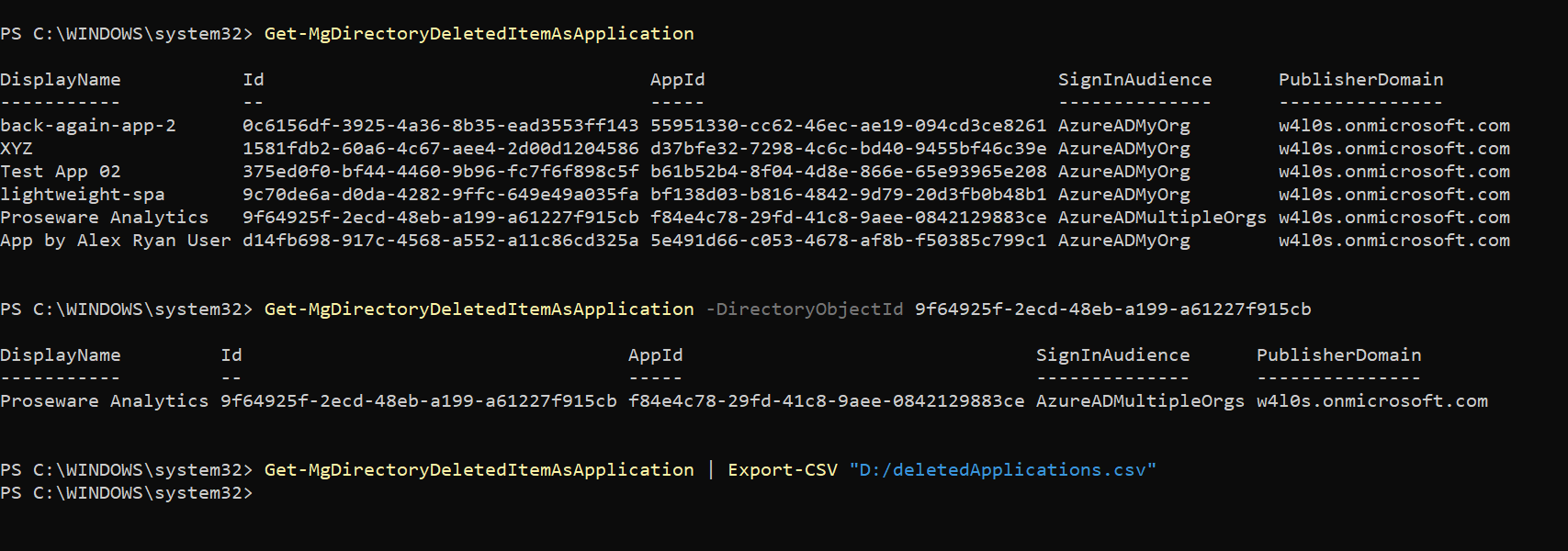
This command retrieves all deleted service principals present in the directory’s deleted items container.
Get-MgDirectoryDeletedItemAsApplicationAdministrators can use this command to quickly identify applications that were recently removed from Microsoft Entra ID.
If you already know the Directory Object ID of the deleted application, you can retrieve its details using the -DirectoryObjectId parameter.
Get-MgDirectoryDeletedItemAsApplication -DirectoryObjectId 9f64925f-2ecd-48eb-a199-a61227f915cbThis command returns detailed information about the specified deleted application.
Administrators may want to export deleted application details for auditing, reporting, or documentation.
Get-MgDirectoryDeletedItemAsApplication | Export-CSV "D:/deletedApplications.csv"The exported CSV file can be used for further analysis or compliance tracking.
Cmdlet Tips
- Deleted Applications Are Retained Temporarily
- Useful for Troubleshooting Broken Integrations
- Export Data for Audit Reviews
- Required Permissions
Applications remain in the deleted items container for a limited time (typically up to 30 days) before being permanently removed from Microsoft Entra ID.
If an automation, API integration, or enterprise application suddenly stops working, administrators can check whether the application registration was deleted using this cmdlet.
Exporting deleted application information to CSV helps administrators maintain audit trails and investigation records, especially in environments with multiple administrators.
To retrieve deleted applications, the Microsoft Graph session must include permissions such as:
Directory.Read.All or Directory.ReadWrite.All
Example connection:
Connect-MgGraph -Scopes "Directory.Read.All"Possible Errors & Solutions
| Error | Cause | Solution |
|---|---|---|
| MgDirectoryDeletedItemAsApplication : Insufficient privileges to complete the operation. | The Graph PowerShell session does not have sufficient permissions to access deleted directory objects. | Reconnect to Microsoft Graph with appropriate permissions. Connect-MgGraph -Scopes "Directory.Read.All" or Connect-MgGraph -Scopes "Directory.ReadWrite.All" |
| Resource '<ObjectID>' does not exist or one of its queried reference-property objects are not present. | The provided DirectoryObjectId does not exist in the deleted items container or may have already been permanently removed. | First retrieve all deleted applications to verify the object ID. Get-MgDirectoryDeletedItemAsApplication |
| Get-MgDirectoryDeletedItemAsApplication : Cannot bind parameter 'DirectoryObjectId'. | An invalid value was passed to the -DirectoryObjectId parameter. | Ensure the value passed is a valid GUID format. Example: 9f64925f-2ecd-48eb-a199-a61227f915cb |
Conclusion
The Get-MgDirectoryDeletedItemAsServicePrincipal cmdlet helps administrators retrieve service principals that have been deleted but are still retained in the directory’s deleted items container. This capability is particularly useful when auditing application removals, troubleshooting broken integrations, or preparing to restore deleted service principals.
By combining this cmdlet with export capabilities and proper Graph permissions, administrators can effectively monitor and analyze deleted application objects within their Microsoft 365 environment.