Get-MgApplicationOwnerAsUser – Retrieve Application Owners (Users Only) Using Graph PowerShell
Managing application ownership in Microsoft Entra ID (Azure AD) is critical for security, accountability, and governance. The Get-MgApplicationOwnerAsUser cmdlet allows administrators to retrieve only user-based owners of an application, excluding groups.
This makes it especially useful when identifying human owners responsible for applications.
🚀 Community Edition Released!
Try the M365Corner Microsoft 365 Reporting Tool — your DIY pack with 20+ out-of-the-box M365 reports for Users, Groups, and Teams.
Cmdlet Syntax
Get-MgApplicationOwnerAsUser [-ApplicationId <String>]Usage Examples
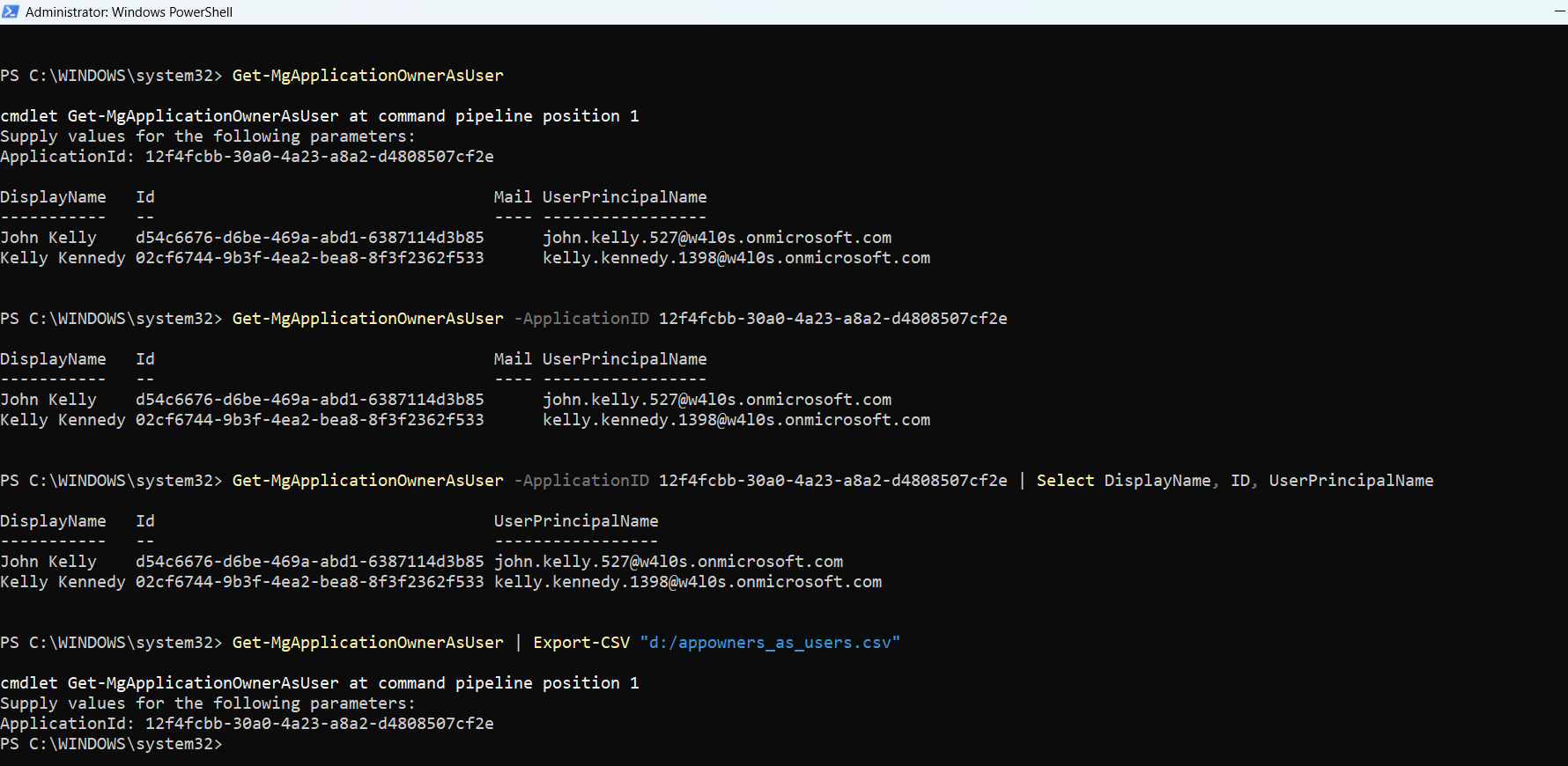
Example 1: Entering ApplicationID When Prompted by PS Console
Get-MgApplicationOwnerAsUser👉 If -ApplicationId is not provided, PowerShell prompts you to enter it manually.
Example 2: Passing ApplicationID Parameter Directly
Get-MgApplicationOwnerAsUser -ApplicationID 12f4fcbb-30a0-4a23-a8a2-d4808507cf2e👉 Retrieves all user owners of the specified application.
Example 3: Selecting Only Specific Application Owner Properties
Get-MgApplicationOwnerAsUser -ApplicationID 12f4fcbb-30a0-4a23-a8a2-d4808507cf2e | Select DisplayName, ID, UserPrincipalName👉 Focuses on essential identity details for reporting and auditing.
Example 4: Exporting Application Owner Details to CSV
Get-MgApplicationOwnerAsUser | Export-CSV "d:/appowners_as_users.csv"👉 Exports application owner details for documentation or compliance audits.
Cmdlet Tips
| Returns Only User Owners | This cmdlet filters out groups and returns only user-based owners. |
| Ideal for Ownership Accountability | Helps identify real individuals responsible for applications. |
| Use Select for Clean Output |
Limit output to relevant fields: ... | Select DisplayName, UserPrincipalName |
| Combine with Other Cmdlets |
Use alongside: Get-MgApplicationOwner → returns all owners Get-MgApplicationOwnerAsServicePrincipal → returns app/service principal owners |
| Permissions Required |
Ensure you have: • Application.Read.All • Directory.Read.All |
Use Cases
| Application Ownership Audit | Identify all users responsible for managing applications |
| Security & Compliance Checks | Ensure applications have valid and active user owners. |
| Orphaned App Detection | Detect applications with no user owners. |
| Access Governance | Validate ownership assignments for sensitive or high-privilege apps. |
| Reporting & Documentation | Export ownership data for audits and reviews. |
Frequently Asked Questions
| What does Get-MgApplicationOwnerAsUser cmdlet return? | It returns only user objects that are owners of the specified application. |
| Does Get-MgApplicationOwnerAsUser include groups? | ❌ No ✔️ Only user owners are returned. |
| How is Get-MgApplicationOwnerAsUser different from Get-MgApplicationOwner? | • Get-MgApplicationOwner → returns all owners • Get-MgApplicationOwnerAsUser → returns only user owners |
Possible Errors & Solutions
| Error | Cause | Solution |
|---|---|---|
| Insufficient privileges to complete the operation | Missing required Graph API permissions. | Connect-MgGraph -Scopes "Application.Read.All","Directory.Read.All" |
| Resource not found | Invalid ApplicationId. |
Verify application ID using: Get-MgApplication | Select DisplayName,Id |
| No results returned |
|
Check all owners using: Get-MgApplicationOwner -ApplicationId <ApplicationId> |
| Access Denied | Insufficient directory permissions. | Ensure admin consent is granted for required scopes. |
Conclusion
The Get-MgApplicationOwnerAsUser cmdlet is an essential tool for administrators who need clear visibility into human ownership of applications in Microsoft Entra ID. By isolating user-based owners, it simplifies accountability, auditing, and governance tasks.