Get-MgApplicationByAppId – Retrieve Application Using AppId (Client ID)
When working with Microsoft Entra applications (Azure AD apps), you’ll often encounter two identifiers:
- ObjectId → Internal directory identifier
- AppId (Client ID) → Public-facing identifier used in authentication
The Get-MgApplicationByAppId cmdlet is specifically designed to fetch an application using its AppId (Client ID) instead of the ObjectId.
🚀 Community Edition Released!
Try the M365Corner Microsoft 365 Reporting Tool — your DIY pack with 20+ out-of-the-box M365 reports for Users, Groups, and Teams.
Cmdlet Syntax
Get-MgApplicationByAppId -AppId <String>[-Property <String>[]>]Usage Examples
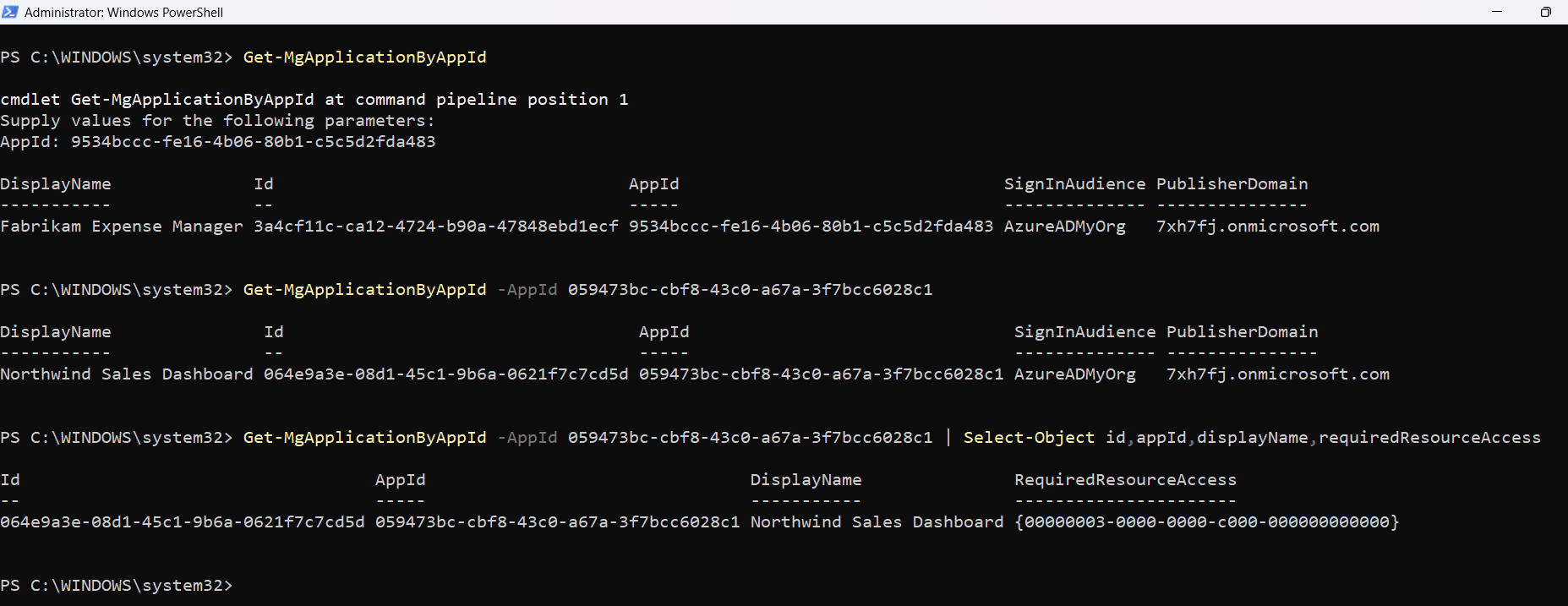
Example 1: Passing -AppId when prompted by PowerShell console
Get-MgApplicationByAppIdWhat happens:
- PowerShell will prompt you to enter the AppId (Client ID).
- Once provided, the cmdlet returns the corresponding application details.
Example 2: Passing -AppId parameter directly
Get-MgApplicationByAppId -AppId 9534bccc-fe16-4b06-80b1-c5c5d2fda483What this does:
- Directly retrieves the application with the AppId you provide.
- Useful for automation and scripting scenarios.
Cmdlet Tips
- AppId ≠ ObjectId
- AppId → Used here
- ObjectId → Used with Get-MgApplication
- Ideal for OAuth / App Registration Workflows
- Use this cmdlet when you already have the Client ID from:
- App registrations
- API integrations
- Authentication flows
- Combine with Selective Properties
- Useful in Automation Scripts
- Perfect for:
- Validating app existence
- Fetching app metadata before updates
- Integration validation scripts
⚠️ Important Note:
Get-MgApplicationByAppId operates using the AppId (Client ID) — not the ObjectId.
To reduce output clutter:
Get-MgApplicationByAppId -AppId <AppId> | Select-Object DisplayName, AppId
Real-World Admin Use Cases
- Validate Application During OAuth / API Integration
- Confirms the app exists in your tenant
- Helps verify correct configuration before granting permissions
- Troubleshooting Authentication Failures
- Does the app exist?
- Is the Client ID correct?
- Quickly confirms if the AppId is valid
- Avoids confusion between AppId vs ObjectId
- Auditing Known Applications by Client ID
- Identify application owner/source
- Validate if the app is trusted
- Pre-Validation in Automation Scripts
- Assigning permissions
- Updating app settings
- Adding secrets/certificates
- Prevents script failures
- Adds reliability to automation workflows
- Cross-Team Collaboration (Dev ↔ Admin)
- Client ID (AppId)
- NOT ObjectId
- Faster collaboration
- No unnecessary back-and-forth
- Incident Response & Security Investigations
- Logs often contain AppId (Client ID)
- What app is this?
- Who owns it?
- Is it legitimate?
When integrating third-party apps or internal tools, admins are usually given a Client ID (AppId).
Instead of searching manually in the Entra portal, you can quickly validate:
Get-MgApplicationByAppId -AppId <ClientId>Why this matters:
If an application fails during login or token acquisition, one of the first checks is:
Using this cmdlet:
Security or audit teams often receive Client IDs in reports/logs.
Instead of manually mapping:
Get-MgApplicationByAppId -AppId <AppId> | Select DisplayName, PublisherDomainUse case:
Before performing operations like:
You can validate the app:
$app = Get-MgApplicationByAppId -AppId <AppId>
if ($app) {
    Write-Host "Application exists. Proceeding..."
}
Benefit:
Developers typically share
Admins can directly use this cmdlet without needing conversions.
Result:
During a security incident:
Admins can quickly retrieve app details:
Get-MgApplicationByAppId -AppId <SuspiciousAppId>Helps answer:
Frequently Asked Questions
- What is Get-MgApplicationByAppId used for?
- What is the difference between AppId and ObjectId?
- AppId (Client ID): Used in authentication and integrations
- ObjectId: Internal identifier used within Entra ID
- Can I use ObjectId with Get-MgApplicationByAppId?
- What permissions are required to run this cmdlet?
Get-MgApplicationByAppId is used to retrieve an Entra (Azure AD) application using its AppId (Client ID) instead of the ObjectId.
This cmdlet specifically works with the AppId.
No. This cmdlet only accepts AppId (Client ID).
To use ObjectId, use:
Get-MgApplication -ApplicationId <ObjectId>You need: Application.Read.All
Connect using:
Connect-MgGraph -Scopes "Application.Read.All"Possible Errors & Solutions
| Error | Cause | Solution |
|---|---|---|
| Resource Not Found |
|
Verify the AppId using: Get-MgApplication | Select DisplayName, AppId |
| Insufficient Privileges |
|
Connect with proper scopes: Connect-MgGraph -Scopes "Application.Read.All" |
| Cannot convert value to type 'Edm.Guid' |
|
Ensure you are indeed passing the AppId and nothing else. |
Conclusion
The Get-MgApplicationByAppId cmdlet is a simple yet powerful tool for retrieving application details using the AppId (Client ID) — especially useful in authentication and integration scenarios where the Client ID is readily available.
Unlike traditional queries based on ObjectId, this cmdlet aligns perfectly with real-world workflows where AppId is the primary reference.
👉 Whether you're validating app configurations, building automation scripts, or troubleshooting integrations — this cmdlet fits right into your toolkit.