Finding Unsponsored Guest Users Using Graph PowerShell
Guest user access is one of the most common collaboration features in Microsoft 365 — but it also introduces governance challenges. One important question administrators often ask is: Which guest users have no internal sponsor assigned? In Microsoft Entra ID, guest accounts can have one or more sponsors, typically representing the internal users responsible for that external account.
However, over time, organizations may accumulate guest users who:
- Were invited long ago
- No longer have an accountable owner
- Have no sponsor relationship assigned or the assigned sponsor was removed for some reason.
These accounts are often referred to as:
Unsponsored Guest Users
In this article, we will build a simple Graph PowerShell report to identify such accounts.
🚀 Community Edition Released!
Try the M365Corner Microsoft 365 Reporting Tool — your DIY pack with 20+ out-of-the-box M365 reports for Users, Groups, and Teams.
Script: Find Unsponsored Guest Users
The following script retrieves all guest users and checks whether they have any sponsors assigned.
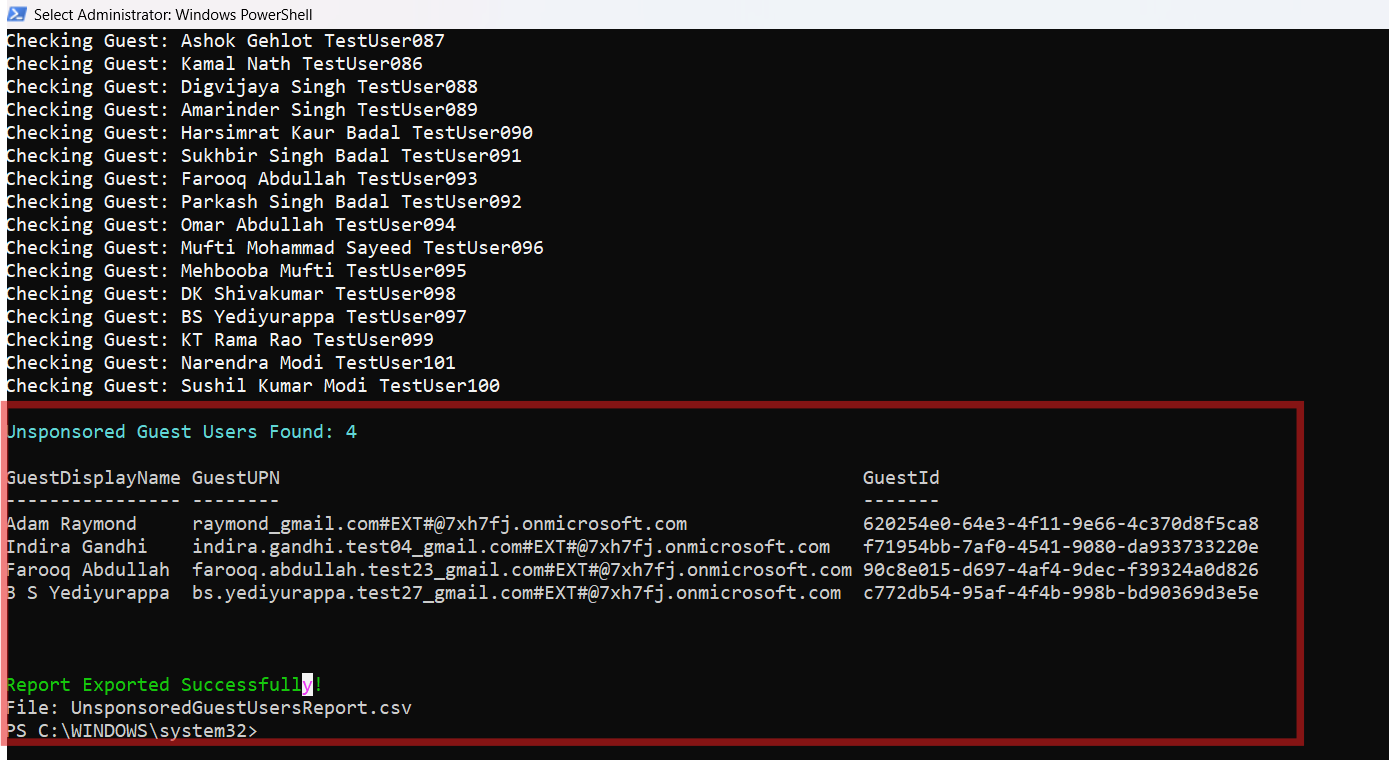
If no sponsors are found, the guest user is added to an exportable report.
Write-Host "Searching for Unsponsored Guest Users..." -ForegroundColor Cyan

# Step 1: Fetch all Guest users
$GuestUsers = Get-MgUser -Filter "userType eq 'Guest'" -All

Write-Host "Total Guest Users Found: $($GuestUsers.Count)" -ForegroundColor Yellow

# Store unsponsored guests
$UnsponsoredGuests = @()

# Step 2: Loop through each guest user
foreach ($guest in $GuestUsers) {

    Write-Host "Checking Guest: $($guest.DisplayName)" -ForegroundColor White

    try {
        # Step 3: Attempt to retrieve sponsor(s)
        $sponsors = Get-MgUserSponsor -UserId $guest.Id

        # Step 4: If no sponsors returned, mark as unsponsored
        if (-not $sponsors -or $sponsors.Count -eq 0) {

            Write-Host " No Sponsor Found!" -ForegroundColor Red

            $UnsponsoredGuests += [PSCustomObject]@{
                GuestDisplayName     = $guest.DisplayName
                GuestUPN             = $guest.UserPrincipalName
                GuestId              = $guest.Id
            }
        }
    }
    catch {
        # Most tenants throw an error if sponsor relationship does not exist
        Write-Host " No Sponsor Assigned (Exception)" -ForegroundColor Red

        $UnsponsoredGuests += [PSCustomObject]@{
            GuestDisplayName     = $guest.DisplayName
            GuestUPN             = $guest.UserPrincipalName
            GuestId              = $guest.Id
        }
    }
}

# Step 5: Output summary
Write-Host "`nUnsponsored Guest Users Found: $($UnsponsoredGuests.Count)" -ForegroundColor Cyan

# Step 6: Display results in console
$UnsponsoredGuests | Format-Table -AutoSize

# Step 7: Export report to CSV
$UnsponsoredGuests | Export-Csv "UnsponsoredGuestUsersReport.csv" -NoTypeInformation

Write-Host "`nReport Exported Successfully!" -ForegroundColor Green
Write-Host "File: UnsponsoredGuestUsersReport.csv"
How the Script Works
Let’s break down what this script is doing step-by-step.
Step 1: Retrieve All Guest Users
The script begins by filtering Entra ID accounts where:
userType eq 'Guest'
$GuestUsers = Get-MgUser -Filter "userType eq 'Guest'" -All
This ensures only external guest accounts are included.
Step 2: Loop Through Each Guest Account
Each guest user is processed individually:
foreach ($guest in $GuestUsers)This is necessary because sponsor relationships are checked per user.
Step 3: Attempt to Fetch Sponsor Information
The cmdlet used is:
Get-MgUserSponsor -UserId $guest.IdThis retrieves sponsor references for the guest user.
Step 4: Detect Unsponsored Guests
If no sponsor objects are returned:
if (-not $sponsors -or $sponsors.Count -eq 0)The guest is classified as unsponsored and added to the report.
Step 5: Handle Sponsor Lookup Exceptions
In many tenants, Graph throws an exception when no sponsor relationship exists.
That is why the script includes:
catch { ... }
Any guest triggering this exception is also treated as unsponsored.
Step 6: Display Results and Export Report
At the end, the script:
- Prints the unsponsored guest list on screen
- Exports results to:
UnsponsoredGuestUsersReport.csv
Frequently Asked Questions
- What is an unsponsored guest user?
A guest account in Entra ID that does not have an internal sponsor relationship assigned. - Why are unsponsored guest users risky?
They lack accountability and may retain access without a responsible internal owner. - Can I automate unsponsored guest detection?
Yes, using Microsoft Graph PowerShell and scheduled reporting.
Possible Errors and Solutions
Below are common issues administrators may encounter when running this report.
| Error | Cause | Solution |
|---|---|---|
| Insufficient privileges to complete the operation. | Your account or app does not have the required Microsoft Graph permissions. | Connect using the proper scopes: Connect-MgGraph -Scopes "User.Read.All","Directory.Read.All" Admin consent may be required. |
| The term 'Get-MgUserSponsor' is not recognized... | Microsoft Graph module is outdated or missing. | Update the Graph PowerShell SDK: Update-Module Microsoft.Graph |
| Large Tenant Performance Issues | Tenants with thousands of guest accounts may experience slow execution. |
|
| Empty Output File | All guest users in your tenant may already have sponsors assigned. | This is actually a good sign — your guest governance is clean. |
Further Enhancements
This script is an excellent baseline report, but you can enhance it further.
Add Guest Creation Date
Include when the guest was created:
- Useful for identifying old orphan accounts
Add Last Sign-In Activity
Unsponsored guests who haven’t signed in for months may be safe to remove.
Export Sponsored vs Unsponsored Reports Separately
Generate two CSVs:
- Sponsored guests
- Unsponsored guests
Automate Guest Cleanup Reviews
You can schedule this script monthly and review unsponsored accounts as part of governance audits.
Combine with Access Reviews
Unsponsored guests should often be prioritized for:
- Access review campaigns
- Conditional access enforcement
- Account removal decisions
Conclusion
Guest access is essential for collaboration, but it must remain accountable.
Unsponsored guest users represent accounts with:
- No clear internal owner
- Increased compliance risk
- Potential long-term access exposure
Using Graph PowerShell, administrators can quickly generate a report of guest accounts without sponsors and take appropriate action.
This script provides a simple but powerful way to strengthen external identity governance in Microsoft Entra ID.