Find Teams with External Users Using PowerShell
Microsoft Teams enables seamless collaboration not only within an organization but also with external users (guest users). While this is a powerful feature, it also introduces important governance and security considerations.
Teams with external users may:
- Share sensitive information externally
- Require compliance validation
- Need stricter access monitoring
👉 This makes it essential for administrators to identify Teams that include guest users and review their access.
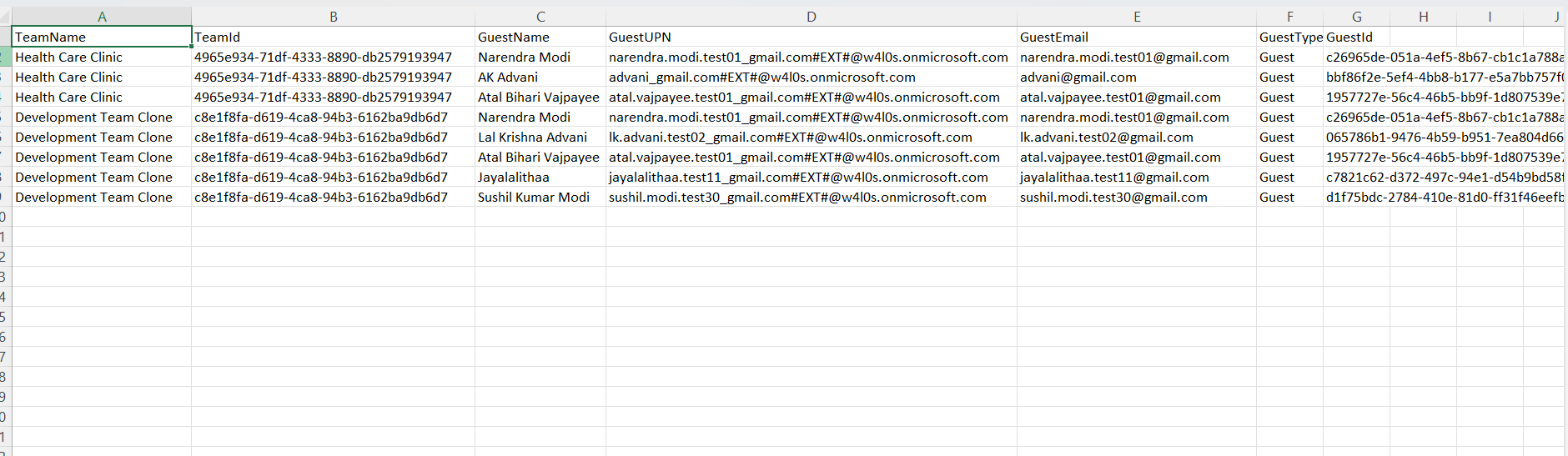
This script helps administrators detect Teams with external (guest) users and generate a detailed report for auditing and governance purposes.
🚀 Community Edition Released!
Try the M365Corner Microsoft 365 Reporting Tool — your DIY pack with 20+ out-of-the-box M365 reports for Users, Groups, and Teams.
The Script
# Output file
$OutputFile = "D:/Teams_With_Guests_Report.csv"

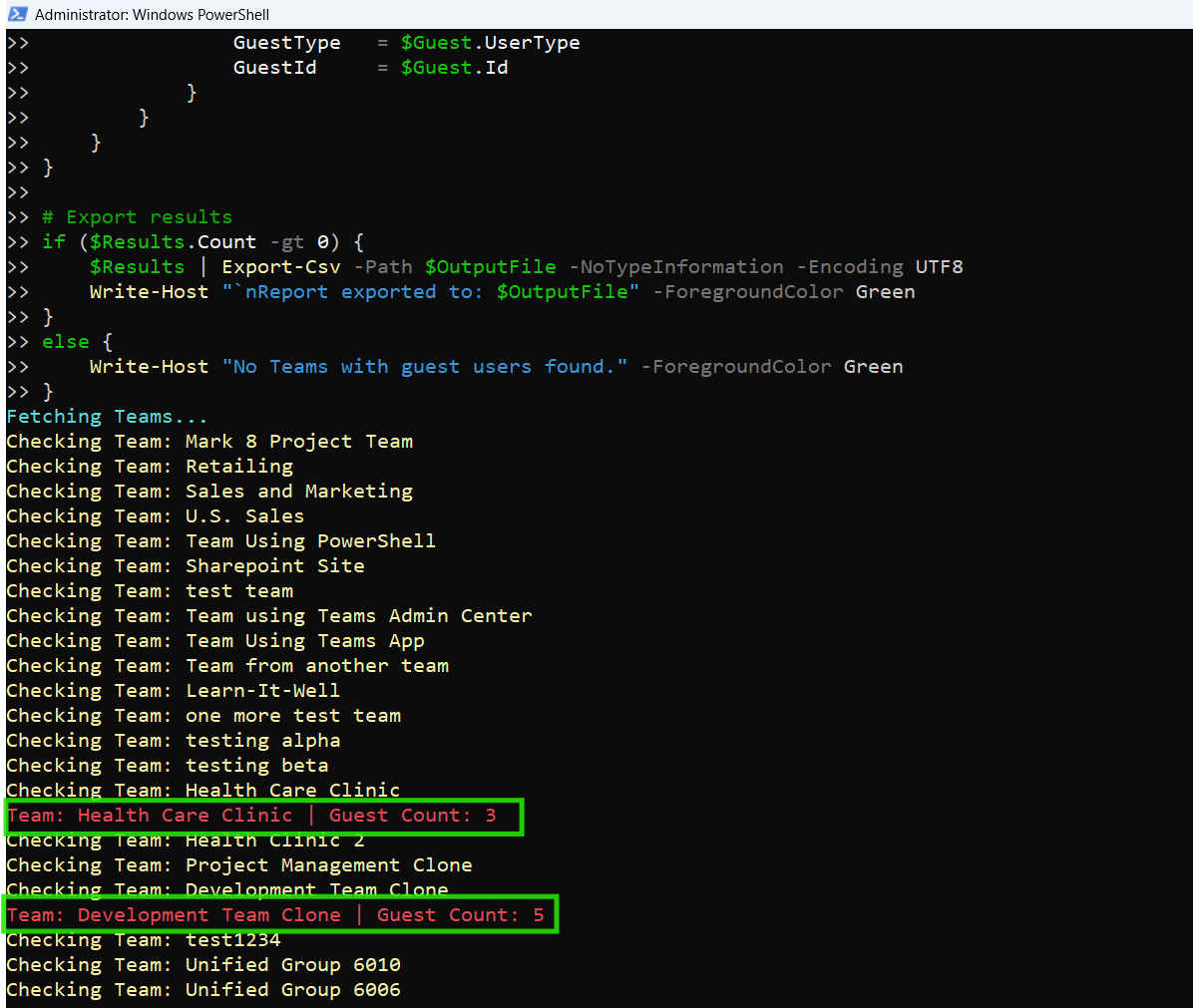
Write-Host "Fetching Teams..." -ForegroundColor Cyan

# Get all Teams
$Teams = Get-MgGroup -Filter "resourceProvisioningOptions/Any(x:x eq 'Team')" -All

$Results = @()

foreach ($Team in $Teams) {
    Write-Host "Checking Team: $($Team.DisplayName)" -ForegroundColor Yellow

    # Get only user members and explicitly request needed properties
    $Members = Get-MgGroupMemberAsUser -GroupId $Team.Id -All -Property "id,displayName,userPrincipalName,mail,userType"

    # Filter guest users
    $GuestUsers = $Members | Where-Object { $_.UserType -eq "Guest" }

    if ($GuestUsers.Count -gt 0) {
        Write-Host "Team: $($Team.DisplayName) | Guest Count: $($GuestUsers.Count)" -ForegroundColor Red

        foreach ($Guest in $GuestUsers) {
            $Results += [PSCustomObject]@{
                TeamName    = $Team.DisplayName
                TeamId      = $Team.Id
                GuestName   = $Guest.DisplayName
                GuestUPN    = $Guest.UserPrincipalName
                GuestEmail  = $Guest.Mail
                GuestType   = $Guest.UserType
                GuestId     = $Guest.Id
            }
        }
    }
}

# Export results
if ($Results.Count -gt 0) {
    $Results | Export-Csv -Path $OutputFile -NoTypeInformation -Encoding UTF8
    Write-Host "`nReport exported to: $OutputFile" -ForegroundColor Green
} else {
    Write-Host "No Teams with guest users found." -ForegroundColor Green
}
How the Script Works
| Step | Description |
|---|---|
| Define Output File | Sets the path for exporting the CSV report |
| Fetch Teams | Retrieves all Teams using Get-MgGroup with Teams filter |
| Loop Through Teams | Iterates through each Team |
| Retrieve Members | Uses Get-MgGroupMemberAsUser to fetch user members |
| Filter Guest Users | Filters users where UserType equals "Guest" |
| Identify Teams with Guests | Checks if any guest users exist in the Team |
| Build Report | Stores Team and guest user details in structured format |
| Export Results | Exports data to CSV if guest users are found |
Further Enhancements
| Enhancement | Description |
|---|---|
| Include Owner Details | Add team owners for better accountability |
| Add Guest Domain | Extract guest email domains for analysis |
| Include Channel Info | Identify channels accessed by guests |
| Add Last Activity | Combine with usage reports |
| Schedule Audits | Automate script execution for periodic monitoring |
Frequently Asked Questions
| Question | Answer |
|---|---|
| What is a guest user in Teams? | An external user invited to collaborate in a Team |
| How are guest users identified? | By UserType = Guest property |
| Are guest users a security risk? | Not inherently, but require monitoring |
| Can guest users access all channels? | Depends on permissions and settings |
| Does this script include internal users? | No, it filters only guest users |
Admin Usecases
| Use Case | Description |
|---|---|
| Security Audit | Identify Teams sharing data externally |
| Compliance Checks | Ensure external access aligns with policies |
| Guest Access Review | Monitor guest participation |
| Data Protection | Prevent unintended data exposure |
| Governance Reporting | Maintain records of external collaboration |
Possible Errors & Solutions
| Error | Cause | Solution |
|---|---|---|
| Insufficient privileges | Missing Graph permissions | Use Group.Read.All or Directory.Read.All |
| Cmdlet not recognized | Graph module not installed | Install using Install-Module Microsoft.Graph |
| Access token expired | Session timeout | Reconnect using Connect-MgGraph |
| Empty results | No guest users present | Verify tenant configuration |
| Missing properties | Incomplete property request | Ensure -Property includes required fields |
Conclusion
External collaboration is a powerful feature in Microsoft Teams, but it must be managed carefully to avoid security and compliance risks.
This Microsoft Graph PowerShell script provides an effective way to identify Teams with external (guest) users and generate a detailed report. By regularly auditing guest access, administrators can ensure:
- Better visibility into external collaboration
- Stronger data protection
- Improved governance and compliance
Incorporating this script into regular audits helps organizations maintain a secure and well-governed Teams environment.