List Custom Entra Apps With High-Risk Permissions And No Owners
In Microsoft Entra ID, one of the most critical security risks arises when custom applications: have high-risk API permissions, AND have no assigned owners
These applications represent a critical governance gap because: i) No one is accountable for the app, ii) The app has elevated access to sensitive data and iii) It can be exploited without detection.
Examples of high-risk permissions include: i) Directory.ReadWrite.All , ii) User.ReadWrite.All, iii) RoleManagement.ReadWrite.Directory and more. This script helps administrators identify such high-risk orphaned applications, enabling immediate remediation.
Download this script from our M365Corner GitHub Repo: https://github.com/m365corner/M365Corner-Scripts/tree/main/Entra-Apps-Related-Scripts/List-Custom-Entra-High-Risk-Apps-With-No-Owners🚀 Community Edition Released!
Try the M365Corner Microsoft 365 Reporting Tool — your DIY pack with 20+ out-of-the-box M365 reports for Users, Groups, and Teams.
The Script
# Connect to Microsoft Graph
Connect-MgGraph -Scopes Application.Read.All, Directory.Read.All

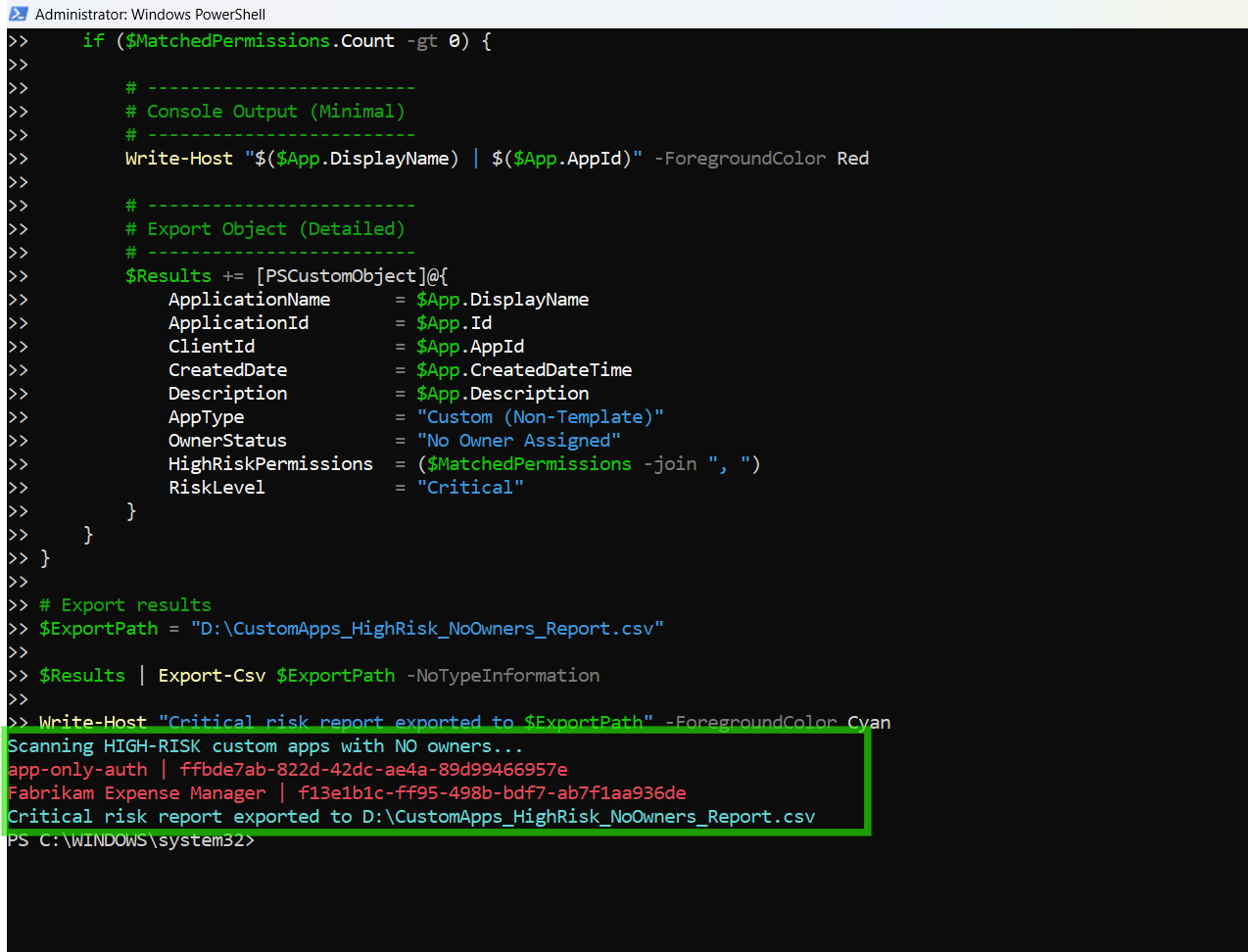
Write-Host "Scanning HIGH-RISK custom apps with NO owners..." -ForegroundColor Cyan

# Define high-risk permissions
$HighRiskPermissions = @(
"Directory.ReadWrite.All",
"User.ReadWrite.All",
"Application.ReadWrite.All",
"RoleManagement.ReadWrite.Directory",
"Group.ReadWrite.All",
"Mail.ReadWrite",
"Files.ReadWrite.All"
)

# Get applications
$Applications = Get-MgApplication -All -Property Id,DisplayName,AppId,CreatedDateTime,Description,ApplicationTemplateId,RequiredResourceAccess

$Results = @()

foreach ($App in $Applications) {

    # -------------------------
    # Step 1: Only Custom Apps
    # -------------------------
    if ($App.ApplicationTemplateId) {
        continue
    }

    # -------------------------
    # Step 2: Check Owners
    # -------------------------
    $Owners = Get-MgApplicationOwner -ApplicationId $App.Id

    if ($Owners) {
        continue
    }

    # -------------------------
    # Step 3: Check Permissions
    # -------------------------
    $MatchedPermissions = @()

    foreach ($Resource in $App.RequiredResourceAccess) {

        foreach ($Access in $Resource.ResourceAccess) {

            $PermissionId = $Access.Id

            $ServicePrincipal = Get-MgServicePrincipal -Filter "appId eq '$($Resource.ResourceAppId)'" -Property AppRoles,Oauth2PermissionScopes

            $PermissionName = ($ServicePrincipal.AppRoles + $ServicePrincipal.Oauth2PermissionScopes | Where-Object {$_.Id -eq $PermissionId}).Value

            if ($HighRiskPermissions -contains $PermissionName) {
                $MatchedPermissions += $PermissionName
            }
        }
    }

    if ($MatchedPermissions.Count -gt 0) {

        # -------------------------
        # Console Output (Minimal)
        # -------------------------
        Write-Host "$($App.DisplayName) | $($App.AppId)" -ForegroundColor Red

        # -------------------------
        # Export Object (Detailed)
        # -------------------------
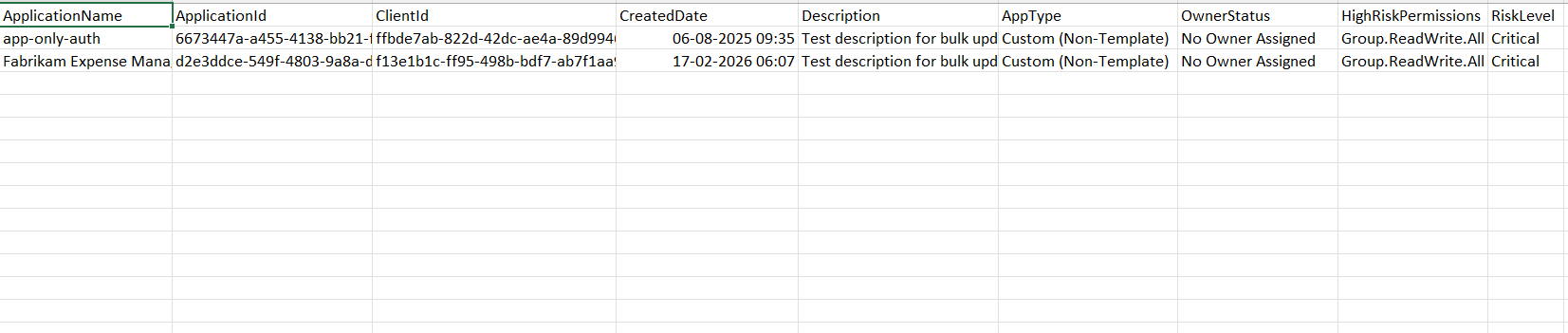
        $Results += [PSCustomObject]@{
            ApplicationName     = $App.DisplayName
            ApplicationId       = $App.Id
            ClientId            = $App.AppId
            CreatedDate         = $App.CreatedDateTime
            Description         = $App.Description
            AppType             = "Custom (Non-Template)"
            OwnerStatus         = "No Owner Assigned"
            HighRiskPermissions = ($MatchedPermissions -join ", ")
            RiskLevel           = "Critical"
        }
    }
}

# Export results
$ExportPath = "C:\Path\CustomApps_HighRisk_NoOwners_Report.csv"

$Results | Export-Csv $ExportPath -NoTypeInformation

Write-Host "Critical risk report exported to $ExportPath" -ForegroundColor Cyan
How the Script Works
| Step | Description |
|---|---|
| Connect to Graph | Authenticates using Application.Read.All and Directory.Read.All |
| Define High-Risk Permissions | Stores a list of sensitive Graph permissions |
| Retrieve Applications | Fetches all Entra applications with required properties |
| Filter Custom Apps | Skips template-based apps with ApplicationTemplateId defined |
| Check Owners | Uses Get-MgApplicationOwner to identify apps without owners |
| Extract Permissions | Iterates through RequiredResourceAccess to gather permissions |
| Resolve Permission Names | Maps permission IDs using Get-MgServicePrincipal |
| Match High-Risk Permissions | Compares permissions against predefined high-risk list |
| Build Report | Captures only apps with high-risk permissions and no owners |
| Export Results | Exports findings into a CSV report |
Further Enhancements
| Enhancement | Description |
|---|---|
| Add Owner Assignment | Automatically assign owners to orphaned apps |
| Permission Risk Levels | Categorize permissions into Medium/High/Critical |
| Include Last Sign-In | Identify inactive but high-risk applications |
| Alerting System | Trigger alerts for newly detected critical apps |
| Integrate with SIEM | Send results to security monitoring tools |
Frequently Asked Questions
| Question | Answer |
|---|---|
| Why is this scenario critical? | High-risk permissions + no owner creates a major security gap |
| How are custom entra apps identified? | Apps without ApplicationTemplateId property defined. |
| What defines high-risk permissions? | Permissions with write or admin-level access to directory/data |
| Can this script detect compromised entra apps? | It helps identify risk, but not actual compromise |
| Should all such apps be removed? | Not necessarily—review, assign owners, and validate usage first |
Admin Usecases
| Use Case | Description |
|---|---|
| Security Audit | Identify orphaned apps with elevated privileges |
| Compliance Enforcement | Ensure all apps have assigned owners |
| Threat Detection | Detect potential attack surfaces |
| Governance Reviews | Maintain control over application permissions |
| Incident Response | Quickly identify risky apps during investigations |
Possible Errors & Solutions
| Error | Cause | Solution |
|---|---|---|
| Insufficient privileges | Missing Graph permissions | Use both Application.Read.All and Directory.Read.All |
| Slow execution | Large tenant | Optimize using filters or batching |
| Cmdlet not recognized | Module missing | Install using Install-Module Microsoft.Graph |
| Access token expired | Session timeout | Reconnect using Connect-MgGraph |
| Export path invalid | Directory missing | Update path to a valid location |
Conclusion
Custom Entra applications with high-risk permissions and no assigned owners represent one of the most dangerous security gaps in any tenant. These applications combine:
- Elevated access
- Lack of accountability
- Potential for misuse
This script enables administrators to quickly identify and export such critical-risk applications, making it easier to take corrective actions such as assigning owners, reducing permissions, or removing unused apps.
By incorporating this script into regular governance workflows, organizations can significantly improve their security posture, compliance readiness, and risk management strategy within Microsoft Entra ID.