🔧 New: User Management Graph PowerShell Toolkit
Simplify user tasks like bulk creation, updates, password resets, deletions, license checks & more — all from one place.
🚀 Launch ToolkitFetch All Microsoft Teams and Email the List with Graph PowerShell
One of the most common challenges in Microsoft 365 administration is keeping track of all Teams in the tenant. Over time, organizations spin up Teams for projects, departments, and ad-hoc collaboration. But without oversight, you risk having Teams with unclear ownership, duplicates, or simply forgotten workspaces consuming resources.
This script solves that pain by pulling a complete list of all Teams-enabled groups (not regular M365 groups) in your tenant and emailing the results as a CSV to an administrator. With this in place, admins can regularly audit Teams usage and maintain better governance.
i) Script
# ===== Simple Graph PowerShell Script =====
# Fetch all TEAMS (not all groups) and email the list to admin
# Requires: Microsoft.Graph module
# Scopes: Group.Read.All, Mail.Send

# --- Variables ---
$FromUser  = "admin@contoso.com"     # Sender (must have mailbox)
$To        = "it-ops@contoso.com"    # Recipient
$Subject   = "All Microsoft Teams report"
$CsvOutDir = "$env:TEMP"

# --- Connect to Microsoft Graph ---
Import-Module Microsoft.Graph -ErrorAction Stop
Connect-MgGraph -Scopes "Group.Read.All","Mail.Send"

# --- Get only Teams (Teams-enabled Microsoft 365 groups) ---
$teams = Get-MgGroup -Filter "resourceProvisioningOptions/Any(x:x eq 'Team')" -All `
-Property "id,displayName,description,visibility,createdDateTime,mailNickname"

# --- Shape data for CSV ---
$teamsOut = $teams | Select-Object Id, DisplayName, Description, Visibility, CreatedDateTime, MailNickname

# --- Export to CSV ---
if (-not (Test-Path -Path $CsvOutDir)) { New-Item -ItemType Directory -Path $CsvOutDir | Out-Null }
$ts = Get-Date -Format "yyyyMMdd_HHmmss"
$csvPath = Join-Path $CsvOutDir ("AllTeams_{0}.csv" -f $ts)
$teamsOut | Export-Csv -Path $csvPath -NoTypeInformation -Encoding UTF8

# --- Prepare HTML Body ---
$summaryHtml = @"
<html>
  <body style='font-family:Segoe UI,Arial,sans-serif'>
    <h3>All Microsoft Teams Report</h3>
    <p>Total Teams: <b>$($teamsOut.Count)</b></p>
    <p>The full list is attached as a CSV.</p>
  </body>
</html>

"@

# --- Prepare Attachment ---
$fileBytes     = [System.IO.File]::ReadAllBytes($csvPath)
$base64Content = [System.Convert]::ToBase64String($fileBytes)
$csvFileName   = [System.IO.Path]::GetFileName($csvPath)
$attachment = @{
    "@odata.type" = "#microsoft.graph.fileAttachment"
    name          = $csvFileName
    contentBytes  = $base64Content
    contentType   = "text/csv"
}

# --- Prepare Mail Object ---
$mail = @{
    message = @{
    subject = "${Subject}"
    body    = @{
        contentType = "HTML"
        content     = $summaryHtml
    }
    toRecipients = @(@{ emailAddress = @{ address = $To } })
    attachments  = @($attachment)
    }
    saveToSentItems = $true
}

# --- Send Email ---
Send-MgUserMail -UserId $FromUser -BodyParameter $mail

Write-Host "Done. CSV saved at: $csvPath" -ForegroundColor Green
ii) How the Script Works
- Connects to Graph
- Filters Only Teams
- Selects Key Properties
- Exports the Data
- Prepares an Email Report
- Sends to Admin
Uses the Group.Read.All scope to read groups in the tenant and Mail.Send to send the report via email.
The filter resourceProvisioningOptions/Any(x:x eq 'Team') ensures only Teams-enabled M365 groups are returned, not all groups.
Extracts useful fields such as Id, DisplayName, Description, Visibility, Creation Date, and MailNickname.
The Teams list is written to a timestamped CSV file in the system’s temp folder.
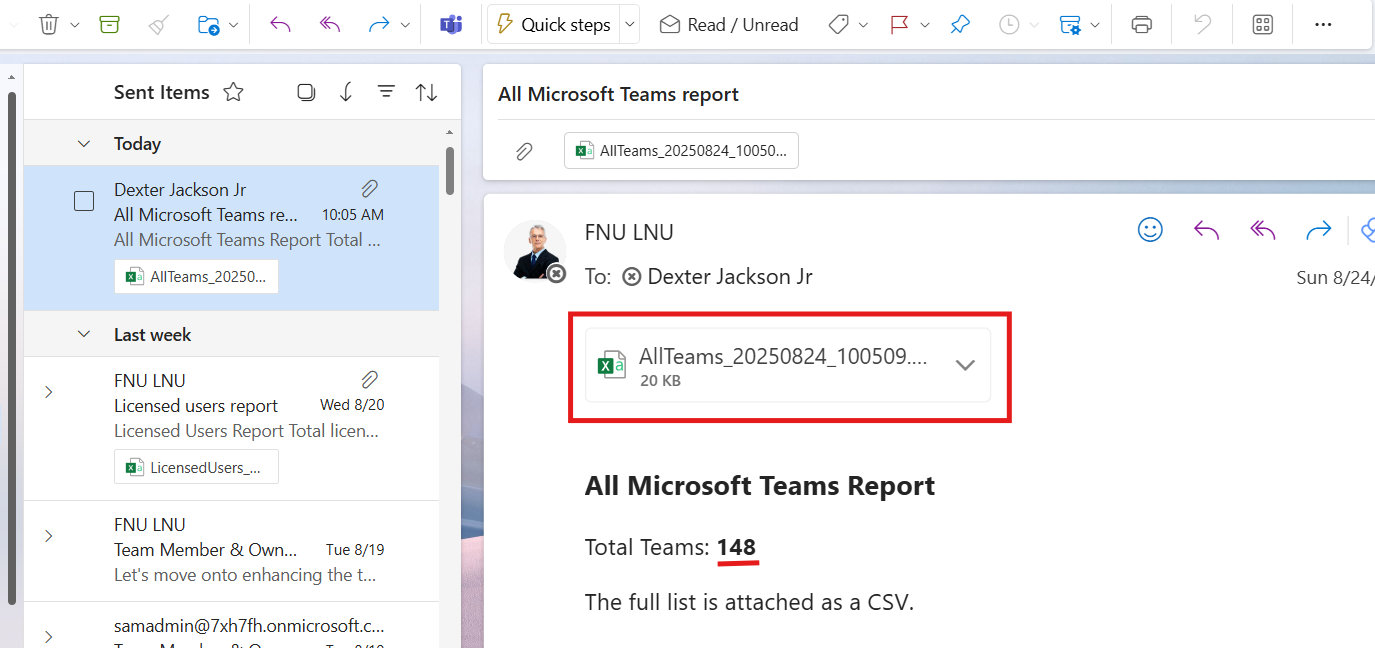
An HTML summary is created, showing the total number of Teams, and the CSV file is attached.
The script sends the report to the administrator via Send-MgUserMail.
iii) Further Enhancements
- Add Owners & Members: Extend the script to fetch owner and member details for each Team.
- Filter by Visibility: Separate private vs. public Teams for governance.
- Include Activity Metrics: Combine with usage reports to identify inactive Teams.
- Automated Scheduling: Run via Task Scheduler or Azure Automation to generate weekly or monthly audits.
- Archive/Flag Orphaned Teams: Integrate with governance policies to flag Teams without owners.
iv) Use Cases
- Tenant Governance: Maintain visibility into all Teams created across the organization.
- Security Audits: Identify public Teams that might expose sensitive information.
- Resource Management: Spot abandoned or duplicate Teams and clean them up.
- Compliance Tracking: Provide IT leadership with periodic snapshots of the Teams landscape.
v) Possible Errors & Solutions
| Error | Cause | Solution |
|---|---|---|
| Authorization_RequestDenied | Missing Graph scopes or consent not granted | Re-run Connect-MgGraph -Scopes "Group.Read.All","Mail.Send" and ensure admin consent. |
| Get-MgGroup not recognized | Microsoft Graph module not installed | Run Install-Module Microsoft.Graph -Scope CurrentUser. |
| CSV not created | Invalid $CsvOutDir path | Update the $CsvOutDir to a valid folder path. |
| Email not sent | $FromUser is not mailbox-enabled | Use a licensed mailbox-enabled account as the sender. |
| Results are empty | No Teams in tenant, or filter applied incorrectly | Remove the filter temporarily to verify group objects exist. |
vi) Conclusion
This script provides a straightforward way to fetch all Teams in your tenant and deliver them as a report directly to the administrator’s inbox. By automating this process, you gain consistent visibility into the Teams landscape, reduce the risk of shadow IT, and ensure proper governance. With a few enhancements, it can even evolve into a complete Teams governance toolkit.