Fetch All Active Admins in Entra ID Using Microsoft Graph PowerShell
Understanding who currently holds active administrative access in your tenant is critical for security, governance, and compliance. Unlike eligible admins, active admin assignments represent real, effective privilege at that moment — whether permanent or activated through Privileged Identity Management (PIM).
In this article, we’ll use Microsoft Graph PowerShell to fetch all active admin role assignments, identify what kind of principal holds the role (User, Service Principal, or Group), and export the results to a CSV file for further analysis.
🚀 Community Edition Released!
Try the M365Corner Microsoft 365 Reporting Tool — your DIY pack with 20+ out-of-the-box M365 reports for Users, Groups, and Teams.
i) The Script
The following script retrieves all active admin assignments in the tenant, resolves the role name, identifies the principal type, determines whether the assignment is permanent or PIM-activated, displays the results on the console, and exports them to a CSV file.
Required permissions
Before running the script, connect to Microsoft Graph with the following permissions:
- RoleManagement.Read.Directory
- Directory.Read.All
Connect-MgGraph -Scopes "RoleManagement.Read.Directory","Directory.Read.All"PowerShell Script – Fetch Active Admins
$CsvPath = "D:/ActiveAdmins_Report.csv"

$ActiveAssignments = Get-MgRoleManagementDirectoryRoleAssignmentScheduleInstance -All

$Results = foreach ($Assignment in $ActiveAssignments) {

    # Role name
    $Role = Get-MgRoleManagementDirectoryRoleDefinition `
                -UnifiedRoleDefinitionId $Assignment.RoleDefinitionId

    # Default values
    $DisplayName = "Unknown"
    $PrincipalType = "Unknown"
    $UPN = $null

    # Try resolving as User
    try {
        $User = Get-MgUser -UserId $Assignment.PrincipalId -ErrorAction Stop
        $DisplayName = $User.DisplayName
        $UPN = $User.UserPrincipalName
        $PrincipalType = "User"
    }
    catch {
        # Try Service Principal
        try {
            $SP = Get-MgServicePrincipal -ServicePrincipalId $Assignment.PrincipalId -ErrorAction Stop
            $DisplayName = $SP.DisplayName
            $PrincipalType = "Service Principal"
        }
        catch {
            # Try Group
            try {
                $Group = Get-MgGroup -GroupId $Assignment.PrincipalId -ErrorAction Stop
                $DisplayName = $Group.DisplayName
                $PrincipalType = "Group"
            }
            catch {
                $DisplayName = $Assignment.PrincipalId
            }
        }
    }

    # Permanent vs Activated
    $AdminType = switch ($Assignment.AssignmentType) {
        "Assigned"  { "Permanent" }
        "Activated" { "PIM Activated" }
        default     { "Unknown" }
    }

    [PSCustomObject]@{
        DisplayName       = $DisplayName
        UserPrincipalName = $UPN
        PrincipalType     = $PrincipalType
        RoleName          = $Role.DisplayName
        AdminType         = $AdminType
        AssignmentType    = $Assignment.AssignmentType
        Scope             = if ($Assignment.DirectoryScopeId -eq "/") { "Tenant" } else { $Assignment.DirectoryScopeId }
        StartDateTime     = $Assignment.StartDateTime
        EndDateTime       = $Assignment.EndDateTime
    }
}

$Results | Format-Table -AutoSize
$Results | Export-Csv -Path $CsvPath -NoTypeInformation -Encoding UTF8

Write-Host "`nActive Admins report exported to $CsvPath" -ForegroundColor Green
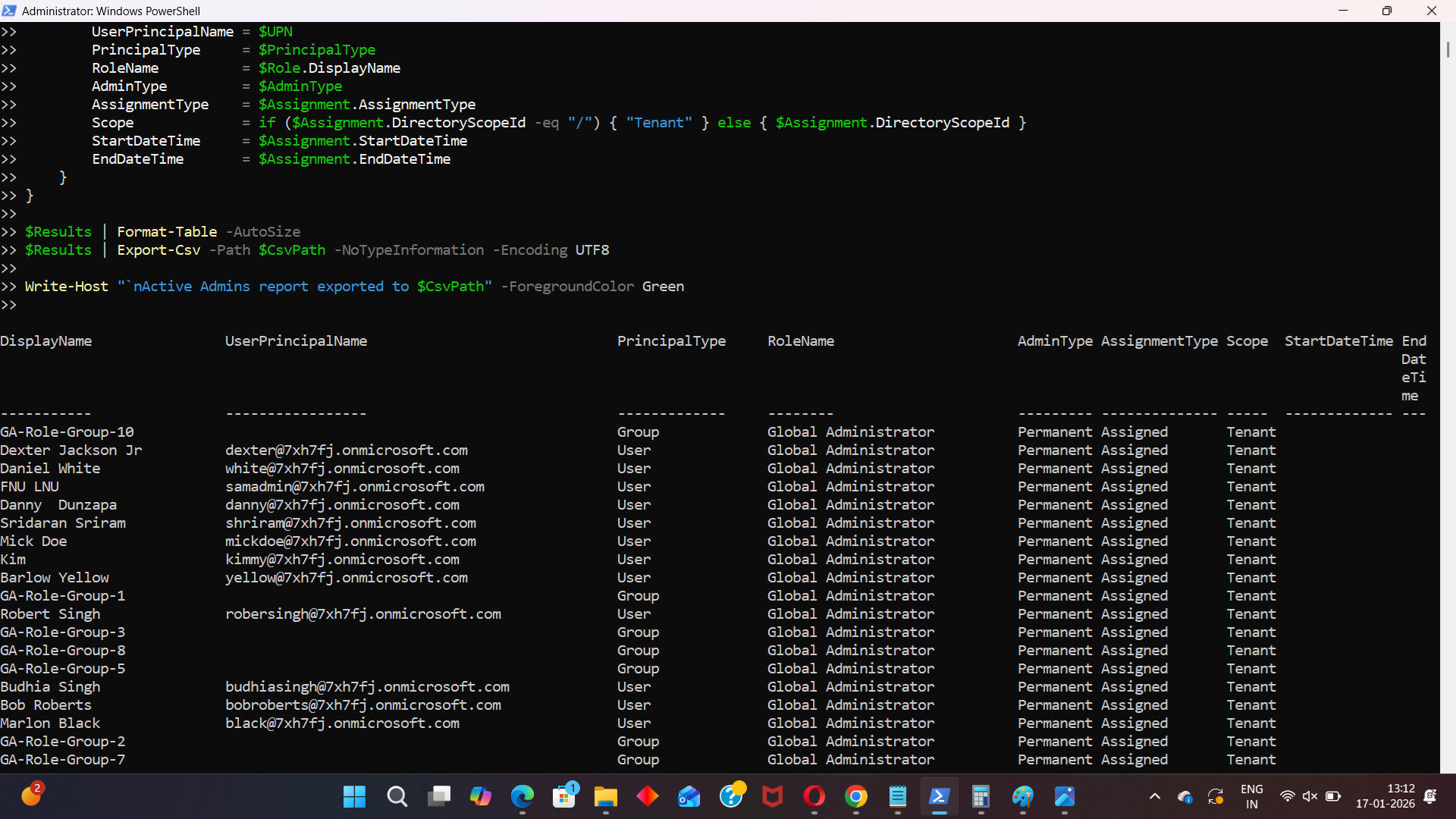
ii) How the Script Works
Let’s break down the script logic in a practical way.
- Fetching active admin assignments
- Permanently assigned admins
- PIM-activated admins (temporarily active)
- Resolving role names
- Resolving the principal type
- User → Get-MgUser
- Service Principal → Get-MgServicePrincipal
- Group → Get-MgGroup
- No false failures
- Accurate identification of who or what holds admin access
- Identifying permanent vs PIM-activated admins
- Scope handling
- / → Tenant-wide role
- Any other value → Scoped assignment
- Output and export
- Results are displayed in the console using Format-Table
- The same data is exported to a CSV file for auditing or reporting
Get-MgRoleManagementDirectoryRoleAssignmentScheduleInstance -AllThis cmdlet retrieves all active directory role assignments in the tenant.
It includes:
The -All parameter ensures pagination is handled correctly.
Each assignment contains a RoleDefinitionId, which is not human-readable.
The script resolves it using:
Get-MgRoleManagementDirectoryRoleDefinition
This converts role IDs into names such as Global Administrator, Exchange Administrator, etc.
Active admin roles can be assigned to different object types, not just users.
The script safely attempts to resolve the PrincipalId in this order:
This approach ensures:
$Assignment.AssignmentType
This property tells us how the role is active:
| AssignmentType | Meaning |
|---|---|
| Assigned | Permanently assigned admin |
| Activated | Activated |
The script converts this into a clear AdminType value.
DirectoryScopeId -eq "/"
iii)Further Enhancements
This script is intentionally written for clarity and correctness. Possible enhancements include:
- Caching users, service principals, and groups to improve performance in large tenants
- Filtering only high-risk roles (Global Admin, Privileged Role Admin, etc.)
- Excluding Microsoft-managed service principals
- Merging Eligible + Active admins into a single exposure report
- Scheduling the script for periodic security audits
iv) Possible Errors & Solutions
| Error | Cause | Solution |
|---|---|---|
| Resource does not exist (404) Get-MgUser : Resource '<GUID>' does not exist |
The admin role is assigned to a service principal or group, not a user. | The script already handles this correctly by attempting:
|
| Error: Authorization_RequestDenied | Missing Graph permissions | Reconnect using: Connect-MgGraph -Scopes "RoleManagement.Read.Directory","Directory.Read.All" and ensure admin consent is granted. |
| Slow execution in large tenants | NoEach assignment triggers multiple Graph calls to resolve principals. | Use this script for smaller tenants or detailed audits. For large tenants, a cached or raw assignment-only approach is recommended. |
v) Conclusion
Active admins represent real, effective privilege in your tenant — whether permanent or temporarily activated through PIM. Knowing exactly who (or what) holds that access is essential for security reviews, audits, and governance.
This Microsoft Graph PowerShell script provides a clear, accurate, and exportable view of all active admin assignments, including users, service principals, and groups, making it a reliable tool for administrators who want full visibility into their tenant’s administrative surface.