Department-Based License Assignment Using Graph PowerShell
Manually assigning Microsoft 365 licenses works fine in small environments — but as tenants grow, licensing quickly becomes a governance challenge.
Consider scenarios like:
- A new branch office opens (e.g., Sales-Rajkot)
- Multiple users are onboarded at once
- Department-based licensing policies are enforced
- Cost control requires avoiding duplicate license assignments
- License availability must be verified before assignment
In such cases, assigning licenses manually from the Microsoft 365 admin center is inefficient and error-prone. This guide demonstrates how to build a department-based smart license assignment script using Microsoft Graph PowerShell.
The script:
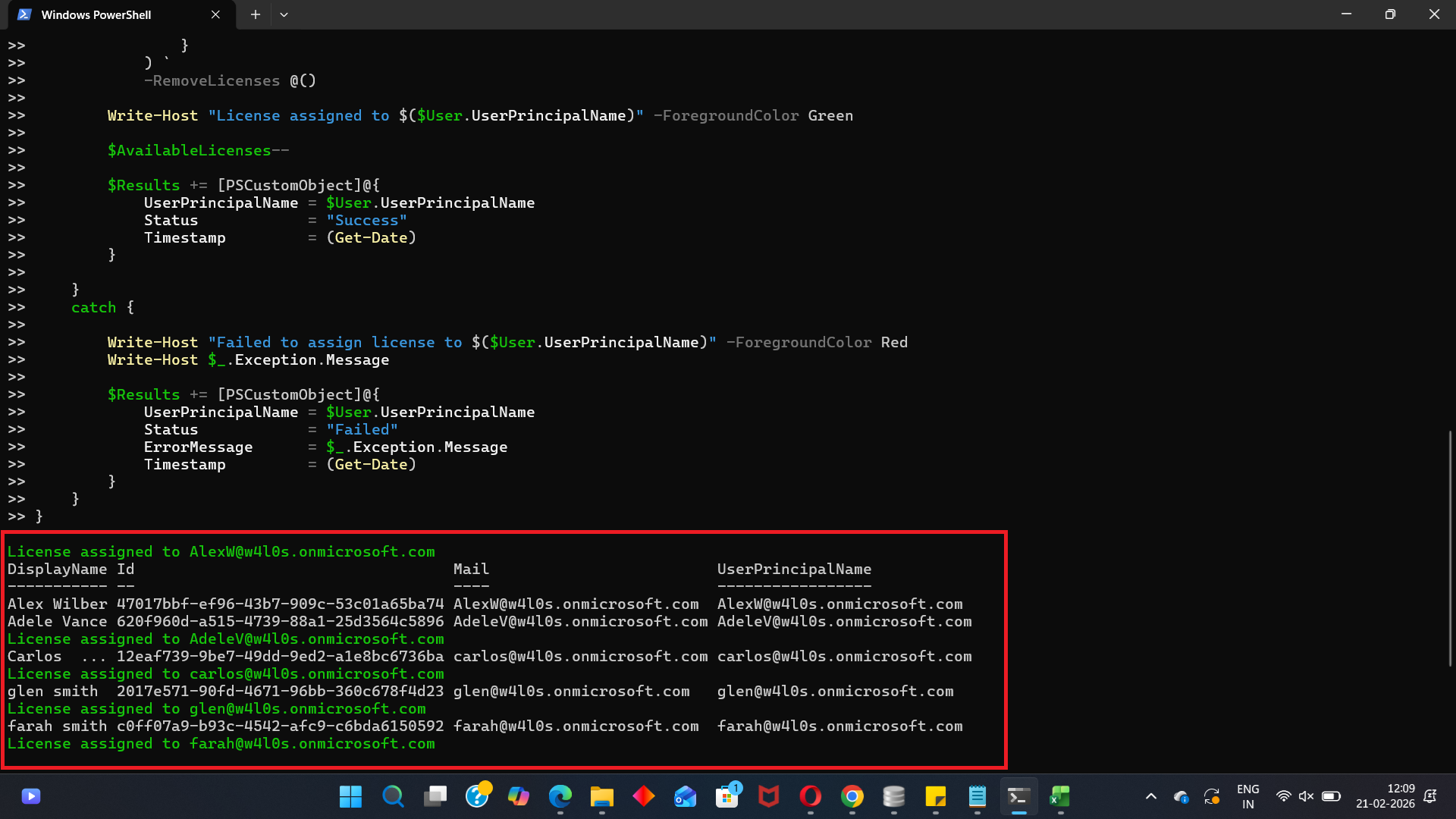
✔ Automatically fetches users from the Sales-Rajkot department
✔ Assigns the DEVELOPERPACK_E5 license
✔ Skips users who already have the license
✔ Verifies license availability before assignment
✔ Exports a detailed execution report
✔ Prevents common Graph licensing errors
We will be using:
- SkuPartNumber: DEVELOPERPACK_E5
- SkuId: c42b9cae-ea4f-4ab7-9717-81576235ccac
🚀 Community Edition Released!
Try the M365Corner Microsoft 365 Reporting Tool — your DIY pack with 20+ out-of-the-box M365 reports for Users, Groups, and Teams.
I) The Script
# Connect to Microsoft Graph
Connect-MgGraph -Scopes User.ReadWrite.All, Organization.Read.All

# Define Variables
$DepartmentName = "Sales-Rajkot"
$SkuId = "c42b9cae-ea4f-4ab7-9717-81576235ccac"

# Get SKU details
$Sku = Get-MgSubscribedSku | Where-Object {$_.SkuId -eq $SkuId}

if (-not $Sku) {
    Write-Host "Specified SKU not found in tenant." -ForegroundColor Red
    break
}

# Check license availability
$AvailableLicenses = $Sku.PrepaidUnits.Enabled - $Sku.ConsumedUnits

if ($AvailableLicenses -le 0) {
    Write-Host "No available licenses to assign." -ForegroundColor Red
    break
}

Write-Host "Available Licenses: $AvailableLicenses" -ForegroundColor Cyan

# Fetch users from department
$Users = Get-MgUser -Filter "department eq '$DepartmentName'" -All -Property Id,UserPrincipalName,AssignedLicenses

if (-not $Users) {
    Write-Host "No users found in department: $DepartmentName" -ForegroundColor Yellow
    break
}

# Prepare reporting array
$Results = @()

foreach ($User in $Users) {

    try {

        # Skip if already licensed
        if ($User.AssignedLicenses.SkuId -contains $SkuId) {

            Write-Host "$($User.UserPrincipalName) already licensed. Skipping." -ForegroundColor Yellow

            $Results += [PSCustomObject]@{
                UserPrincipalName = $User.UserPrincipalName
                Status            = "Skipped - Already Licensed"
                Timestamp         = (Get-Date)
            }

            continue
        }

        # Re-check license availability
        if ($AvailableLicenses -le 0) {
            Write-Host "No remaining licenses available. Stopping process." -ForegroundColor Red
            break
        }

        # Assign license
        Set-MgUserLicense -UserId $User.Id `
            -AddLicenses @(
                @{
                    SkuId = $SkuId
                }
            ) `
            -RemoveLicenses @()

        Write-Host "License assigned to $($User.UserPrincipalName)" -ForegroundColor Green

        $AvailableLicenses--

        $Results += [PSCustomObject]@{
            UserPrincipalName = $User.UserPrincipalName
            Status            = "Success"
            Timestamp         = (Get-Date)
        }

    }
    catch {

        Write-Host "Failed to assign license to $($User.UserPrincipalName)" -ForegroundColor Red
        Write-Host $_.Exception.Message

        $Results += [PSCustomObject]@{
            UserPrincipalName = $User.UserPrincipalName
            Status            = "Failed"
            ErrorMessage      = $_.Exception.Message
            Timestamp         = (Get-Date)
        }
    }
}

# Export Report
$ReportPath = "C:\Path\Sales-Rajkot-LicenseReport.csv"
$Results | Export-Csv $ReportPath -NoTypeInformation

Write-Host "Report exported to $ReportPath" -ForegroundColor Cyan
II) How the Script Works
- Connect to Graph
Requests:User.ReadWrite.All and Organization.Read.All permissions.
Required Role: Global Administrator or License Administrator - Validate SKU
Get-MgSubscribedSku - License exists
- SKU matches tenant
- Prevents runtime failure
- Check License Availability
- LicenseLimitExceeded errors
- Mid-process failures
- Fetch Users by Department
- Skip Already Licensed Users
- Assign License Properly
Ensures:
$Sku.PrepaidUnits.Enabled - $Sku.ConsumedUnitsPrevents:
Get-MgUser -Filter "department eq 'Sales-Rajkot'" -All
No CSV required.
Fully dynamic.
if ($User.AssignedLicenses.SkuId -contains $SkuId)Prevents duplicate assignment.
Set-MgUserLicense `
  -AddLicenses @{SkuId = $SkuId} `
  -RemoveLicenses @()
NOTE: -RemoveLicenses @() Is Mandatory
Even when not removing anything.
If omitted, you may see:
Cannot convert the literal 'System.Collections.Hashtable' to the expected type 'Edm.Guid'
Always include it.
NOTE: Validate SKU Before Running
Run:
Get-MgSubscribedSku | Select SkuId, SkuPartNumberNever assume SKU IDs across tenants.
Required Graph API Permissions
Scopes: User.ReadWrite.All and Organization.Read.All
Role: Global Admin OR License Admin
III) Further Enhancements
You can extend this script to:
- Assign different licenses based on department
- Remove old license before assigning new one (upgrade flow)
- Auto-run during user onboarding
- Combine with dynamic group validation
- Log to SharePoint instead of CSV
IV) Possible Errors & Solutions
| Error | Cause | Solution |
|---|---|---|
| LicenseLimitExceeded | No available licenses | Purchase more or free up unused licenses |
| Insufficient Privileges | Missing scopes or role | Reconnect with proper permissions |
| Department Filter Returns Nothing | Misspelled department value | Validate with: Get-MgUser -All | Select UserPrincipalName,Department |
V) Conclusion
This script transforms license management from: Manual → Intelligent → Controlled → Reported
It is ideal for:
- Structured onboarding
- Departmental licensing models
- Cost optimization
- Governance enforcement
For growing tenants, department-based automation is a must, not a luxury.