Create a Microsoft 365 Role-Assignable Security Group using Graph PowerShell
Role-assignable security groups are the foundation for managing administrative access in Microsoft Entra ID without directly assigning roles to individual users. Instead of repeatedly assigning roles user by user, administrators can assign roles to a group and manage access simply by controlling group membership.
This article walks through a simple Microsoft Graph PowerShell script that creates a role-assignable security group in Microsoft 365—clean, minimal, and fully aligned with Graph requirements.
🚀 Community Edition Released!
Try the M365Corner Microsoft 365 Reporting Tool — your DIY pack with 20+ out-of-the-box M365 reports for Users, Groups, and Teams.
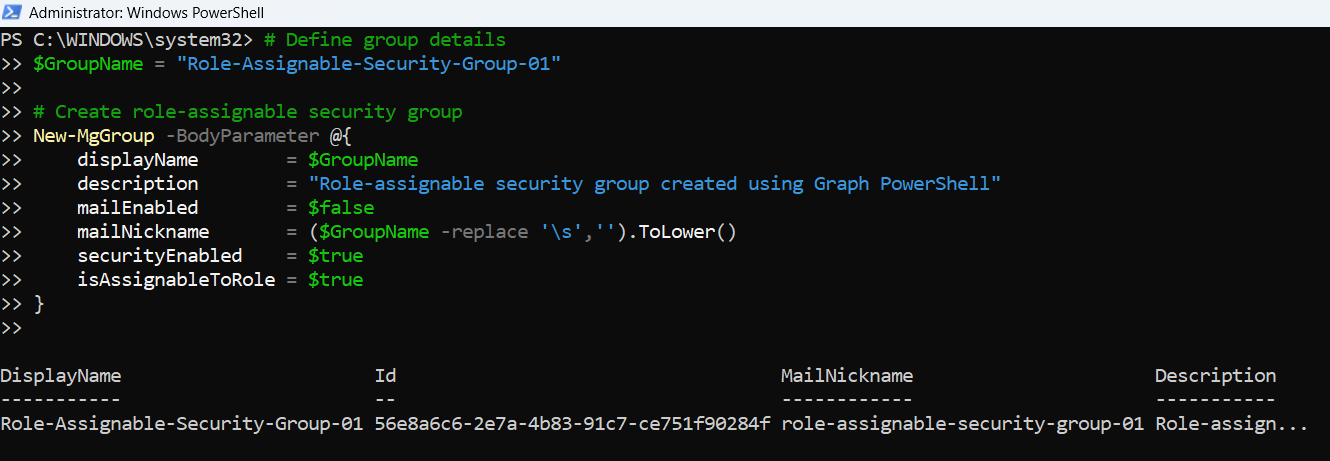
i) The Script
# Define group details
$GroupName = "Role-Assignable-Security-Group-01"

# Create role-assignable security group
New-MgGroup -BodyParameter @{
    displayName        = $GroupName
    description        = "Role-assignable security group created using Graph PowerShell"
    mailEnabled        = $false
    mailNickname       = ($GroupName -replace '\s','').ToLower()
    securityEnabled    = $true
    isAssignableToRole = $true
}
ii) How the Script Works
- Defines the group name
- The group’s Display Name
- Generating a valid Mail Nickname
- Creates the security group using Microsoft Graph
- displayName
The friendly name of the group as shown in Entra ID. - description
Provides clarity on the purpose of the group, which is especially useful in larger tenants. - mailEnabled = $false
Ensures the group is not mail-enabled. Role-assignable groups must be security groups. - mailNickname
Mandatory even for non-mail-enabled groups. The script auto-generates it by removing spaces and converting the name to lowercase. - securityEnabled = $true
Confirms this is a security group. - isAssignableToRole = $true
This is the critical setting that makes the group eligible for admin role assignments.
The script begins by storing the display name of the group in a variable:
$GroupName = "Role-Assignable-Security-Group-01"
This value is used consistently for:
The group is created using the New-MgGroup cmdlet with a -BodyParameter hashtable, which is the recommended and safest approach when working with Microsoft Graph PowerShell.
Key properties explained:
⚠️ Important:
A group must be created with isAssignableToRole = $true from the start.
Existing groups cannot be converted into role-assignable groups later.
iii) Further Enhancements
Once you’re comfortable with this basic script, you can extend it in several useful ways:
- Assign an Entra ID role to the group
- Immediately assign roles like Global Reader, Security Administrator, or Authentication Administrator after creation.
- Bulk creation
- Read group names and descriptions from a CSV file to create multiple role-assignable groups in one run.
- Naming standard enforcement
- Add prefixes such as PRIV-, RBAC-, or environment tags like PROD, TEST.
- Logging and reporting
- Capture created group names, IDs, and timestamps into a CSV file for auditing.
- Validation checks
- Check if a group with the same name already exists before attempting creation.
iv) Possible Errors and Solutions
| Error | Cause | Solution |
|---|---|---|
| Authorization_RequestDenied | The signed-in account does not have permission to create role-assignable groups. | Run the script using an account with sufficient Entra ID privileges, such as Privileged Role Administrator. |
| Request_BadRequest during group creation |
|
Ensure the group name generates a unique and valid mail nickname. Adjust naming conventions if required. |
| Attempting to modify an existing group Role assignable property cannot be updated |
isAssignableToRole cannot be added to an existing group. | Always create a new group with isAssignableToRole = $true. Conversion is not supported. |
| Group creation succeeds but role assignment later fails Role assignment errors in follow-up scripts |
Role-assignable group creation succeeded, but role management permissions are missing. | Ensure the account has both group management and directory role management privileges. |
v) Conclusion
Role-assignable security groups are a best practice for managing administrative access in Microsoft 365. This simple Graph PowerShell script provides a clean starting point for creating such groups correctly and consistently.
By combining this script with bulk creation, role assignment, and membership automation, administrators can build a scalable, auditable, and secure role management model—exactly the kind of automation that simplifies day-to-day Entra ID administration and aligns with modern RBAC practices.