Confirm-MgUserMemberGroup: Graph PowerShell Cmdlet
In Microsoft Entra ID, administrators often need to quickly verify whether a user belongs to one or more specific groups—especially during access reviews, troubleshooting permission issues, or validating conditional access dependencies.
The Confirm-MgUserMemberGroup cmdlet simplifies this task by checking a user’s membership against a given list of group IDs and returning only the groups where the user is actually a member.
i) Cmdlet Syntax
Confirm-MgUserMemberGroup -UserId <String> -BodyParameter <Hashtable>]Key Parameter:
- -UserId: Specifies the user whose group membership you want to confirm.
You can provide either the User Principal Name (UPN) or the Object ID. - -BodyParameter: A hashtable containing the list of groupIds to check membership against.
ii) Usage Examples
$params = @{
    groupIds = @(
        "0f1031ba-c82f-4a27-b609-ec4e61c0975f"
        "347fd60f-f23a-40d0-9e57-f735f512b510"
    )
}
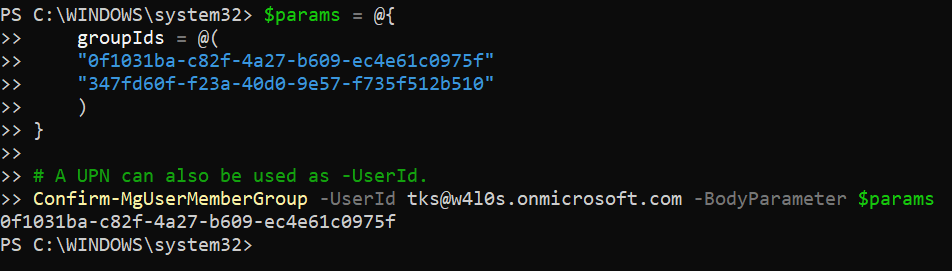
Confirm-MgUserMemberGroup -UserId tks@w4l0s.onmicrosoft.com -BodyParameter $params
Explanation:
This example checks whether the user tks@w4l0s.onmicrosoft.com is a member of the two specified groups. The cmdlet returns only the group IDs where membership is confirmed. If the user is not a member of any of the provided groups, the result will be empty.
iii) Cmdlet Tips
- The cmdlet does not list all groups the user belongs to—only those passed in groupIds.
- Use this cmdlet when you already know the target group IDs and want a fast membership check.
- A UPN or Object ID can be used for the -UserId parameter.
- Ideal for conditional access validation, license group checks, and role assignment verification.
- More efficient than enumerating all group memberships for the user.
iv) Possible Errors & Solutions
| Error / Message | Cause | Solution |
| Authorization_RequestDenied | Insufficient permissions | Ensure User.Read.All and Group.Read.All permissions are granted with admin consent. |
| Request_BadRequest | Invalid or malformed group IDs | Verify that each value in groupIds is a valid group object ID. |
| Empty output | User is not a member of the specified groups | Confirm membership using the Entra admin center or check different group IDs. |
| Cmdlet not recognized | Microsoft.Graph module missing | Install or update using Install-Module Microsoft.Graph. |
v) Conclusion
The Confirm-MgUserMemberGroup cmdlet is a precise and efficient way to validate user membership in specific groups within Microsoft Entra ID. By returning only confirmed memberships, it helps administrators perform targeted access checks without unnecessary overhead—making it especially useful for audits, troubleshooting, and automated governance workflows.