Bulk Invite Entra ID Guest Users Using PowerShell
Inviting external users (guests) into Microsoft 365 one-by-one can be time-consuming—especially when you’re onboarding vendors, partners, clients, or contractors in bulk.
In this guide, you’ll learn how to bulk invite Microsoft 365 guest users using Microsoft Graph PowerShell, using a CSV input file and exporting a clean results report after execution.
🚀 Community Edition Released!
Try the M365Corner Microsoft 365 Reporting Tool — your DIY pack with 20+ out-of-the-box M365 reports for Users, Groups, and Teams.
Sample CSV File Format (GuestUsers.csv)
Create a CSV file with the following headers:
DisplayName,EmailAddress
John Vendor,john.vendor@externaldomain.com
Sarah Partner,sarah.partner@partnerdomain.com
Adam Contractor,adam.contractor@contosoext.com
✅ Make sure the column names match exactly: DisplayName and EmailAddress
Script
# -----------------------------
# Bulk Invite Guest Users (Graph PowerShell)
# -----------------------------

# Install module if needed:
# Install-Module Microsoft.Graph -Scope CurrentUser

Import-Module Microsoft.Graph.Identity.SignIns

# Connect to Graph (you must be a tenant admin to invite guests)
Connect-MgGraph -Scopes "User.Invite.All"

# Path to CSV
$CsvPath = "D:\test_data\guestusers-test-data\GuestUsers.csv"

# Import guest list
$GuestUsers = Import-Csv $CsvPath

# Output results
$Results = @()

foreach ($Guest in $GuestUsers) {

    $DisplayName  = $Guest.DisplayName
    $EmailAddress = $Guest.EmailAddress

    Write-Host "Inviting: $DisplayName <$EmailAddress>" -ForegroundColor Cyan

    try {
        $InvitationParams = @{
            InvitedUserDisplayName  = $DisplayName
            InvitedUserEmailAddress = $EmailAddress
            InviteRedirectUrl       = "https://myapps.microsoft.com"
            SendInvitationMessage   = $true
        }

        $InviteResult = New-MgInvitation -BodyParameter $InvitationParams

        $Results += [PSCustomObject]@{
            DisplayName            = $DisplayName
            EmailAddress           = $EmailAddress
            Status                 = "Invited"
            InvitedUserId          = $InviteResult.InvitedUser.Id
            InviteRedeemUrl        = $InviteResult.InviteRedeemUrl
            InvitationCreationTime = $InviteResult.CreatedDateTime
        }
    }
    catch {
        $Results += [PSCustomObject]@{
            DisplayName            = $DisplayName
            EmailAddress           = $EmailAddress
            Status                 = "Failed"
            InvitedUserId          = ""
            InviteRedeemUrl        = ""
            InvitationCreationTime = ""
            Error                  = $_.Exception.Message
        }

        Write-Host "Failed: $EmailAddress -> $($_.Exception.Message)" -ForegroundColor Red
    }
}

# Export results
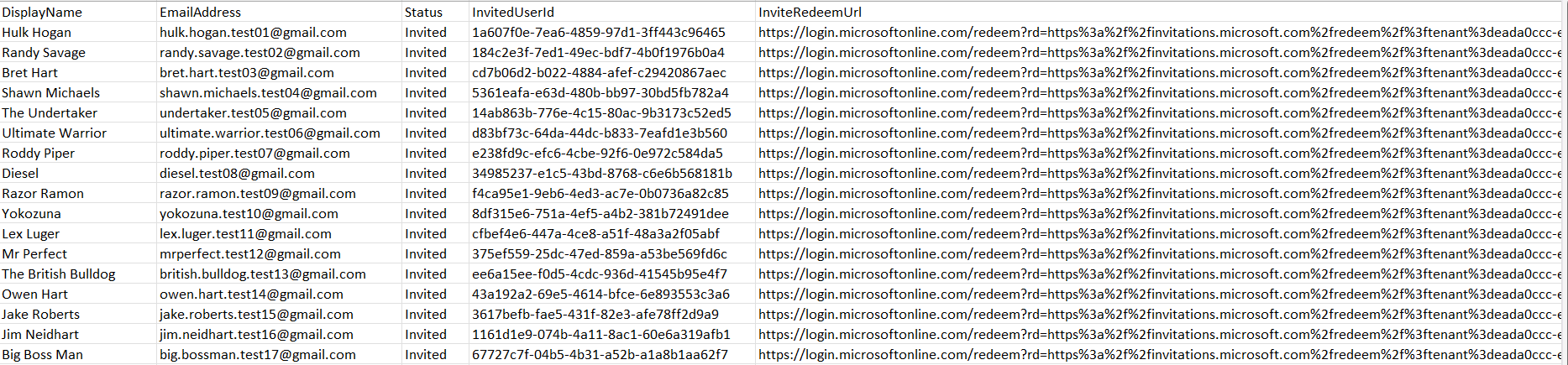
$Results | Export-Csv ".\GuestInviteResults.csv" -NoTypeInformation

Write-Host "`nDone! Results saved to GuestInviteResults.csv" -ForegroundColor Green.
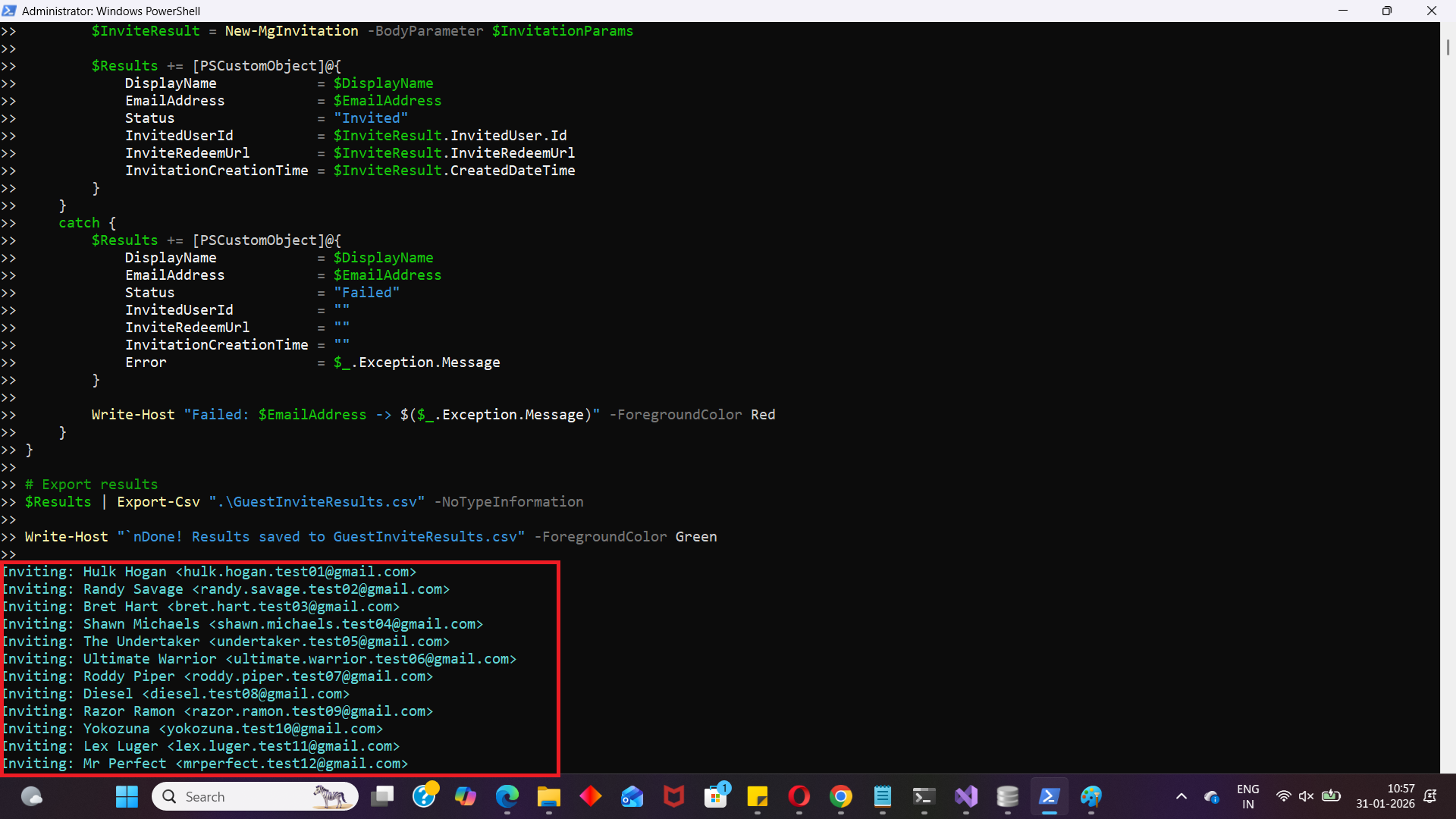
How the Script Works
This script uses Microsoft Graph PowerShell to send guest invitations in bulk using a CSV input file.
- Imports the required Graph module
- Connects to Microsoft Graph with required permission
- Loads guest users from the CSV file
- DisplayName
- EmailAddress
- Invites each guest using New-MgInvitation
- Captures success and failure results
- Status = Invited
- InvitedUserId
- InviteRedeemUrl
- InvitationCreationTime
- Status = Failed
- Error message returned by Graph
- Exports the results to a CSV report
Import-Module Microsoft.Graph.Identity.SignInsThis loads the Graph module needed to run invitation-related commands.
Connect-MgGraph -Scopes "User.Invite.All"The script connects using delegated permissions and requests the User.Invite.All scope, which is required to invite guest users.
$GuestUsers = Import-Csv $CsvPathEach row in the CSV becomes one guest entry with:
For each guest user, the script builds a hashtable:
$InvitationParams = @{
    InvitedUserDisplayName  = $DisplayName
    InvitedUserEmailAddress = $EmailAddress
    InviteRedirectUrl       = "https://myapps.microsoft.com"
    SendInvitationMessage   = $true
}
Then it sends the invitation using:
New-MgInvitation -BodyParameter $InvitationParamsIf the invite succeeds, the script stores details such as:
If it fails, the script stores:
$Results | Export-Csv ".\GuestInviteResults.csv" -NoTypeInformationAt the end, you get a clean report file:
✅ GuestInviteResults.csv
Further Enhancements
Here are a few improvements you can add to make the script more powerful for real-world production use:
- Validate empty values before inviting
Skip rows where DisplayName or EmailAddress is missing to avoid avoidable failures. - Prevent duplicate invitations
You can check if a guest already exists in Entra ID before inviting again.
Example logic: - Search by mail address
- If found, mark as “Already Exists” instead of inviting again
- Add custom invitation message
You can customize the invitation message (branding + instructions) to reduce confusion for external users. - Use different redirect URLs per guest type
Instead of using a single redirect URL (https://myapps.microsoft.com), you can route users to: - A SharePoint onboarding page
- A Teams welcome page
- An internal access request portal
- Export results with timestamped file names
This helps when you run the script frequently.
Example idea: - GuestInviteResults-2026-01-31.csv
Possible Errors & Solutions
Below are common issues you may face while running this guest invitation script.
| Error | Cause | Solution |
|---|---|---|
| Insufficient privileges to complete the operation | Your account doesn’t have permission to invite guest users or the required scope wasn’t granted. |
|
| InvalidAuthenticationToken / Access token is empty | Graph authentication failed, or the token expired. | Disconnect and reconnect: Disconnect-MgGraph Connect-MgGraph -Scopes "User.Invite.All" |
| New-MgInvitation : Resource not found | This can happen if Graph modules aren’t loaded correctly, or if the environment is missing required dependencies. |
|
| The term 'New-MgInvitation' is not recognized | The required Graph module isn’t installed or not imported properly. | Install and import the module: Install-Module Microsoft.Graph -Scope CurrentUser Import-Module Microsoft.Graph.Identity.SignIns |
| Import-Csv : Could not find file | The CSV path in $CsvPath is incorrect. | Verify the CSV file exists and update: $CsvPath = "D:\test_data\guestusers-test-data\GuestUsers.csv" |
| One or more properties contains invalid values | The email address format is invalid, or required fields are empty. |
|
Conclusion
Bulk inviting guest users is one of the most common onboarding tasks for Microsoft 365 administrators—especially when working with external vendors and partner organizations.
With this Microsoft Graph PowerShell script, you can:
✅ Import guests from a CSV file
✅ Invite them automatically using Graph
✅ Capture success/failure results cleanly
✅ Export a detailed invitation report for tracking