List Apps Created by Specific User in Entra ID
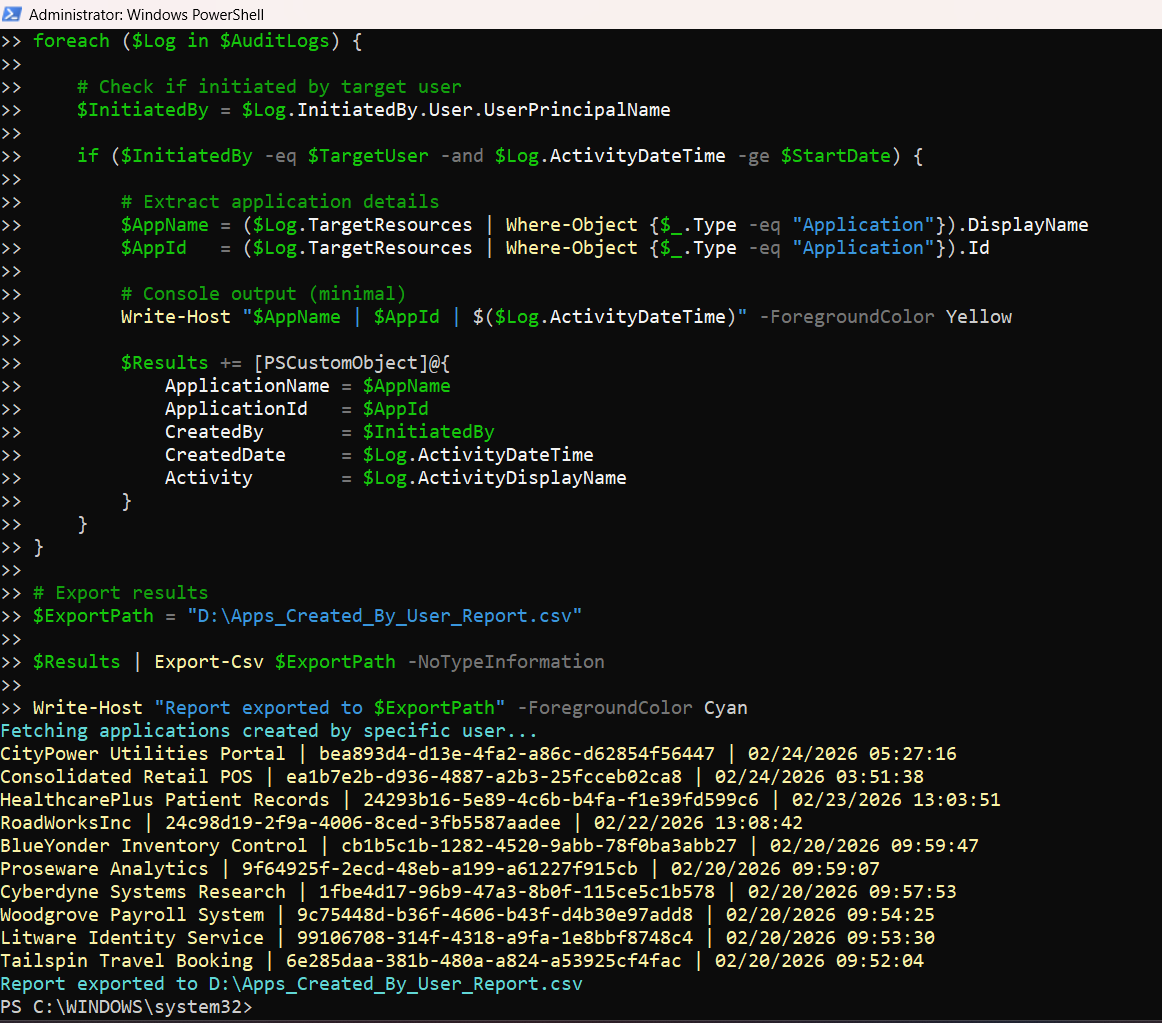
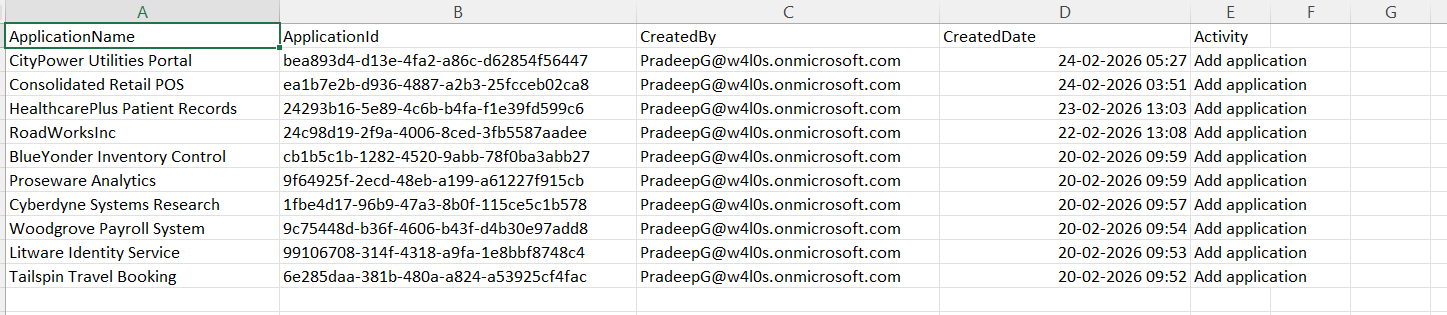
Tracking which applications are created by a specific user is critical for governance, auditing, and identifying potential misuse of app registrations. This script leverages audit logs to identify applications created by a specific user within a defined timeframe and exports the results to a CSV report.
🚀 Community Edition Released!
Try the M365Corner Microsoft 365 Reporting Tool — your DIY pack with 20+ out-of-the-box M365 reports for Users, Groups, and Teams.
i) Script
Connect-MgGraph -Scopes AuditLog.Read.All, Application.Read.All

Write-Host "Fetching applications created by specific user..." -ForegroundColor Cyan

# Define target user
$TargetUser = "pradeepg@w4l0s.onmicrosoft.com"

# Define date range (optional - last 30 days)
$StartDate = (Get-Date).AddDays(-30)

# Fetch audit logs for application creation
$AuditLogs = Get-MgAuditLogDirectoryAudit -Filter "activityDisplayName eq 'Add application'" -All

$Results = @()

foreach ($Log in $AuditLogs) {

    # Check if initiated by target user
    $InitiatedBy = $Log.InitiatedBy.User.UserPrincipalName

    if ($InitiatedBy -eq $TargetUser -and $Log.ActivityDateTime -ge $StartDate) {

        # Extract application details
        $AppName = ($Log.TargetResources | Where-Object {$_.Type -eq "Application"}).DisplayName
        $AppId   = ($Log.TargetResources | Where-Object {$_.Type -eq "Application"}).Id

        # Console output (minimal)
        Write-Host "$AppName | $AppId | $($Log.ActivityDateTime)" -ForegroundColor Yellow

        $Results += [PSCustomObject]@{
            ApplicationName = $AppName
            ApplicationId   = $AppId
            CreatedBy       = $InitiatedBy
            CreatedDate     = $Log.ActivityDateTime
            Activity        = $Log.ActivityDisplayName
        }
    }
}

# Export results
$ExportPath = "D:\Apps_Created_By_User_Report.csv"

$Results | Export-Csv $ExportPath -NoTypeInformation

Write-Host "Report exported to $ExportPath" -ForegroundColor Cyan
Download this script from our M365Corner GitHub Repo: https://github.com/m365corner/M365Corner-Scripts/tree/main/Entra-Apps-Related-Scripts/List-Entra-Apps-Created-By-Specific-User
ii) How the Script Works
| Step | Explanation |
|---|---|
| Connect to Graph | Uses Connect-MgGraph with AuditLog.Read.All and Application.Read.All permissions |
| Define Target User | Specifies the user whose app creation activity is being tracked |
| Set Date Range | Filters logs to only include activity within the last 30 days |
| Fetch Audit Logs | Retrieves directory audit logs for “Add application” events |
| Filter Logs | Checks if the app was created by the target user and within the time range |
| Extract App Details | Pulls application name and ID from TargetResources |
| Console Output | Displays minimal details for quick verification |
| Build Report Object | Stores structured data including creator, app name, and creation date |
| Export to CSV | Saves results for further analysis and reporting |
iii) Further Enhancements
Support Multiple Users
- Accept a list of users (CSV input)
- Generate a combined or per-user report
Remove Date Filter
- Track all-time app creation activity for forensic investigations
Include App Owners
- Enrich the report with: Get-MgApplicationOwner
Add API Permissions
- Extend script to capture permissions for deeper governance insights
Schedule Automation
- Run weekly/monthly to track user behavior trends
iv) Frequently Asked Questions
| Question | Answer |
|---|---|
| Why use audit logs instead of Get-MgApplication? | Because creator info is only available in audit logs |
| Can this script track older apps? | Only if audit logs are retained (default retention applies) |
| What if no results are returned? | User may not have created apps or logs may be outside retention |
| Can I track multiple users? | Yes, with minor modification (loop through user list) |
v) Admin Usecases
| Use Case | Description |
|---|---|
| Security Auditing | Identify apps created by specific users |
| Insider Risk Monitoring | Detect unusual app creation activity |
| Compliance Reporting | Track who is creating applications in the tenant |
| Incident Investigation | Trace suspicious apps back to the creator |
| Governance Enforcement | Ensure only authorized users create apps |
vi) Possible Errors & Solutions
| Error | Cause | Solution |
|---|---|---|
| Insufficient privileges | Missing Graph permissions |
Ensure: Connect-MgGraph -Scopes AuditLog.Read.All, Application.Read.All Admin consent may be required. |
| No results returned |
• User hasn’t created any apps • Activity outside retention period |
• Remove or extend date filter • Verify audit log availability |
| InitiatedBy is null | Some logs may not contain user information | Add null checks before comparison if needed |
| Export path not found | Invalid directory |
Ensure the path exists: D:\Apps_Created_By_User_Report.csv |
vii) Conclusion
This script provides a focused way to track applications created by a specific user, making it highly valuable for: 1) Security investigations, 2) Governance enforcement and 3) Compliance reporting.
By leveraging audit logs, it fills a critical gap that standard application queries cannot—identifying the creator of an app. With further enhancements, this script can evolve into a powerful user-based app activity monitoring solution within your M365 environment.