Get-MgRoleManagementDirectory RoleAssignmentScheduleInstance — Graph PowerShell Guide
Microsoft Entra ID (Azure AD) Privileged Identity Management (PIM) and role governance rely heavily on role assignment schedules. But in real admin life, what you often need is simple:
“Show me the active role assignments right now — who has which role, and from what schedule?”
That’s exactly what Get-MgRoleManagementDirectoryRoleAssignmentScheduleInstance does.It retrieves instances of active directory role assignments in your tenant — including assignments created directly, through schedules, or via activation requests.
🚀 Community Edition Released!
Try the M365Corner Microsoft 365 Reporting Tool — your DIY pack with 20+ out-of-the-box M365 reports for Users, Groups, and Teams.
i) Cmdlet Syntax
Module: Microsoft.Graph.Identity.Governance
List (Default)
Get-MgRoleManagementDirectoryRoleAssignmentScheduleInstance ` [-ExpandProperty <string[]>] [-Property <string[]>] [-Filter <string>] [-Search <string>] [-Skip <int>] [-Sort <string[]>] [-Top <int>]Get (Single Instance by Id)
Get-MgRoleManagementDirectoryRoleAssignmentScheduleInstance -UnifiedRoleAssignmentScheduleInstanceId <string>Required Permissions
To run this cmdlet, your account/app needs at least one of these permissions:
Delegated:
- RoleAssignmentSchedule.Read.Directory (least privileged)
- RoleManagement.Read.Directory
- RoleManagement.Read.All
- RoleManagement.ReadWrite.Directory
- RoleAssignmentSchedule.ReadWrite.Directory
Application:
- RoleAssignmentSchedule.Read.Directory (least privileged)
- RoleManagement.Read.Directory
- RoleManagement.Read.All
- RoleManagement.ReadWrite.Directory
- RoleAssignmentSchedule.ReadWrite.Directory
ii) Usage Examples
Example 1: List all Directory Role Assignment Schedule Instances
Get-MgRoleManagementDirectoryRoleAssignmentScheduleInstance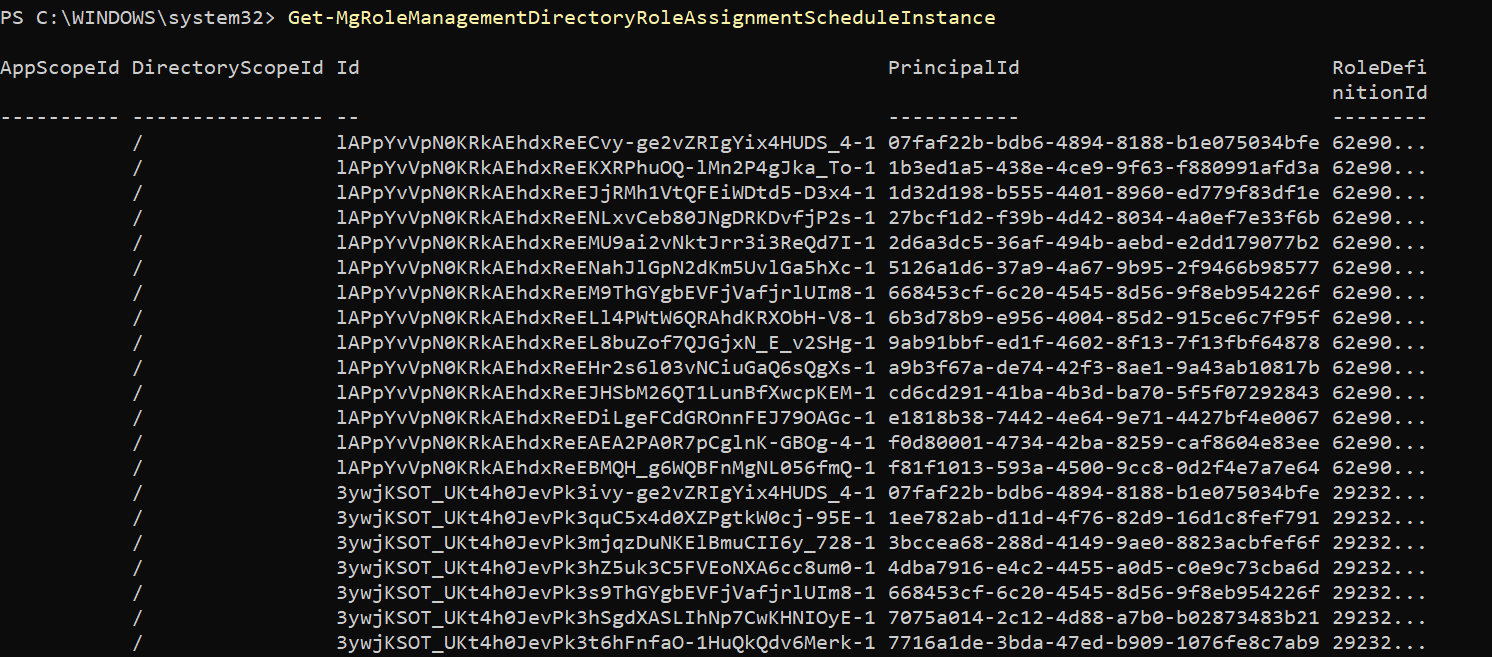
What this does:
Returns all active directory role assignment schedule instances in your tenant (paged by default).
Example 2: View a single Directory Role Assignment Schedule Instance
Get-MgRoleManagementDirectoryRoleAssignmentScheduleInstance -UnifiedRoleAssignmentScheduleInstanceId y-RKGSaxskC9W2CRs4CXfQ2WD2IVpTlHiKEl01ZMWJY-1
What this does:
Fetches only the specific schedule instance matching that ID — useful for investigations or audits.
Example 3: Export all instances to CSV
Get-MgRoleManagementDirectoryRoleAssignmentScheduleInstance | export-csv d:/abcdef.csvWhat this does:
Exports the retrieved schedule instances to a CSV file for reporting or compliance archives.
iii) Cmdlet Tips
- Always import the correct module
- Use -All for full tenant pulls
By default, Graph returns paged results. - Use -Property to speed up output
Pulling only what you need is faster in large tenants: - Use -ExpandProperty when you want rich objects
Expanding relationships (principal, roleDefinition, directoryScope) makes the output more human-readable: - Filter early when investigatingFilters reduce noise. The cmdlet supports OData filters.
Import-Module Microsoft.Graph.Identity.GovernanceIf the module isn’t loaded, the cmdlet won’t be found.
Get-MgRoleManagementDirectoryRoleAssignmentScheduleInstance -AllThis avoids missing assignments beyond the first page.
Get-MgRoleManagementDirectoryRoleAssignmentScheduleInstance -All -Property Id,PrincipalId,RoleDefinitionId,StartDateTime,EndDateTimeGet-MgRoleManagementDirectoryRoleAssignmentScheduleInstance -All -ExpandProperty "principal,roleDefinition,directoryScope"iv) Use Cases
This cmdlet is especially useful for:
- PIM / Role Assignment Auditing
List active role assignments created through PIM schedules. - Security Investigations
When a user suddenly has elevated privilege, use this cmdlet to inspect the assignment instance. - Compliance Reporting
Export all schedule instances regularly to maintain proof of role governance. - Role Hygiene Reviews
Identify long-running or permanent active role instances that should be time-bound.
v) Possible Errors and Solutions
| Error | Cause | Solution |
|---|---|---|
| “Get-MgRoleManagementDirectoryRoleAssignmentScheduleInstance : The term is not recognized…” | Module not installed or imported. | Install-Module Microsoft.Graph.Identity.Governance Import-Module Microsoft.Graph.Identity.Governance |
| Insufficient privileges to complete the operation | Cause: Wrong ID Instance no longer active ID copied from a different object type (e.g., schedule request) |
First list instances and confirm the ID: Get-MgRoleManagementDirectoryRoleAssignmentScheduleInstance -Top 50 Then retry with the correct value. |
| Empty output | Cause: No active schedule instances currently You are filtering too narrowly Results are paged and you didn’t use -All |
Get-MgRoleManagementDirectoryRoleAssignmentScheduleInstance -All |
vi) Conclusion
Get-MgRoleManagementDirectoryRoleAssignmentScheduleInstance is your go-to Graph PowerShell cmdlet for pulling active Entra directory role assignment schedule instances.
It helps you:
- audit PIM-based assignments,
- investigate unexpected privilege elevation,
- build compliance exports,
- and review role hygiene across your tenant.
For large environments, combine it with -All, -Property, and -ExpandProperty to get clean, performance-friendly output.