What are Microsoft Entra Directory Roles?
Microsoft Entra Directory Roles are predefined permission sets that allow administrators to perform specific tasks within a tenant.
Each role grants access to particular areas such as:
- User management
- Group management
- Security settings
- Application management
By assigning roles, organizations can control who can perform administrative actions.
How Directory Roles Work
Directory roles follow a simple model:
- Assign a role to a user
- The user receives permissions associated with that role
- The user can perform only the allowed administrative tasks
This ensures least privilege access, where users only get the permissions they need.
Common Microsoft Entra Directory Roles
| Role | Description |
|---|---|
| Global Administrator | Full access to all settings and resources |
| User Administrator | Manage users and reset passwords |
| Groups Administrator | Manage groups and memberships |
| Security Administrator | Manage security policies and settings |
| Application Administrator | Manage app registrations and enterprise apps |
Key Features of Microsoft Entra Directory Roles
| Feature | Description |
|---|---|
| Role-Based Access Control | Assign permissions based on roles instead of users |
| Predefined Roles | Microsoft provides built-in roles for common tasks |
| Least Privilege Access | Users get only the permissions they need |
| Granular Permissions | Different roles for different administrative tasks |
| Secure Delegation | Safely distribute administrative responsibilities |
Where Directory Roles Are Used
Directory roles are used to manage administrative tasks such as:
- Creating and managing users
- Resetting passwords
- Managing groups
- Configuring security settings
- Managing applications and permissions
Roles help ensure that administrative access is controlled and distributed properly.
How to Assign a Directory Role
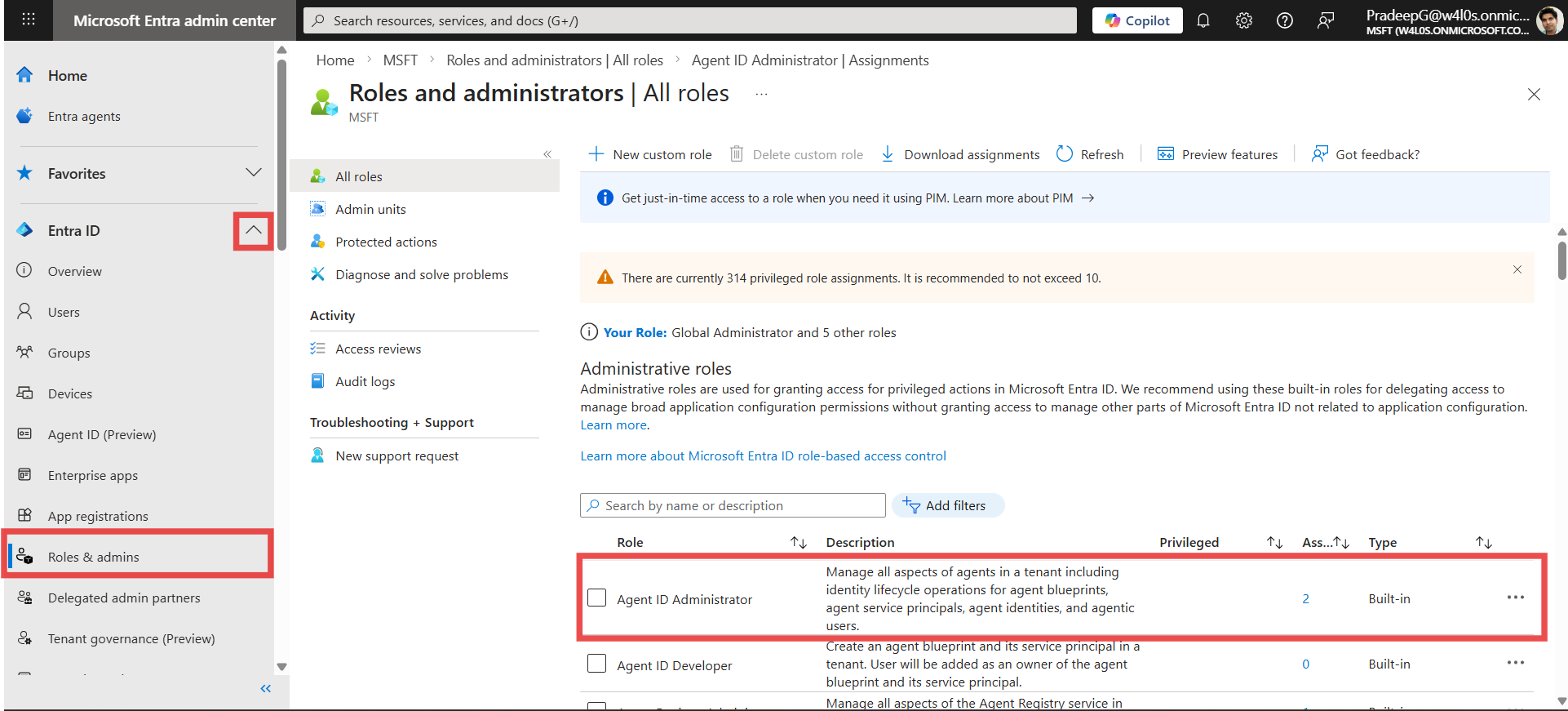
Administrators can assign roles using the Microsoft Entra Admin Center.
Steps:
- Go to: https://entra.microsoft.com
- Select Microsoft Entra ID
- Navigate to Roles and adminis
- Choose a role → Select Add assignments → Assign the role to a user
Why Directory Roles Are Important
Directory roles help organizations:
- Enforce security best practices
- Implement least privilege access
- Reduce risk of unauthorized changes
- Delegate administrative tasks efficiently
Without roles, organizations would have to rely on full administrative access, which increases security risks.
Conclusion
Microsoft Entra Directory Roles provide a structured way to manage administrative permissions within a tenant. By assigning roles instead of full access, organizations can ensure secure, controlled, and efficient administration of Microsoft Entra environments.
Did You Know? Managing Microsoft 365 applications is even easier with automation. Try our Graph PowerShell scripts to automate tasks like generating reports, cleaning up inactive Teams, or assigning licenses efficiently.
Ready to get the most out of Microsoft 365 tools? Explore our free Microsoft 365 administration tools to simplify your administrative tasks and boost productivity.