Microsoft 365 Free Reporting Tool — Disabled Users Report
Disabled user accounts are a normal part of Microsoft 365 lifecycle management. Employees leave, roles change, and access needs to be revoked. But tracking disabled users efficiently is not as straightforward as it should be.
The Microsoft 365 Disabled Users Report, available in the M365 Free Reporting Tool (also referred to as the Microsoft 365 free community dashboard or Free M365 Community Dashboard), simplifies this task by giving admins instant visibility into all disabled accounts — without manual filtering or scripts.
Who Are Microsoft 365 Disabled Users?
Microsoft 365 disabled users are accounts where sign-in access has been blocked (AccountEnabled = False). These accounts may include:
- Former employees
- Temporarily suspended users
- Guest users whose access has been revoked
- Accounts disabled for security or compliance reasons
Although disabled, these users still exist in the tenant and may retain licenses, group memberships, or historical access references — making visibility critical.
Why Generate Microsoft 365 Disabled Users Report?
Generating a Disabled Users Report helps admins maintain security, compliance, and license hygiene.
- ✔ Strengthen security posture
- ✔ Improve license management
- ✔ Support audits and compliance
- ✔ Simplify cleanup operations
Ensure disabled users are not accidentally re-enabled or left in sensitive groups.
Identify disabled users still holding licenses and reclaim unused subscriptions.
Auditors often ask for lists of inactive or blocked user accounts.
Use the report as a baseline for further actions like license removal or group cleanup.
Without a consolidated report, this process becomes manual and error-prone.
How to Generate Microsoft 365 Disabled Users Report?
Admins typically rely on one of the following methods.
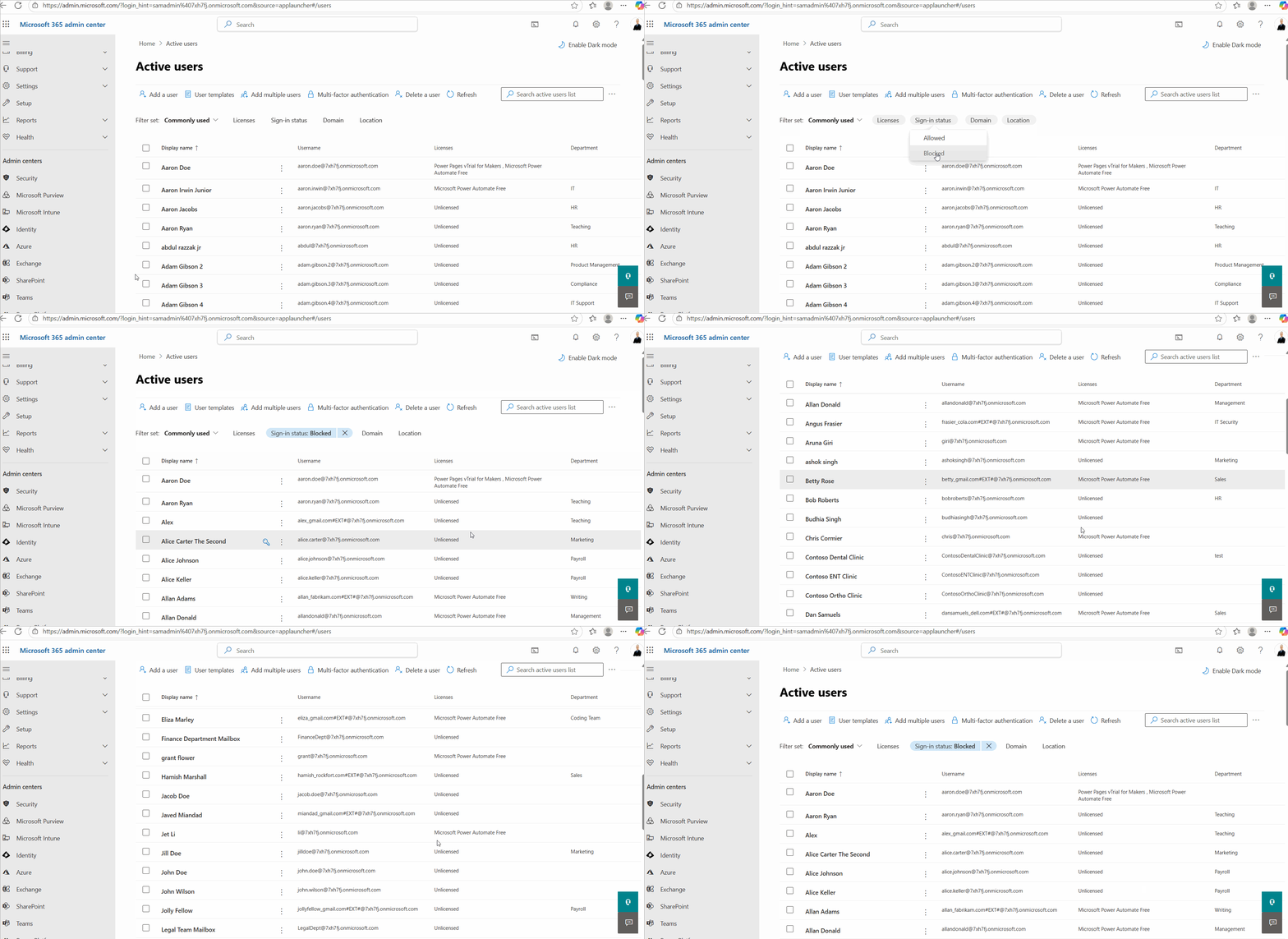
- Using Microsoft 365 Admin Center
- Go to Users → Active users
- Manually apply the Sign-in status = Blocked filter
- Scroll through the results
- Filters must be applied manually every time
- No filtering by Department or Job Title
- No quick export tailored to disabled users
- Not efficient for repeated reporting
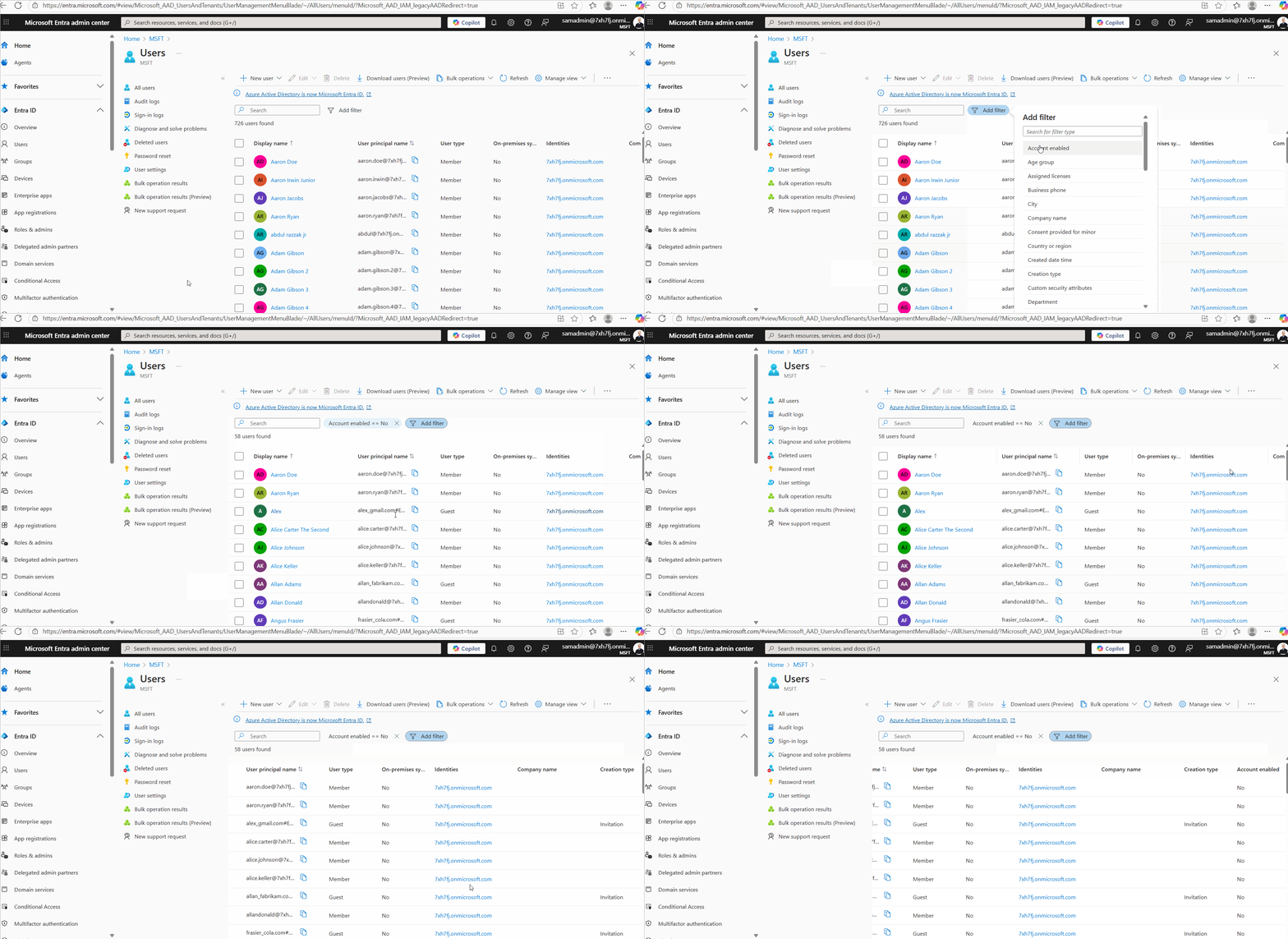
- Using Microsoft Entra ID Admin Center
- Go to Users
- Apply filter for Account enabled = No
- Review results manually
- Manual filtering required
- No built-in department or job title filtering
- Export options are limited
- Not optimized for operational reporting
- Using Graph PowerShell
- Requires scripting and Graph knowledge
- Manual CSV export logic
- Error handling required
- Not ideal for quick or frequent reporting
- Less accessible for junior admins
- Using M365Corner Microsoft 365 Free Reporting Tool
- No scripts required
- No manual filters
- Filter by Department, Job Title, License state, and more
- One-click CSV export
- Email Report capability
- Clean, consistent UI
In the Microsoft 365 Admin Center, you can view disabled users — but only with manual filtering.
Steps involved:
❌ Limitations
The Entra ID Admin Center also allows you to identify disabled users, but with similar limitations.
Steps involved:
❌ Limitations
Graph PowerShell gives admins full control — but requires scripting knowledge and extra effort.
Sample Graph PowerShell Script
(As demonstrated here:
https://m365corner.com/m365-powershell/fetch-and-mail-disabled-users-report-using-powershell.html)
Connect-MgGraph -Scopes "User.Read.All","Mail.Send"

# ---------------------------------------------
# 1) Fetch all disabled users (Members + Guests)
# ---------------------------------------------
$DisabledUsers = Get-MgUser -All `
-Filter "accountEnabled eq false" `
-Property Id, DisplayName, UserPrincipalName, Mail, AccountEnabled, UserType

# ---------------------------------------------
# 2) Shape the data for export
# ---------------------------------------------
$ReportRows = $DisabledUsers | Select-Object `
DisplayName,
UserPrincipalName,
Mail,
UserType,
AccountEnabled

# ---------------------------------------------
# 3) Export to CSV
# ---------------------------------------------
$ReportPath = "$env:TEMP\DisabledUsers.csv"
$ReportRows | Export-Csv -Path $ReportPath -NoTypeInformation -Encoding UTF8
⚠️ Downsides of PowerShell
This is where the Free M365 Community Dashboard offers a clear advantage.
With the M365Corner Microsoft 365 Free Reporting Tool, generating a Microsoft 365 Disabled Users Report is effortless.
👉 You can generate the Disabled Users Report at the click of a button.
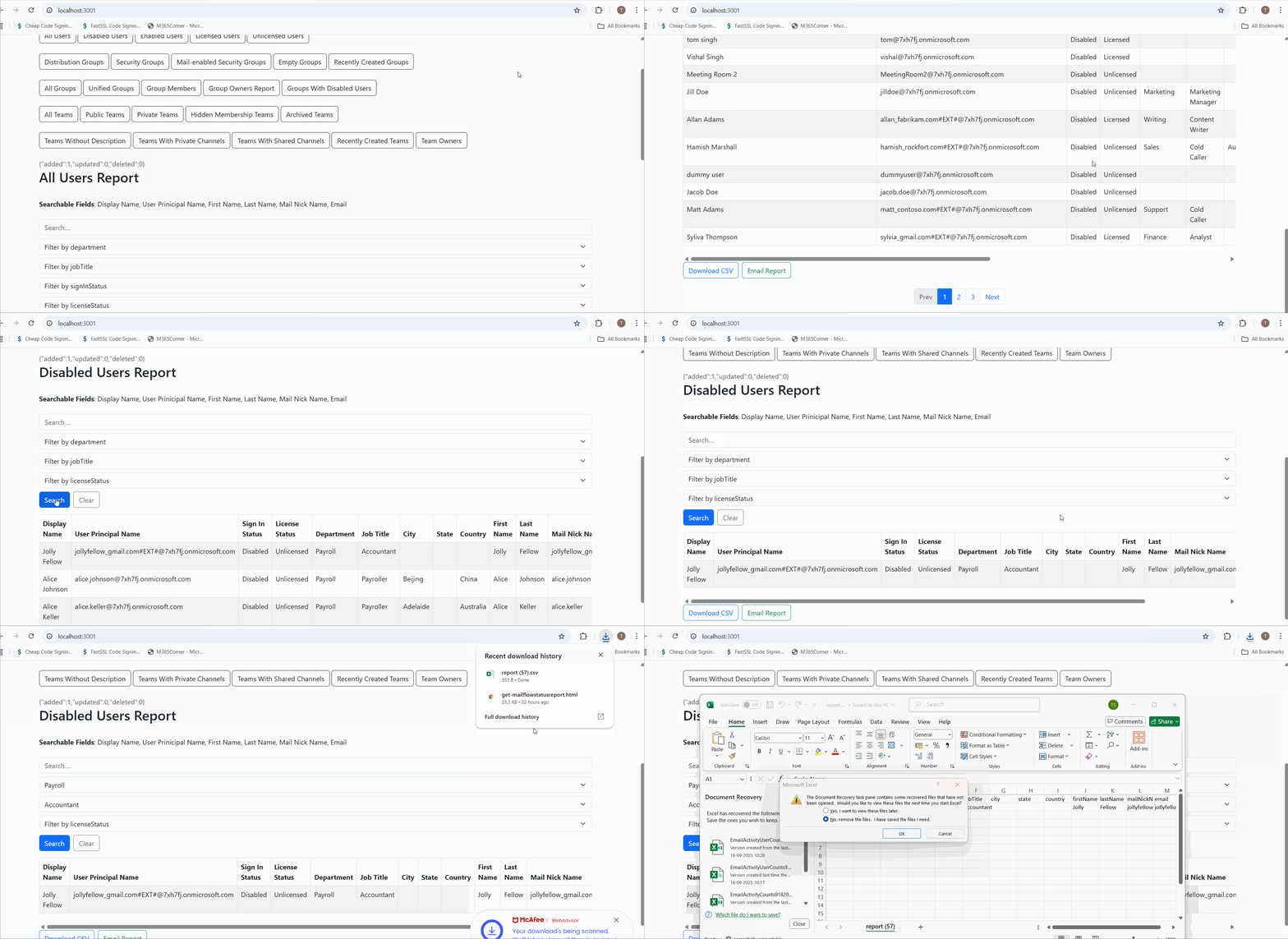
Why this helps admins
This dramatically quickens reporting and gives admins instant clarity into inactive accounts across the tenant.
Explore Disabled Users Report
- 🔗 Learn More About Disabled Users Report
- 🔗 Explore All Reports in the M365 Free Reporting Tool
- 🔗 Download the Community Edition
https://m365corner.com/m365-free-tools/microsoft-365-disabled-user-report.html
See what the report includes and how it helps secure your tenant.
https://m365corner.com/m365-free-tools/m365corner-reporting-tool.html
Discover all reports available in the Microsoft 365 free community dashboard.
https://github.com/m365corner/m365corner-reporting-tool-community-edition.git
Start using the Free M365 Community Dashboard today.
The M365 Free Reporting Tool turns what used to be a repetitive, manual task into a fast, reliable, and admin-friendly experience — exactly what Microsoft 365 administrators need.
Did You Know? Managing Microsoft 365 applications is even easier with automation. Try our Graph PowerShell scripts to automate tasks like generating reports, cleaning up inactive Teams, or assigning licenses efficiently.
Ready to get the most out of Microsoft 365 tools? Explore our free Microsoft 365 administration tools to simplify your administrative tasks and boost productivity.