How to Disable a User in Microsoft Entra
Disabling a user account in Microsoft Entra ID is a common administrative task used to block access to organizational resources without permanently deleting the account.
Administrators typically disable users when:
- An employee leaves the organization
- An account is compromised
- Temporary access needs to be revoked
Microsoft Entra allows administrators to disable user accounts using both the Entra Admin Center and Microsoft Graph PowerShell.
Disable User Using Microsoft Entra Admin Center
Follow these steps to disable a user.
| Step 1 | Go to the Microsoft Entra Admin Center https://entra.microsoft.com |
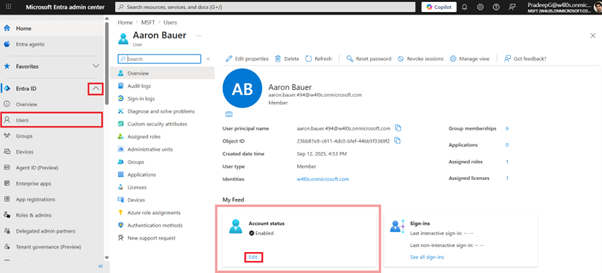
| Step 2 | Navigate to: Microsoft Entra ID → Users |
| Step 3 | Select the user account you want to disable |
| Step 4 | Under the user profile, locate and click Edit under Account status option. |
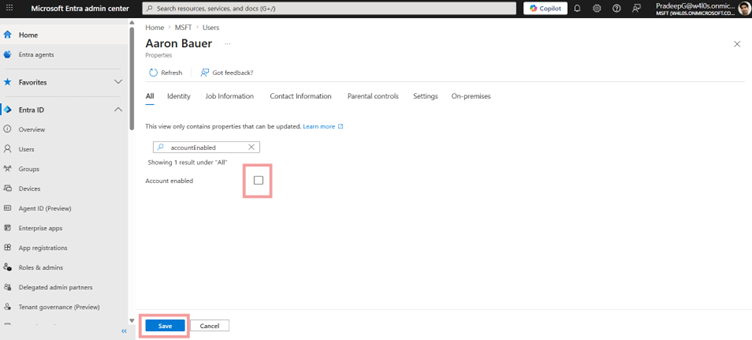
| Step 5 | Uncheck Account enabled option. |
| Step 6 | Click Save The user will no longer be able to sign in to Microsoft 365 or other connected applications. |
Disable User Using Microsoft Graph PowerShell
Administrators can disable a user account using Graph PowerShell by setting the accountEnabled property to false.
Example
$params = @{
  accountEnabled = $false
}
Update-MgUser -UserId "user@contoso.com" -BodyParameter $params
This command disables the user account and blocks sign-in.
Key Parameter Explained
| Parameter | Description |
|---|---|
| accountEnabled | Controls whether the user can sign in (True = enabled, False = disabled) |
| UserId | User Principal Name or User ID |
When to Disable vs Delete a User
| Action | When to Use |
|---|---|
| Disable User | Temporary or reversible access removal |
| Delete User | Permanent removal of the account |
Disabling a user is recommended when you may need to retain data or restore access later.
Common Use Cases
Administrators disable users when:
- Employees leave the organization
- Accounts are under investigation
- Temporary access suspension is required
- Security incidents occur
Best Practices
- Disable accounts immediately when employees exit
- Retain accounts temporarily before deletion
- Review group memberships after disabling
- Monitor audit and sign-in logs for suspicious activity
Conclusion
Disabling a user in Microsoft Entra is a simple and effective way to block access while preserving account data.
Administrators can quickly disable accounts using the Entra Admin Center or automate the process using Graph PowerShell, depending on their requirements.
Did You Know? Managing Microsoft 365 applications is even easier with automation. Try our Graph PowerShell scripts to automate tasks like generating reports, cleaning up inactive Teams, or assigning licenses efficiently.
Ready to get the most out of Microsoft 365 tools? Explore our free Microsoft 365 administration tools to simplify your administrative tasks and boost productivity.