How to Create a User in Microsoft Entra
Creating users is one of the most common tasks performed by administrators in Microsoft Entra ID. User accounts allow individuals to access Microsoft 365 services, applications, and organizational resources.
Microsoft Entra provides multiple ways to create users, including the Entra Admin Center and Microsoft Graph PowerShell.
Creating a User in Microsoft Entra
Administrators can create users using:
- Microsoft Entra Admin Center (GUI)
- Microsoft Graph PowerShell (automation)
Using the Microsoft Entra Admin Center
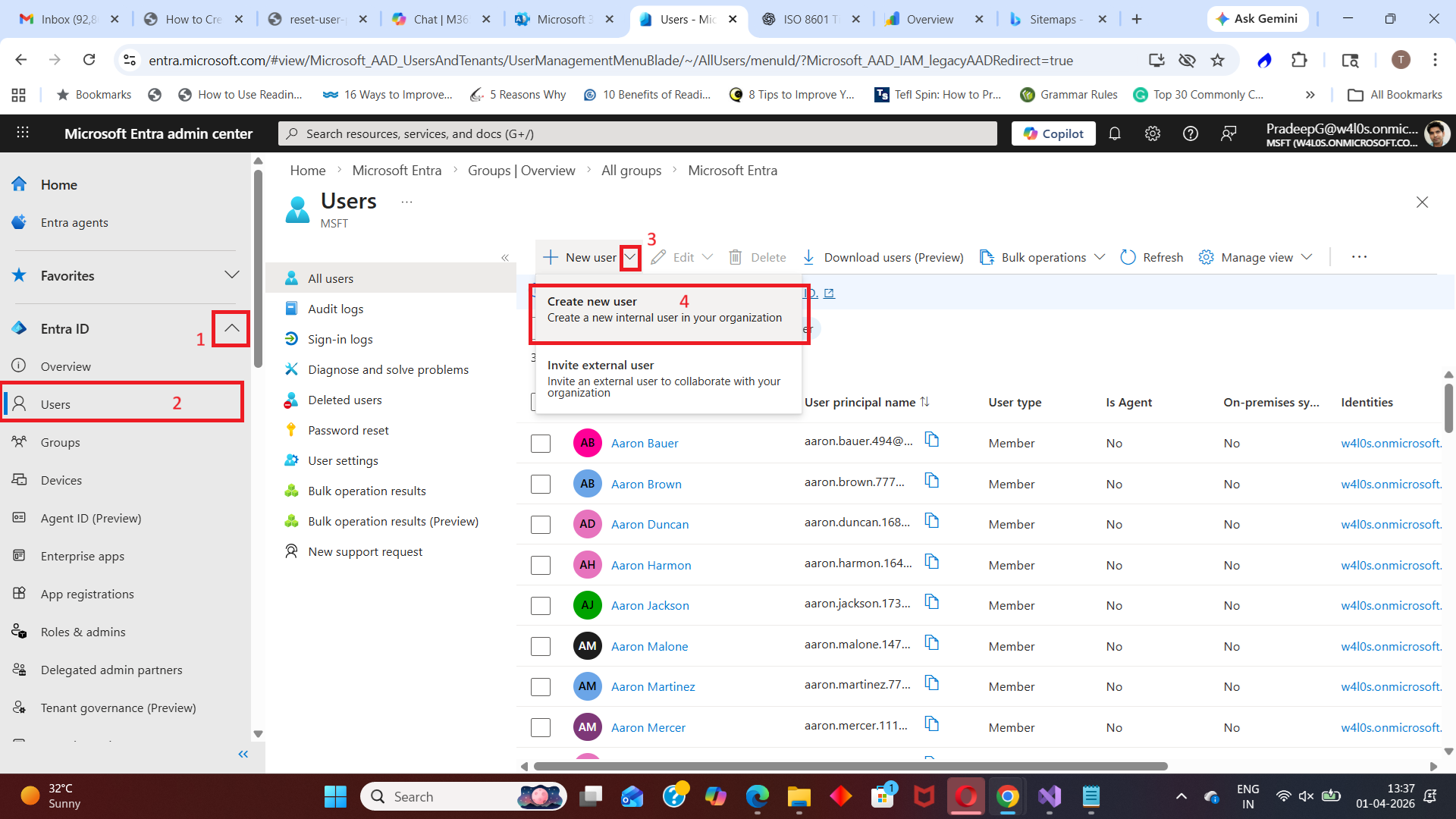
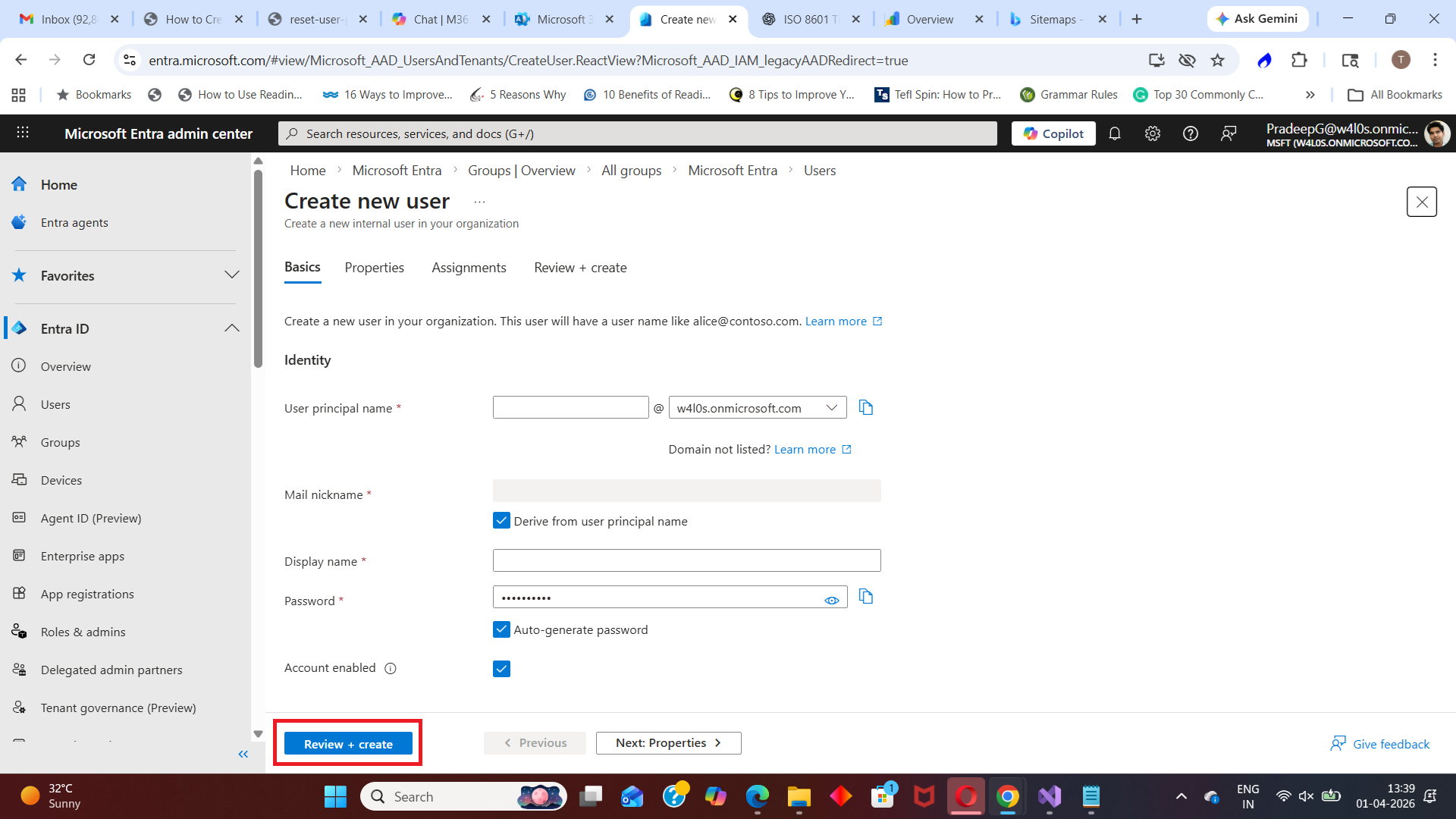
Follow these steps to create a user.
| Role | Description |
|---|---|
| Step 1 | Go to the Microsoft Entra Admin Center https://entra.microsoft.com |
| Step 2 |
Navigate to Microsoft Entra ID → Users → New user |
| Step 3 | Select Create new user |
| Step 4 | Enter user details:
|
| Step 5 | (Optional) Configure:
|
| Step 6 |
Click Create The new user account will be created in the tenant. |
Using Microsoft Graph PowerShell
Administrators can also create users using Microsoft Graph PowerShell, which is useful for automation and bulk operations.
$params = @{
        accountEnabled = $true
        displayName = "John Doe"
        mailNickname = "johndoe"
        userPrincipalName = "johndoe@contoso.com"
        passwordProfile = @{
        forceChangePasswordNextSignIn = $true
        password = "Temp@12345"
    }
}

New-MgUser -BodyParameter $params
This command creates a new user with a temporary password.
Key Parameters Explained
| Parameter | Description |
|---|---|
| displayName | Name of the user |
| userPrincipalName | Sign-in name of the user |
| mailNickname | Mail alias |
| accountEnabled | Enables or disables the account |
| passwordProfile | Defines password settings |
When to Use Each Method
| Method | Best Use Case |
|---|---|
| Entra Admin Center | Creating individual users manually/td> |
| Graph PowerShell | Bulk user creation and automation |
Common Use Cases
Administrators create users when:
- Onboarding new employees
- Granting access to applications
- Assigning licenses
- Setting up test accounts
Best Practices
- Use naming conventions for user accounts
- Assign users to groups instead of individual permissions
- Enable MFA for new users
- Use PowerShell for bulk operations
Conclusion
Creating users in Microsoft Entra is a fundamental administrative task that can be performed using both the Entra Admin Center and Graph PowerShell.
Using the right method helps administrators efficiently manage users and ensure secure access to organizational resources.
Did You Know? Managing Microsoft 365 applications is even easier with automation. Try our Graph PowerShell scripts to automate tasks like generating reports, cleaning up inactive Teams, or assigning licenses efficiently.
Ready to get the most out of Microsoft 365 tools? Explore our free Microsoft 365 administration tools to simplify your administrative tasks and boost productivity.