What are Unified Groups?
Unified Groups in Microsoft 365 (also called Microsoft 365 Groups or Entra ID Unified Groups) are a special type of group designed to bring collaboration and access management together.
Key Features
- Collaboration Hub: When you create a Unified Group, Microsoft 365 automatically provisions shared resources:
- Outlook: shared mailbox & calendar
- SharePoint: team site for document storage
- Planner: task management board
- Teams: workspace for chat and meetings
- Access Control: Acts as a security group to manage permissions across apps and services.
- Membership Integration: Microsoft Teams, Planner, and other apps rely on Unified Groups for membership and access.
Comparison with Other Group Types
| Group Type | Primary Use | Collaboration Features | Access Control |
|---|---|---|---|
| Distribution Group | Email notifications to many users | ❌ None | ❌ No |
| Security Group | Grant access to apps/resources | ❌ None | ✅ Yes |
| Mail-enabled Security | Access + email notifications | ❌ None | ✅ Yes |
| Microsoft 365 (Unified) | Collaboration + access | ✅ Shared mailbox, SharePoint, Teams, Planner | ✅ Yes |
Why They Matter
Unified Groups are the backbone of collaboration in Microsoft 365. Instead of manually setting up separate tools, they unify communication, file sharing, and task management under one identity. This makes them essential for modern teamwork across Outlook, Teams, SharePoint, and more.
Would you like me to break down best practices for managing Unified Groups (like lifecycle policies, naming conventions, or guest access)? That’s often where organizations run into challenges.
How to create Unified Groups Using PowerShell?
Use the New-MgGroup cmdlet. A Unified Group requires:
- GroupTypes = "Unified"
- -MailEnabled [true by default]
- -SecurityEnabled [true by default]
Creating a Single Unified Group
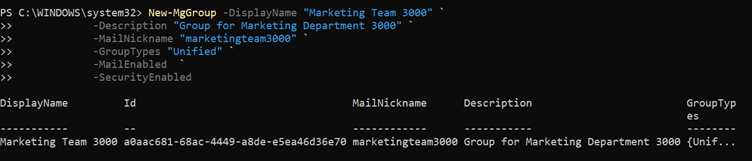
New-MgGroup -DisplayName "Marketing Team 3000" `
            -Description "Group for Marketing Department 3000" `
            -MailNickname "marketingteam3000" `
            -GroupTypes "Unified" `
            -MailEnabled  `
            -SecurityEnabled
Bulk Creation (Optional)
If you need to create many groups, you can import details from a CSV and loop through them. CSV file should contain the following headers and respective values:
DisplayName,MailNickname,Description
IT Operations,itoperations01,M365 Unified Group for IT operations and service management
Helpdesk Support,helpdesksupport02,M365 Unified Group for helpdesk ticket handling and user support
Cloud Engineering,cloudengineering03,M365 Unified Group for cloud infrastructure and automation
Security Operations,securityoperations04,M365 Unified Group for security monitoring and incident response
Identity & Access Management,identityaccess05,M365 Unified Group for IAM governance and access control
Microsoft 365 Administration,m365admin06,M365 Unified Group for Microsoft 365 administration tasks
PowerShell Script
Import-Module Microsoft.Graph.Groups
Connect-MgGraph -Scopes "Group.ReadWrite.All"
$CsvPath = ".\UnifiedGroups.csv"
$Groups  = Import-Csv $CsvPath

$Results = @()

foreach ($G in $Groups) {

    $DisplayName  = $G.DisplayName
    $MailNickname = $G.MailNickname
    $Description  = $G.Description

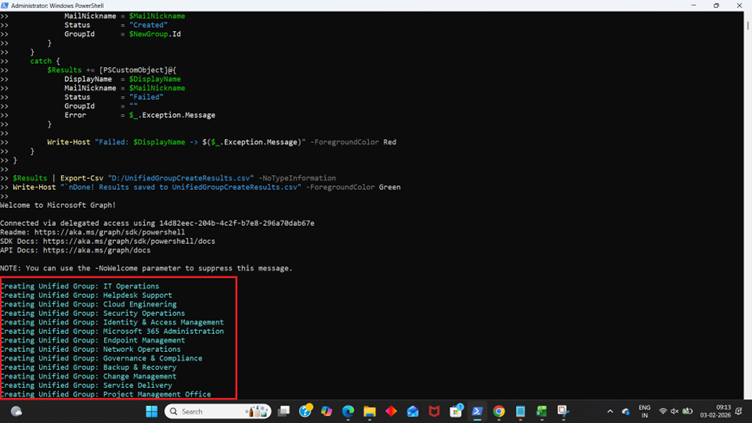
    Write-Host "Creating Unified Group: $DisplayName" -ForegroundColor Cyan

    try {

        # Optional: Check if group already exists with same MailNickname
        $Existing = Get-MgGroup -Filter "mailNickname eq '$MailNickname'" -ErrorAction SilentlyContinue

        if ($Existing) {
            Write-Host "Already exists, skipping: $DisplayName ($MailNickname)" -ForegroundColor Yellow

            $Results += [PSCustomObject]@{
                DisplayName  = $DisplayName
                MailNickname = $MailNickname
                Status       = "Skipped (Already Exists)"
                GroupId      = $Existing.Id
            }
            continue
        }

        $Params = @{
            DisplayName     = $DisplayName
            Description     = $Description
            MailEnabled     = $true
            MailNickname    = $MailNickname
            SecurityEnabled = $false
            GroupTypes      = @("Unified")
            Visibility      = "Private"
        }

        $NewGroup = New-MgGroup -BodyParameter $Params

        $Results += [PSCustomObject]@{
            DisplayName  = $DisplayName
            MailNickname = $MailNickname
            Status       = "Created"
            GroupId      = $NewGroup.Id
        }
    }
    catch {
        $Results += [PSCustomObject]@{
            DisplayName  = $DisplayName
            MailNickname = $MailNickname
            Status       = "Failed"
            GroupId      = ""
            Error        = $_.Exception.Message
        }

        Write-Host "Failed: $DisplayName -> $($_.Exception.Message)" -ForegroundColor Red
    }
}
$Results | Export-Csv ".\UnifiedGroupCreateResults.csv" -NoTypeInformation
Write-Host "`nDone! Results saved to UnifiedGroupCreateResults.csv" -ForegroundColor Green
Did You Know? Managing Microsoft 365 applications is even easier with automation. Try our Graph PowerShell scripts to automate tasks like generating reports, cleaning up inactive Teams, or assigning licenses efficiently.
Ready to get the most out of Microsoft 365 tools? Explore our free Microsoft 365 administration tools to simplify your administrative tasks and boost productivity.