5 Useful Update-MgUser Scripts for Microsoft 365 Admins
Managing user properties in Microsoft 365 manually can be time-consuming and error-prone. PowerShell automation with the Microsoft Graph Update-MgUser cmdlet allows administrators to streamline updates, ensure consistency, and maintain compliance. This article explores five practical scripts that every M365 admin can use to simplify daily tasks.
Prerequisites
Before running the scripts, connect to Microsoft Graph:
Connect-MgGraph -Scopes "User.ReadWrite.All"Update a Single User’s Job Title
Update Department for a User
Disable a User Account
Update Multiple Properties at Once
- Update Multiple Properties at Once
Bulk Update Users via CSV (Most Useful)
- Mass updates during restructuring
- Migrating user data from another system
- Cleaning up inconsistent user attributes
This is one of the most common tasks — updating user profile information.
$params = @{
  jobTitle = "Senior Systems Engineer"
}
Update-MgUser -UserId "user@domain.com" -BodyParameter $params
👉 Use case: Promote users or update roles after internal changes.
$params = @{
  department = "IT Operations"
}
Update-MgUser -UserId "user@domain.com" -BodyParameter $params
👉 Use case: Align users to correct departments for reporting and policies.
Instead of deleting users, disabling accounts is often safer.
$params = @{
  accountEnabled = $false
}
Update-MgUser -UserId "user@domain.com" -BodyParameter $params
👉 Use case: Offboarding users while preserving mailbox and data.
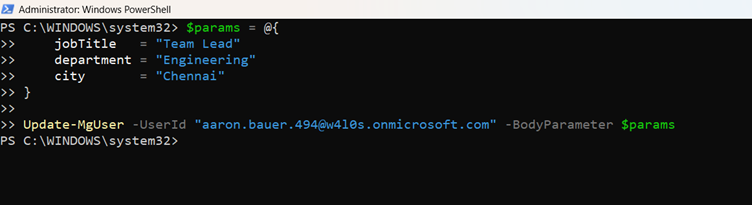
You can update several attributes in a single command.
$params = @{
  jobTitle   = "Team Lead"
  department = "Engineering"
  city       = "Chennai"
}
Update-MgUser -UserId "user@domain.com" -BodyParameter $params
👉 Use case: Bulk profile corrections or onboarding updates.
You can update several attributes in a single command.
$params = @{
  jobTitle   = "Team Lead"
  department = "Engineering"
  city       = "Chennai"
}
Update-MgUser -UserId "user@domain.com" -BodyParameter $params
👉 Use case: Bulk profile corrections or onboarding updates.
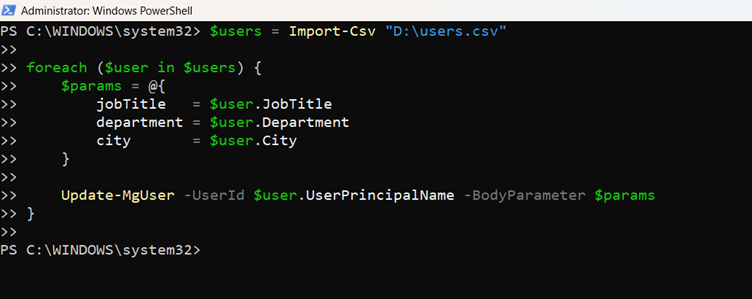
This is where Update-MgUser really shines — handling bulk updates.
Sample CSV (users.csv)
UserPrincipalName,JobTitle,Department,City
user1@domain.com,Manager,Sales,Chennai
user2@domain.com,Analyst,Finance,Bangalo
reuser3@domain.com,Engineer,IT,Hyderabad
Script
$users = Import-Csv "C:\Scripts\users.csv"

foreach ($user in $users) {
  $params = @{
    jobTitle   = $user.JobTitle
    department = $user.Department
    city       = $user.City
  }
  Update-MgUser -UserId $user.UserPrincipalName -BodyParameter $params
}
Use case:
Tips for Using Update-MgUser
- Always use -BodyParameter with a hashtable (recommended by Microsoft).
- Test scripts on a small set of users before bulk execution.
- Ensure required permissions (User.ReadWrite.All) are granted.
- Double-check CSV headers — they must match your script exactly.
Common Error to Watch For
| Error | Cause | solution |
| Cannot convert the literal 'True' to the expected type | Passing values directly instead of using -BodyParameter. | Always structure updates like this: |
Frequently Asked Questions
- Can I update custom attributes with Update-MgUser?
- What permissions are required to run Update-MgUser?
- Can I run these scripts in Azure Automation?
- How do I test safely before bulk updates?
Yes, provided they are supported by Microsoft Graph.
User.ReadWrite.All is mandatory.
Yes, with proper authentication setup.
Use a small CSV with test accounts.
Conclusion
The Update-MgUser cmdlet is a must-have tool for every M365 administrator. From simple profile updates to large-scale bulk operations, it helps you manage users efficiently and consistently.
Start small with single-user updates, then move to CSV-based bulk scripts as you gain confidence — that’s where the real productivity boost happens.
Did You Know? Managing Microsoft 365 applications is even easier with automation. Try our Graph PowerShell scripts to automate tasks like generating reports, cleaning up inactive Teams, or assigning licenses efficiently.
Ready to get the most out of Microsoft 365 tools? Explore our free Microsoft 365 administration tools to simplify your administrative tasks and boost productivity.