Find Entra Apps With Multiple Owners Using PowerShell
In Microsoft Entra ID, assigning multiple owners to applications is considered a best practice for ensuring:
- Redundancy and accountability
- Business continuity
- Proper ownership coverage
Applications with multiple owners reduce the risk of orphaned apps and ensure that administrative responsibilities are not tied to a single individual.
This script helps administrators identify Entra applications that have more than one owner, providing better visibility into ownership distribution and governance.
Download this script from our M365Corner GitHub Repo: https://github.com/m365corner/M365Corner-Scripts/tree/main/Entra-Apps-Related-Scripts/Find-Entra-Apps-With-Multiple-Owners🚀 Community Edition Released!
Try the M365Corner Microsoft 365 Reporting Tool — your DIY pack with 20+ out-of-the-box M365 reports for Users, Groups, and Teams.
The Script
# Connect to Microsoft Graph
Connect-MgGraph -Scopes Application.Read.All, Directory.Read.All

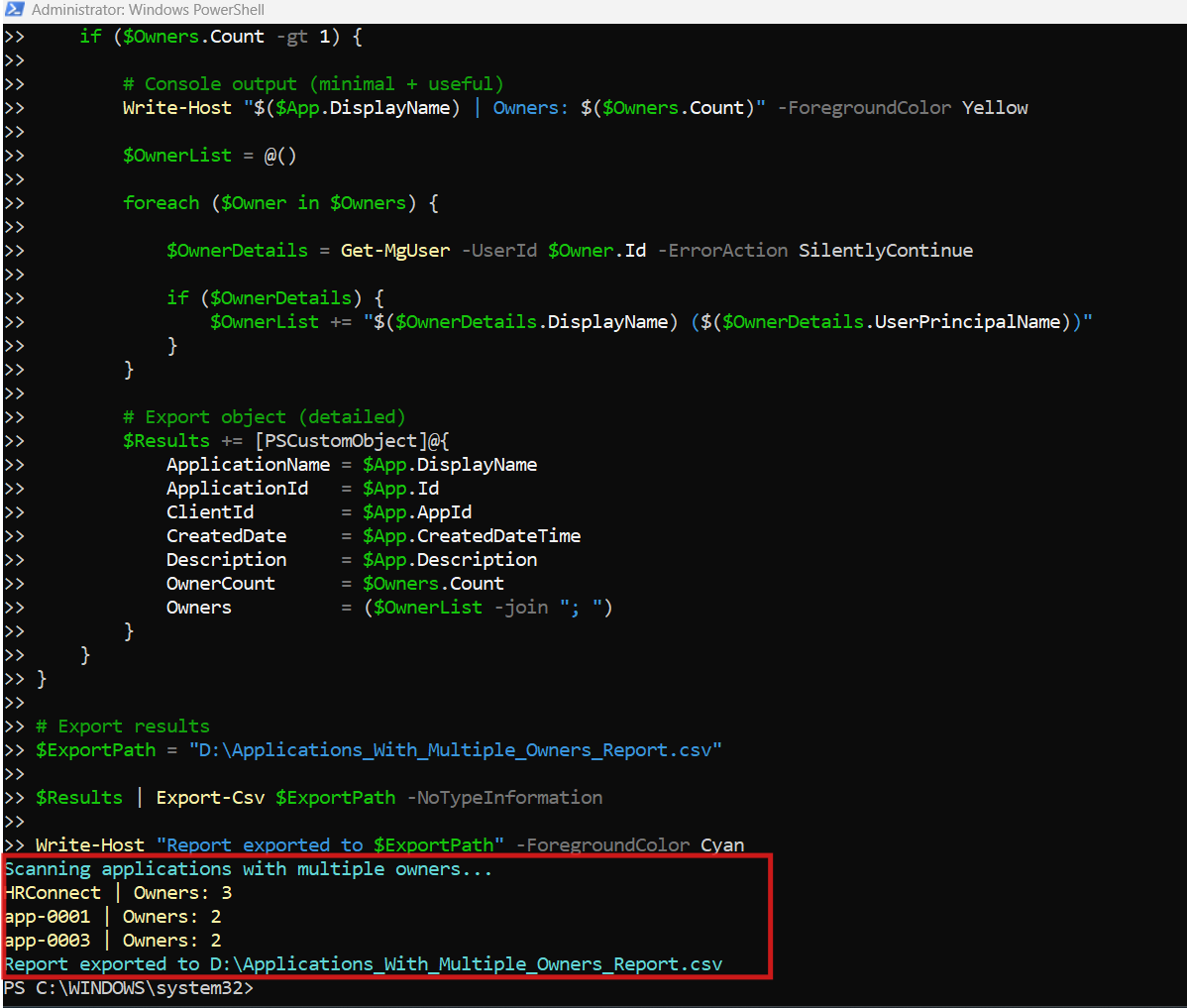
Write-Host "Scanning applications with multiple owners..." -ForegroundColor Cyan

# Get all applications
$Applications = Get-MgApplication -All -Property Id,DisplayName,AppId,CreatedDateTime,Description

$Results = @()

foreach ($App in $Applications) {

    # Get application owners
    $Owners = Get-MgApplicationOwner -ApplicationId $App.Id

    if ($Owners.Count -gt 1) {

        # Console output (minimal + useful)
        Write-Host "$($App.DisplayName) | Owners: $($Owners.Count)" -ForegroundColor Yellow

        $OwnerList = @()

        foreach ($Owner in $Owners) {

            $OwnerDetails = Get-MgUser -UserId $Owner.Id -ErrorAction SilentlyContinue

            if ($OwnerDetails) {
                $OwnerList += "$($OwnerDetails.DisplayName) ($($OwnerDetails.UserPrincipalName))"
            }
        }

        # Export object (detailed)
        $Results += [PSCustomObject]@{
            ApplicationName = $App.DisplayName
            ApplicationId   = $App.Id
            ClientId        = $App.AppId
            CreatedDate     = $App.CreatedDateTime
            Description     = $App.Description
            OwnerCount      = $Owners.Count
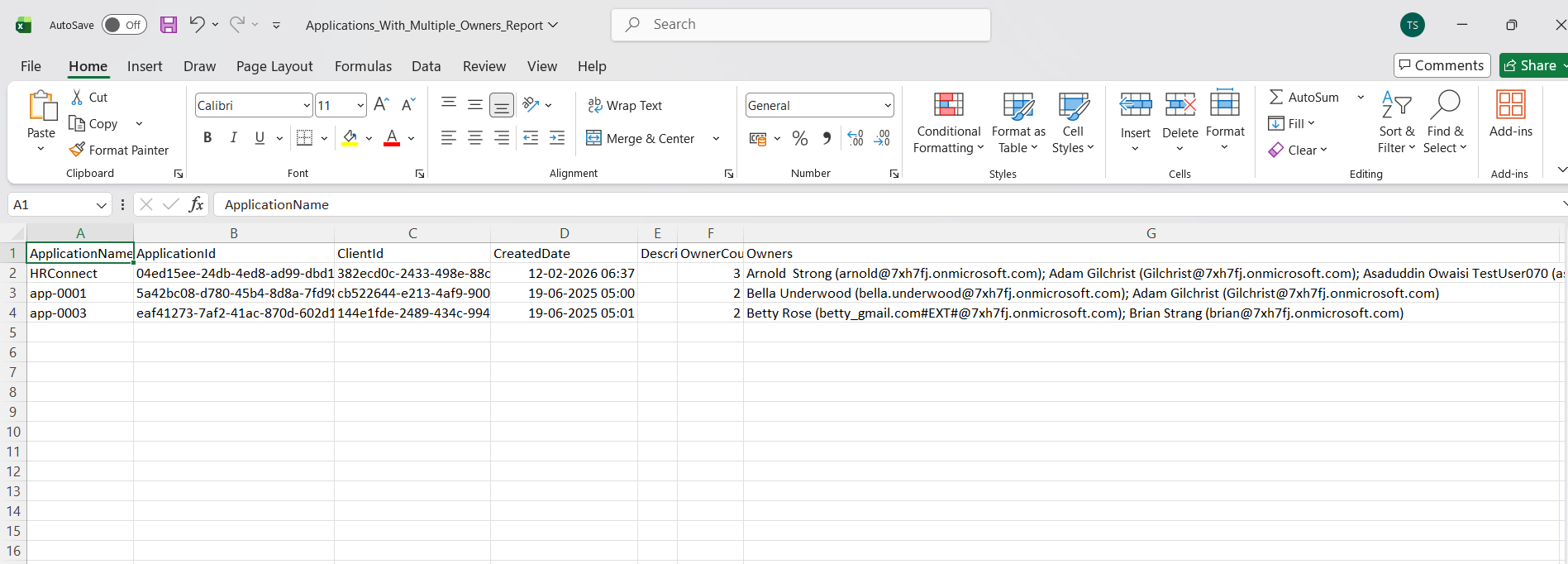
            Owners          = ($OwnerList -join "; ")
        }
    }
}

# Export results
$ExportPath = "D:\Applications_With_Multiple_Owners_Report.csv"

$Results | Export-Csv $ExportPath -NoTypeInformation

Write-Host "Report exported to $ExportPath" -ForegroundColor Cyan
How the Script Works
| Step | Description |
|---|---|
| Connect to Graph | Authenticates using Application.Read.All and Directory.Read.All |
| Retrieve Applications | Fetches all applications using Get-MgApplication -All |
| Fetch Owners | Retrieves owners for each app using Get-MgApplicationOwner |
| Filter Multiple Owners | Checks if owner count is greater than 1 |
| Retrieve Owner Details | Uses Get-MgUser to get display name and UPN |
| Build Owner List | Aggregates owner details into a readable format |
| Create Report Object | Stores application and owner details in structured format |
| Export Results | Exports results to CSV for reporting |
Further Enhancements
| Enhancement | Description |
|---|---|
| Include Single Owner Apps | Modify logic to include apps with exactly one owner |
| Add Owner Roles | Identify whether owners are admins or standard users |
| Include Last Sign-In | Combine with audit logs for activity tracking |
| Add Department Info | Pull additional user attributes like department |
| Automate Reporting | Schedule script execution for periodic audits |
Frequently Asked Questions
| Question | Answer |
|---|---|
| Why are multiple owners important? | They ensure redundancy and prevent ownership gaps |
| What happens if an app has no owners? | It becomes an orphaned application |
| Can apps have more than two owners? | Yes, there is no strict limit |
| Does this script include service principals as owners? | It primarily resolves user-based owners |
| Can this script handle large tenants? | Yes, but performance may vary with scale |
Admin Usecases
| Use Case | Description |
|---|---|
| Governance Review | Ensure critical apps have multiple owners |
| Compliance Audit | Validate ownership policies |
| Risk Reduction | Avoid single points of failure |
| Ownership Validation | Confirm correct assignment of responsibilities |
| Documentation | Maintain ownership records for applications |
Possible Errors & Solutions
| Error | Cause | Solution |
|---|---|---|
| Insufficient privileges | Missing Graph permissions | Use Application.Read.All and Directory.Read.All |
| Cmdlet not recognized | Graph module not installed | Install using Install-Module Microsoft.Graph |
| Access token expired | Session timeout | Reconnect using Connect-MgGraph |
| Slow execution | Large tenant | Optimize by filtering or batching |
| Missing owner details | Non-user owners | Handle service principals separately |
Conclusion
Applications with multiple owners play a key role in maintaining robust governance and operational continuity in Microsoft Entra ID. Ensuring that applications are not dependent on a single owner helps reduce risks associated with account deletion, role changes, or employee exits.
This Microsoft Graph PowerShell script provides a simple and effective way to identify applications with multiple owners and export detailed ownership information. By incorporating this script into regular audits, administrators can strengthen their ownership strategy, compliance posture, and application governance framework.