Find Disabled Entra Service Principals Using PowerShell
In Microsoft Entra ID, service principals represent applications and services that interact with your environment. Over time, some service principals may become disabled due to:
- Decommissioned applications
- Security actions
- Lifecycle management policies
While disabled service principals are not actively used, they still remain in the directory and should be reviewed periodically for:
- Cleanup opportunities
- Audit purposes
- Compliance validation
👉 Identifying disabled service principals helps administrators maintain a clean, secure, and well-managed identity environment.
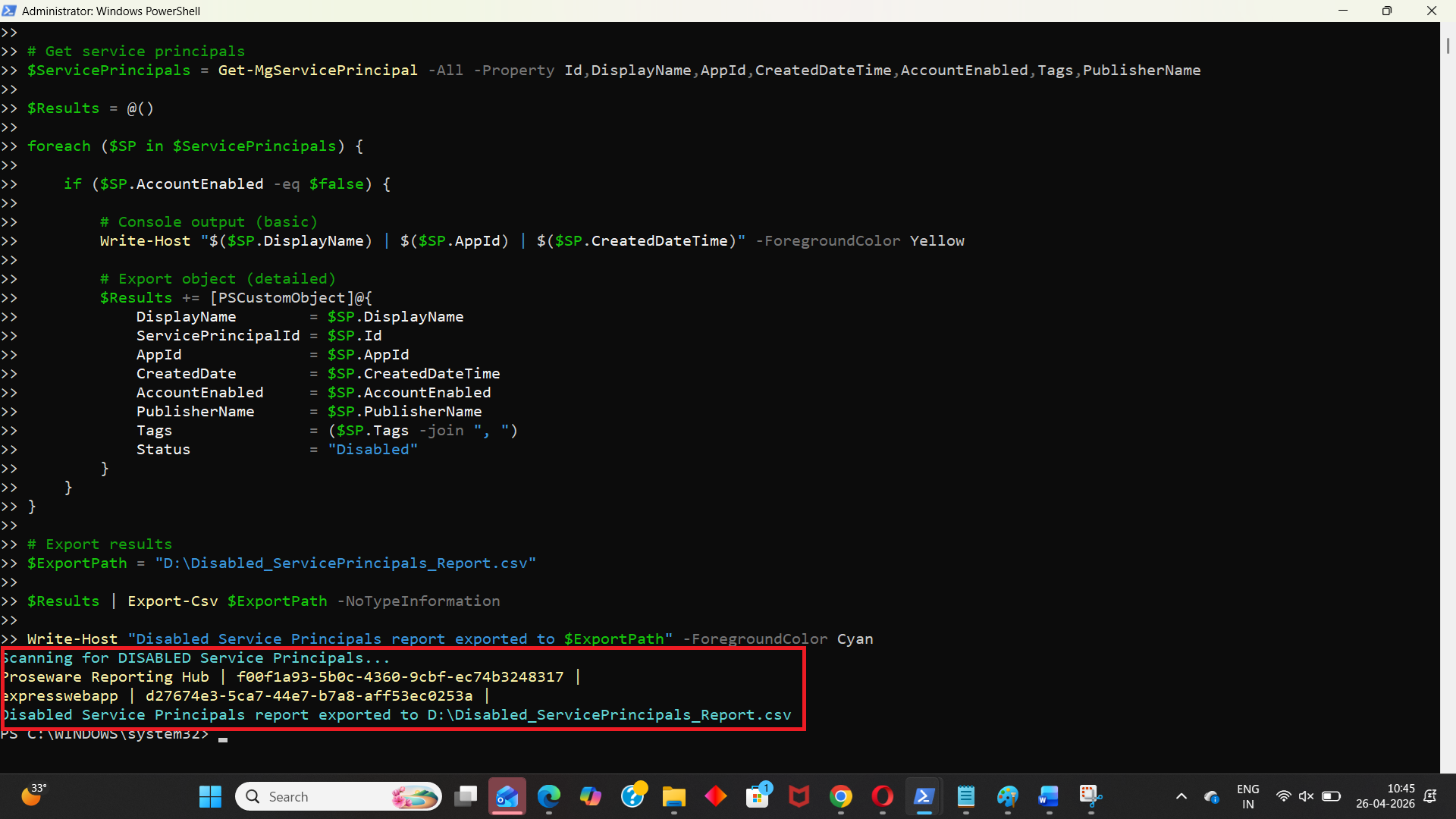
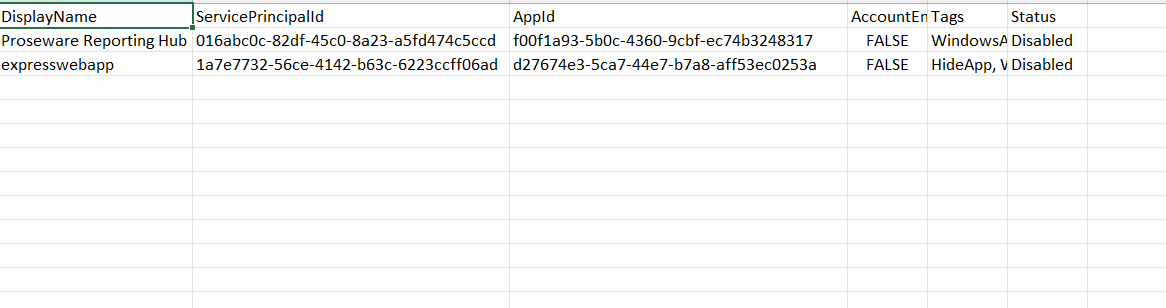
This script enables administrators to fetch all disabled Entra service principals and export the details into a CSV report.
🚀 Community Edition Released!
Try the M365Corner Microsoft 365 Reporting Tool — your DIY pack with 20+ out-of-the-box M365 reports for Users, Groups, and Teams.
The Script
# Connect to Microsoft Graph
Connect-MgGraph -Scopes Application.Read.All

Write-Host "Scanning for DISABLED Service Principals..." -ForegroundColor Cyan

# Get service principals
$ServicePrincipals = Get-MgServicePrincipal -All -Property Id,DisplayName,AppId,CreatedDateTime,AccountEnabled,Tags,PublisherName

$Results = @()

foreach ($SP in $ServicePrincipals) {

    if ($SP.AccountEnabled -eq $false) {

        # Console output (basic)
        Write-Host "$($SP.DisplayName) | $($SP.AppId) | $($SP.CreatedDateTime)" -ForegroundColor Yellow

        # Export object (detailed)
        $Results += [PSCustomObject]@{
            DisplayName        = $SP.DisplayName
            ServicePrincipalId = $SP.Id
            AppId              = $SP.AppId
            CreatedDate        = $SP.CreatedDateTime
            AccountEnabled     = $SP.AccountEnabled
            PublisherName      = $SP.PublisherName
            Tags               = ($SP.Tags -join ", ")
            Status             = "Disabled"
        }
    }
}

# Export results
$ExportPath = "C:\Path\Disabled_ServicePrincipals_Report.csv"

$Results | Export-Csv $ExportPath -NoTypeInformation

Write-Host "Disabled Service Principals report exported to $ExportPath" -ForegroundColor Cyan
How the Script Works
| Step | Description |
|---|---|
| Connect to Graph | Authenticates using Application.Read.All permission |
| Fetch Service Principals | Retrieves all service principals using Get-MgServicePrincipal -All |
| Loop Through Each SP | Iterates through every service principal |
| Check Status | Filters service principals where AccountEnabled = false |
| Console Output | Displays disabled service principals in real time |
| Build Report | Stores detailed properties in a structured object |
| Export Results | Exports disabled service principal details to CSV |
Further Enhancements
| Enhancement | Description |
|---|---|
| Include Owner Details | Add owner information for accountability |
| Add Last Sign-In | Identify inactive vs recently disabled service principals |
| Include Permissions | Add API permissions for deeper analysis |
| Add Deletion Recommendation | Flag candidates for cleanup |
| Filter by Publisher | Identify disabled apps from specific vendors |
Frequently Asked Questions
| Question | Answer |
|---|---|
| What is a disabled service principal? | A service principal that is not active (AccountEnabled = false) |
| Are disabled service principals safe to ignore? | Not always; they should be reviewed periodically |
| Can disabled service principals still pose risks? | Yes, especially if misconfigured or re-enabled |
| Should disabled service principals be deleted? | Only after verifying they are no longer needed |
| Does this script include all service principals? | Yes, it filters from all retrieved service principals |
Admin Usecases
| Use Case | Description |
|---|---|
| Security Audit | Identify inactive or disabled identities |
| Cleanup Activity | Remove unused or obsolete service principals |
| Compliance Reporting | Maintain records of disabled identities |
| Governance Review | Ensure proper lifecycle management |
| Risk Reduction | Reduce clutter and potential attack surface |
Possible Errors & Solutions
| Error | Cause | Solution |
|---|---|---|
| Insufficient privileges | Missing Graph permission | Use Application.Read.All |
| Cmdlet not recognized | Graph module not installed | Install using Install-Module Microsoft.Graph |
| Access token expired | Session timeout | Reconnect using Connect-MgGraph |
| Slow execution | Large tenant | Use filtering or batching |
| Null properties | Some SP fields may be empty | Add null checks if needed |
Conclusion
Disabled service principals are often overlooked, but they play an important role in maintaining a clean and secure Entra ID environment. Without proper visibility, these identities can accumulate and create unnecessary clutter or potential risks.
This Microsoft Graph PowerShell script provides an efficient way to identify and export all disabled service principals, enabling administrators to:
- Perform cleanup activities
- Improve governance
- Maintain compliance
By incorporating this script into regular audits, organizations can ensure better identity lifecycle management and security hygiene within their Entra environment.