Automate Microsoft Teams Ownership Governance with Graph PowerShell
Microsoft Teams ownership plays a critical role in maintaining a secure, manageable, and well-governed collaboration environment. Team owners are responsible for:
- Managing memberships
- Reviewing guest access
- Maintaining Team metadata
- Overseeing collaboration policies
- Ensuring lifecycle governance
However, in large Microsoft 365 environments, administrators often encounter governance issues such as:
- Teams without owners
- Teams with only one owner
- Excessive numbers of owners
- Guest users assigned as owners
- Stale Teams with unmanaged ownership
These ownership gaps can create operational and security risks across the organization.
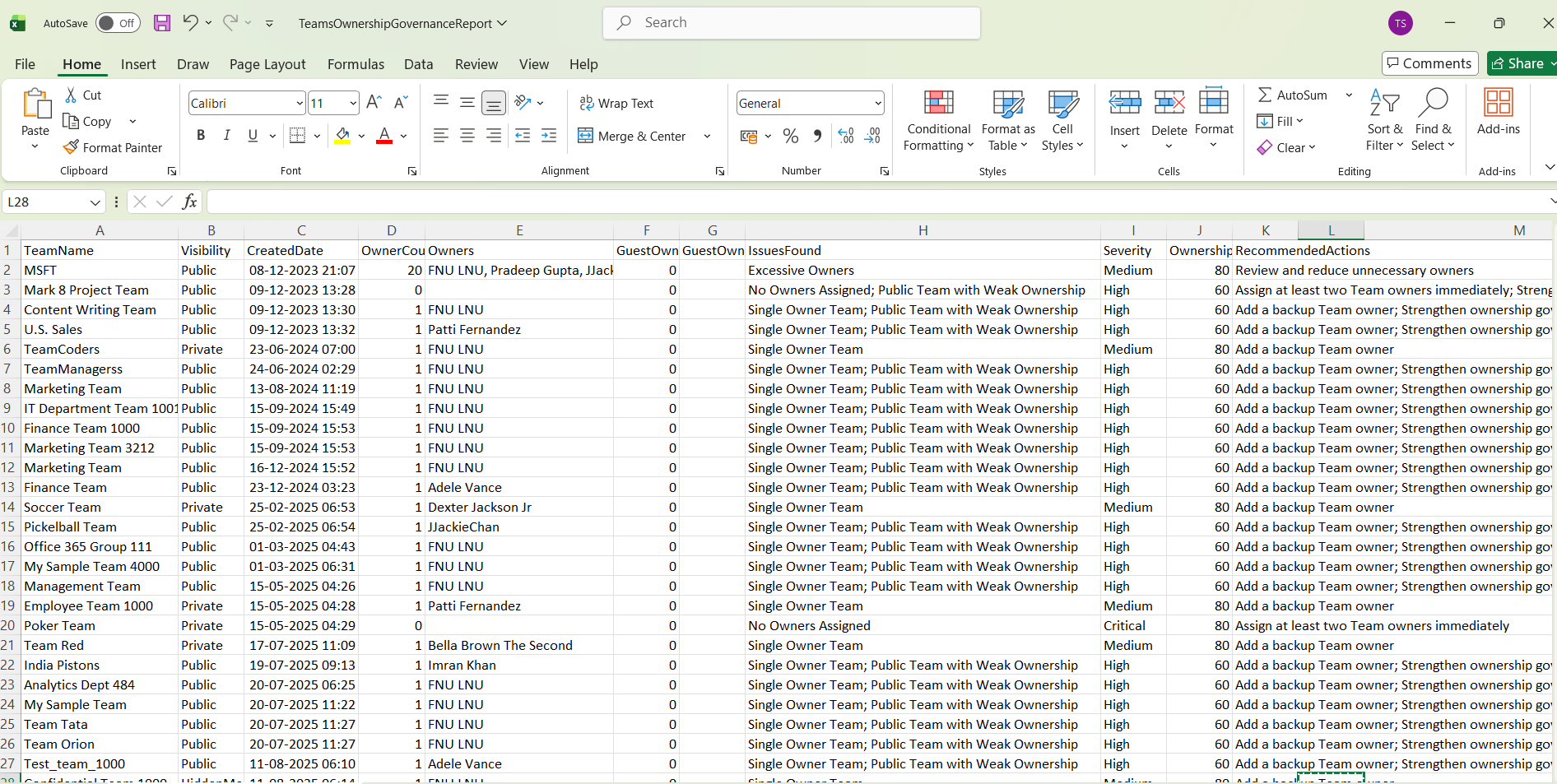
This Graph PowerShell automation script helps administrators perform Microsoft Teams ownership governance checks and generate a detailed governance report containing:
- Owner count
- Teams without owners
- Single-owner Teams
- Guest owner detection
- Excessive owner assignments
- Governance severity levels
- Recommended remediation actions
The report is exported to CSV and automatically emailed to administrators for regular governance reviews.
🚀 Community Edition Released!
Try the M365Corner Microsoft 365 Reporting Tool — your DIY pack with 20+ out-of-the-box M365 reports for Users, Groups, and Teams.
Why Microsoft Teams Ownership Governance Matters
Proper Team ownership ensures:
- Accountability for Team management
- Timely guest access reviews
- Consistent lifecycle governance
- Membership oversight
- Better compliance visibility
Poor ownership governance can result in:
- Orphaned Teams
- Unmanaged guest access
- Stale collaboration spaces
- Security and compliance exposure
Regular ownership reviews help organizations maintain healthier Microsoft Teams environments.
Prerequisites
Install the Microsoft Graph PowerShell module if it is not already installed:
Install-Module Microsoft.Graph -Scope CurrentUserConnect to Microsoft Graph using the required permissions:
Connect-MgGraph -Scopes `
"Group.Read.All",
"User.Read.All",
"Directory.Read.All",
"Mail.Send"
Complete Script to Automate Microsoft Teams Ownership Governance
# Connect to Microsoft Graph
Connect-MgGraph -Scopes `
"Group.Read.All",
"User.Read.All",
"Directory.Read.All",
"Mail.Send"

# CSV Export Path
$CsvPath = "C:\Reports\TeamsOwnershipGovernanceReport.csv"

# Email Settings
$Sender = "admin@contoso.com"
$Recipient = "governance@contoso.com"

# Get all Teams-enabled Microsoft 365 Groups
$Teams = Get-MgGroup `
-Filter "resourceProvisioningOptions/Any(x:x eq 'Team')" `
-All

$OwnershipReport = @()

foreach ($Team in $Teams) {

    try {

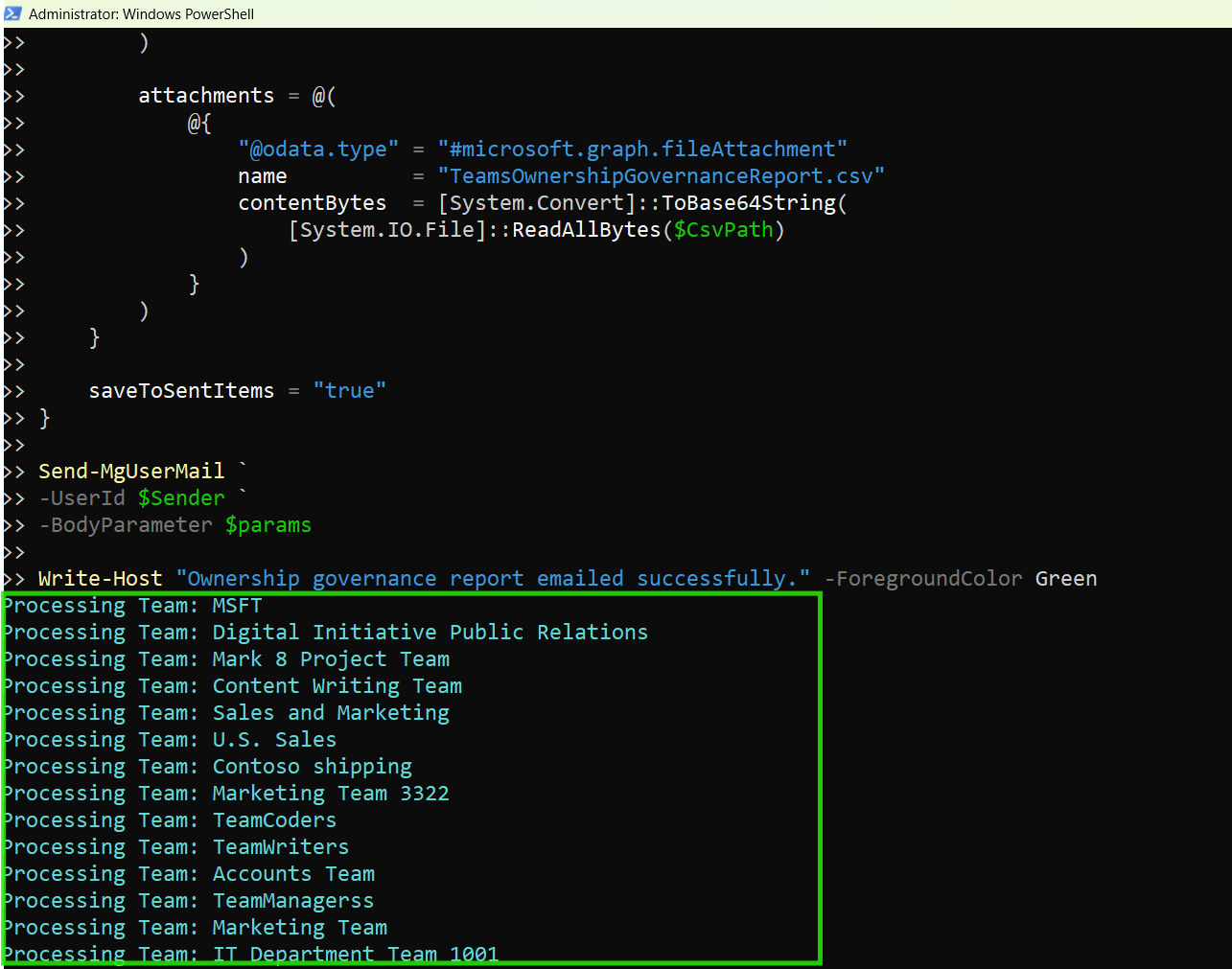
        Write-Host "Processing Team: $($Team.DisplayName)" -ForegroundColor Cyan

        # Get Owners
        $Owners = Get-MgGroupOwner `
        -GroupId $Team.Id `
        -All

        $OwnerCount = $Owners.Count

        # Owner Names
        $OwnerNames = (
            $Owners | ForEach-Object {
                $_.AdditionalProperties.displayName
            }
        ) -join ", "

        # Detect Guest Owners
        $GuestOwners = (
            $Owners | Where-Object {
                $_.AdditionalProperties.userType -eq "Guest"
            }
        )

        $GuestOwnerCount = $GuestOwners.Count

        $GuestOwnerNames = (
            $GuestOwners | ForEach-Object {
                $_.AdditionalProperties.displayName
            }
        ) -join ", "

        # Governance evaluation
        $Issues = @()
        $Severity = "Low"
        $RecommendedActions = @()

        # No owners
        if ($OwnerCount -eq 0) {

            $Issues += "No Owners Assigned"
            $Severity = "Critical"

            $RecommendedActions += "Assign at least two Team owners immediately"
        }

        # Single owner
        elseif ($OwnerCount -eq 1) {

            $Issues += "Single Owner Team"

            if ($Severity -ne "Critical") {
                $Severity = "Medium"
            }

            $RecommendedActions += "Add a backup Team owner"
        }

        # Excessive owners
        if ($OwnerCount -gt 5) {

            $Issues += "Excessive Owners"

            if ($Severity -ne "Critical") {
                $Severity = "Medium"
            }

            $RecommendedActions += "Review and reduce unnecessary owners"
        }

        # Guest owners
        if ($GuestOwnerCount -gt 0) {

            $Issues += "Guest Owners Detected"

            if ($Severity -ne "Critical") {
                $Severity = "High"
            }

            $RecommendedActions += "Review external ownership assignments"
        }

        # Public Team with weak ownership
        if (
            $Team.Visibility -eq "Public" -and
            $OwnerCount -le 1
        ) {

            $Issues += "Public Team with Weak Ownership"

            $Severity = "High"

            $RecommendedActions += "Strengthen ownership governance for public Team"
        }

        # Ownership Health Score
        $OwnershipHealthScore = 100

        $OwnershipHealthScore -= ($Issues.Count * 20)

        if ($OwnershipHealthScore -lt 0) {
            $OwnershipHealthScore = 0
        }

        # Add only Teams with governance findings
        if ($Issues.Count -gt 0) {

            $OwnershipReport += [PSCustomObject]@{

                TeamName              = $Team.DisplayName
                Visibility            = $Team.Visibility
                CreatedDate           = $Team.CreatedDateTime
                OwnerCount            = $OwnerCount
                Owners                = $OwnerNames
                GuestOwnerCount       = $GuestOwnerCount
                GuestOwners           = $GuestOwnerNames
                IssuesFound           = $Issues -join "; "
                Severity              = $Severity
                OwnershipHealthScore  = $OwnershipHealthScore
                RecommendedActions    = $RecommendedActions -join "; "
            }
        }
    }

    catch {

        Write-Host "Error processing Team: $($Team.DisplayName)" -ForegroundColor Red
        Write-Host $_.Exception.Message
    }
}

# Export report
$OwnershipReport | Export-Csv `
-Path $CsvPath `
-NoTypeInformation `
-Encoding UTF8

Write-Host "Ownership governance report exported successfully." -ForegroundColor Green

# Governance statistics
$TotalIssues = $OwnershipReport.Count

$CriticalIssues = (
    $OwnershipReport |
    Where-Object {
        $_.Severity -eq "Critical"
    }
).Count

$HighIssues = (
    $OwnershipReport |
    Where-Object {
        $_.Severity -eq "High"
    }
).Count

$SingleOwnerTeams = (
    $OwnershipReport |
    Where-Object {
        $_.IssuesFound -match "Single Owner Team"
    }
).Count

# HTML preview
$HtmlPreview = (
    $OwnershipReport |
    Select-Object -First 10 |
    ConvertTo-Html -Fragment
)

# Email body
$EmailBody = @"
<html>
<body>

<h2>Microsoft Teams Ownership Governance Report</h2>

<p>The automated ownership governance review has completed successfully.</p>

<ul>
<li>Total Teams with Governance Issues: $TotalIssues</li>
<li>Critical Ownership Issues: $CriticalIssues</li>
<li>High Severity Issues: $HighIssues</li>
<li>Single Owner Teams: $SingleOwnerTeams</li>
</ul>

<p>Below is a preview of the first 10 Teams with ownership governance findings:</p>

$HtmlPreview

</body>
</html>
"@

# Send email
$params = @{
    message = @{
        subject = "Microsoft Teams Ownership Governance Report"

        body = @{
            contentType = "HTML"
            content = $EmailBody
        }

        toRecipients = @(
            @{
                emailAddress = @{
                    address = $Recipient
                }
            }
        )

        attachments = @(
            @{
                "@odata.type" = "#microsoft.graph.fileAttachment"
                name          = "TeamsOwnershipGovernanceReport.csv"
                contentBytes  = [System.Convert]::ToBase64String(
                    [System.IO.File]::ReadAllBytes($CsvPath)
                )
            }
        )
    }

    saveToSentItems = "true"
}

Send-MgUserMail `
-UserId $Sender `
-BodyParameter $params

Write-Host "Ownership governance report emailed successfully." -ForegroundColor Green
How the Script Works
- Retrieves All Microsoft Teams
- Retrieves Team Owners
- total owners
- guest owners
- ownership health
- Detects Ownership Governance Risks
- Teams without owners
- Teams with only one owner
- Teams with excessive owners
- Teams containing guest owners
- Assigns Governance Severity Levels
- Calculates Ownership Health Scores
- ownership redundancy
- external ownership exposure
- governance compliance
- Exports Results to CSV
- reviewed in Excel
- shared with governance teams
- used for audit tracking
- Emails the Governance Report Automatically
- attaches the CSV report
- embeds governance statistics
- includes an HTML preview table
The script retrieves all Teams-enabled Microsoft 365 Groups:
Get-MgGroup -Filter "resourceProvisioningOptions/Any(x:x eq 'Team')"Each Team’s owners are retrieved using:
Get-MgGroupOwner
The script evaluates:
The script identifies:
This helps administrators quickly identify governance gaps.
Each ownership issue is categorized by severity:
| Issue | Severity |
|---|---|
| No Owners | Critical |
| Guest Owners | High |
| Single Owner | Medium |
| Excessive Owners | Medium |
Each Team receives an Ownership Health Score based on:
This provides a quick way to assess Team ownership quality.
The governance report is exported using:
Export-Csv
The CSV can be:
The script:
This makes the solution ideal for recurring governance reviews.
Risks of Orphaned Microsoft Teams
Teams without owners create significant governance risks because:
- membership changes go unmanaged
- guest access is not reviewed
- Team settings remain uncontrolled
- lifecycle management becomes difficult
Over time, orphaned Teams can become:
- stale collaboration spaces
- compliance liabilities
- security blind spots
Regular ownership reviews help reduce these risks.
Why Multiple Team Owners Matter
Having at least two Team owners helps organizations:
- avoid orphaned Teams
- maintain operational continuity
- reduce dependency on a single user
- improve governance resilience
If one owner leaves the organization or becomes inactive, another owner can continue managing the Team.
Real-World Use Cases
- Quarterly Ownership Reviews
- Guest Access Oversight
- Compliance and Audit Reviews
- Teams Lifecycle Governance
- archiving Teams
- renewing Teams
- deleting stale Teams
- Scheduling the Script
- Windows Task Scheduler
- Azure Automation
- GitHub Actions
- Scheduled PowerShell Jobs
Run recurring governance reviews to identify ownership gaps across Teams environments.
Identify Teams where external users have owner permissions.
Provide ownership governance reports to security and compliance teams.
Review ownership health before:
You can automate this script using:
This enables recurring ownership governance reviews without manual effort.
Possible Errors and Solutions
| Error | Cause | Solution |
|---|---|---|
| Insufficient privileges to complete the operation | Required Microsoft Graph permissions were not granted. | Reconnect using: Connect-MgGraph -Scopes ` "Group.Read.All", "User.Read.All", "Directory.Read.All", "Mail.Send" and ensure admin consent is granted. |
| Resource not found | The Team may have been deleted or partially provisioned. | Use proper try/catch handling as included in the script. |
| Access Denied | The account lacks permission to send emails. | Ensure the account has:
|
How Teams Ownership Supports Microsoft 365 Governance
Microsoft Teams ownership directly impacts:
- collaboration governance
- guest access management
- lifecycle operations
- retention management
- compliance visibility
Well-managed ownership structures help organizations maintain healthier and more secure Microsoft Teams environments.
Conclusion
As Microsoft Teams environments continue to grow, ownership governance becomes increasingly important. Teams without proper ownership oversight can create operational risks, security concerns, and governance blind spots across Microsoft 365.
This Graph PowerShell automation script helps organizations:
- identify ownership governance gaps
- detect orphaned Teams
- review guest ownership
- strengthen operational continuity
- automate recurring ownership reviews
By automating Microsoft Teams governance checks, administrators can maintain cleaner, more secure, and more manageable collaboration environments across Microsoft 365.